 小雨同学 2026-05-30 07:28:08 发布
前言
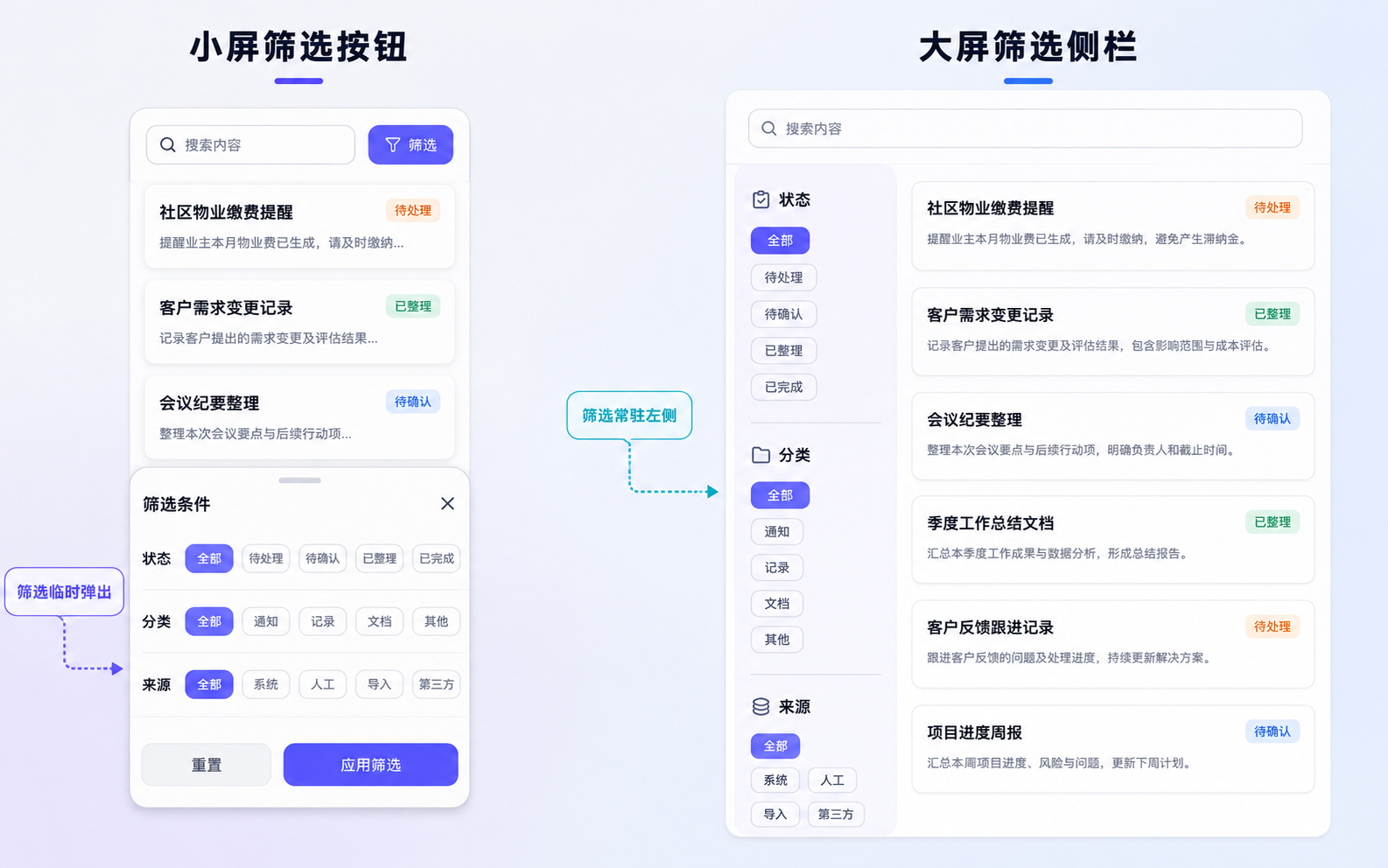
搜索页和普通列表页不太一样。普通列表页更多是在浏览,搜索页会让用户反复调整条件。用户可能先输入一个关键词,再切状态,再换分类,看到结果不对还会继续改来源。这个过程在外屏上用搜索框加筛选按钮还能接受,因为空间有限,筛选条件临时弹出来,用户选完再回到结果列表。
我在做材料搜索页时,最开始也用了这种结构。顶部一个搜索框,旁边一个筛选按钮,下面是结果列表。外屏下看起来没什么问题,用户输入关键词以后,点筛选按钮打开底部面板,选状态、分类、来源,然后关闭面板继续看结果。这个路径虽然多一步,但手机上没有多少空间长期摆筛选条件。
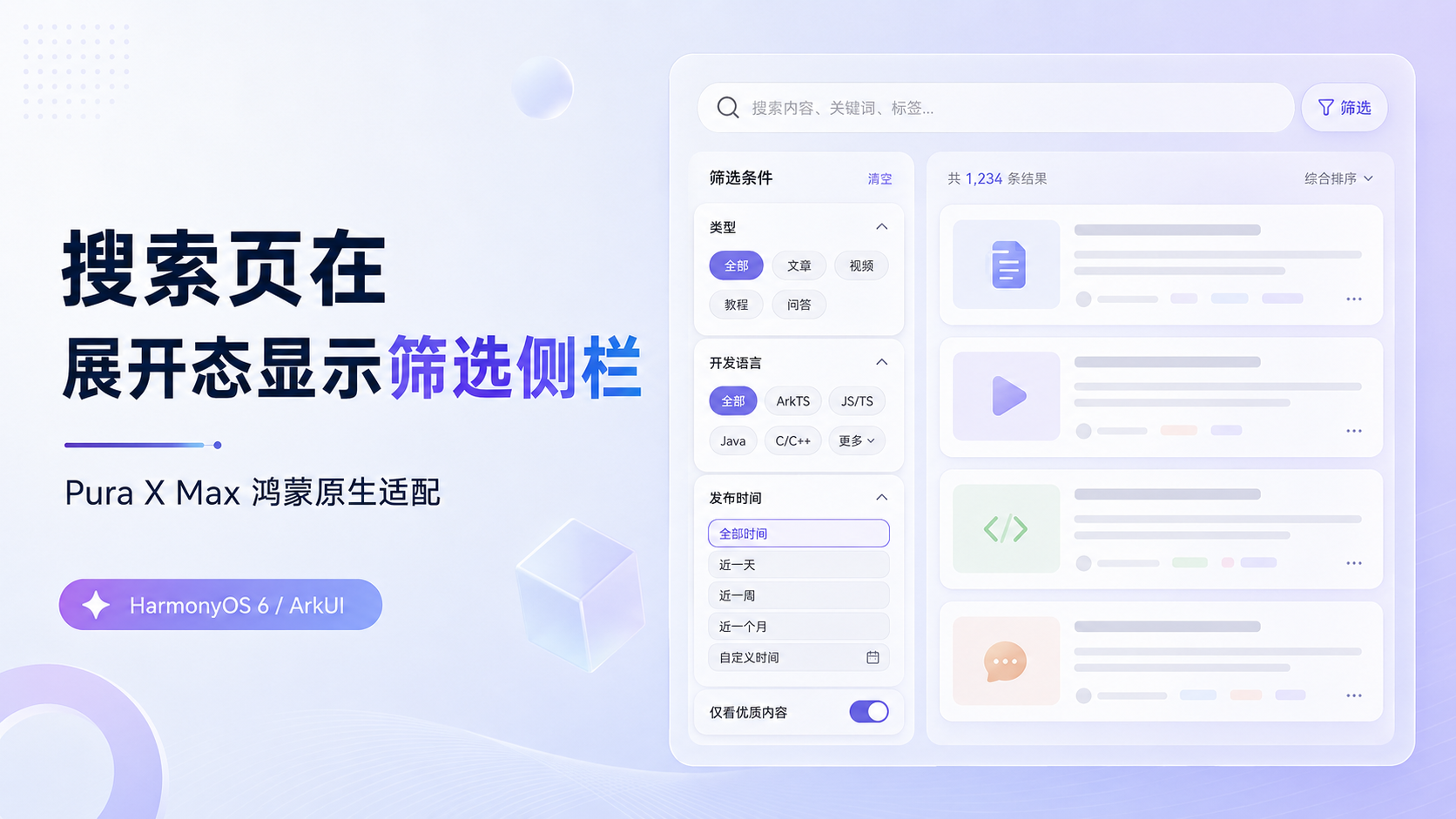
到了 Pura X Max 展开态以后,这个页面开始显得有点浪费了。页面的右侧结果列表能铺得很宽,左侧却空着一大片,筛选条件还藏在按钮后面。用户每次想改条件,都要打开筛选面板,再关闭面板,再回头看结果。搜索页本来就是一个不断缩小范围的页面,展开态里还用弹层筛选,会把这个连续动作切成一段一段。
这类问题不只出现在材料搜索页。下面这些页面也会遇到类似情况:
- 消息中心按状态和来源筛选
- 订单列表按付款状态、渠道、时间筛选
- 客户列表按标签、负责人、跟进状态筛选
- 知识库搜索按分类、来源、更新时间筛选
- 内容管理页按发布状态、类型、作者筛选
- 待办中心按优先级、来源、处理状态筛选
Pura X Max 的展开态横向空间足够让筛选条件从临时弹层变成左侧常驻区域;外屏、分屏和悬浮窗里,搜索框加筛选按钮仍然更适合窄窗口。这个页面最终要处理的,不只是筛选栏放在哪里,还包括筛选状态怎么保留、结果列表怎么跟着变化,以及侧栏出现前要不要先计算右侧结果区还能不能读。
一、分析搜索动作本身
1.1 搜索页会反复改条件
搜索页的使用过程很少是一锤子买卖。用户输入关键词以后,通常还会继续调整状态、分类、来源这些条件。比如在材料整理类页面里,用户先搜缴费,看到结果太多,就切到待处理;如果还是不够精确,再切来源为拍照整理;最后可能还会把关键词从缴费改成物业。
在外屏里,这些筛选条件不适合长期摆出来。页面宽度有限,搜索框和结果列表已经占了主要空间,筛选条件只能放到按钮后面。这个处理没什么问题,用户需要时再打开筛选面板,不需要时就把空间留给结果列表。
展开态里,搜索动作的节奏发生了变化。窗口已经有足够宽度,左侧可以放状态、分类、来源,右侧继续显示结果列表。用户点一下筛选条件,右侧结果马上变化,不用打开面板,也不用关掉面板。这个变化对搜索页很有价值,因为它保留了筛选和结果之间的连续关系。
我会把搜索页拆成三块进行分析:
- 搜索框负责关键词输入
- 筛选区负责缩小结果范围
- 结果列表负责展示当前条件下的材料
外屏把筛选区临时收纳起来,是为了给结果列表让空间;展开态把筛选区展示出来,是为了减少反复打开弹层的动作。两个状态的目标不一样,页面结构也应该跟着变。
1.2 展开态继续弹筛选会打断判断
我把外屏搜索页搬到展开态后,最先看到的是左侧空间没有被利用。搜索框和筛选按钮仍然挤在顶部,结果列表铺在下面。用户想改状态或来源时,依旧要点筛选按钮,打开面板,再回到列表里看结果。大屏空间没有帮助用户更快判断结果,反而保留了手机端那套临时弹层路径。
这里的问题不是筛选按钮不能用。外屏下它是合适的。问题出在展开态有空间让筛选条件常驻时,页面还把筛选当成临时动作。搜索页里的条件不是偶尔才改,它们经常和关键词一起反复调整。尤其是业务数据多起来以后,筛选条件藏得越深,用户越难知道当前结果到底是按什么条件筛出来的。
二、筛选区该放什么
2.1 高频条件可以常驻
展开态里把筛选区固定到左侧,并不代表把所有搜索条件都搬过去。搜索页的筛选项一多,左侧也会变成另一个长页面。状态、分类、来源这类高频条件适合常驻,因为用户会频繁切换它们,而且每个条件都比较短。时间范围、负责人、排序方式、高级搜索这类条件,频率相对低,可以放到更多筛选里。
我这次只保留三组条件:
- 处理状态:全部、待处理、待确认、已完成
- 材料分类:全部、通知、会议、项目、提醒
- 来源方式:全部、拍照整理、语音转写、文本整理
这三组条件能覆盖材料搜索页里最常见的缩小范围动作。用户输入关键词以后,左侧切一下状态或来源,右侧结果马上跟着变化。这个结构比每次打开底部筛选面板更适合展开态。
示例里把筛选选项整理成统一的数据结构。
interface FilterOption { id: number; title: string; count: number;}真实项目里,筛选项通常会来自接口、配置或枚举,后面还可能增加数量、禁用状态、排序。用数据驱动 UI,后面调整起来会少改很多组件代码。
2.2 侧栏出现前要留出结果宽度
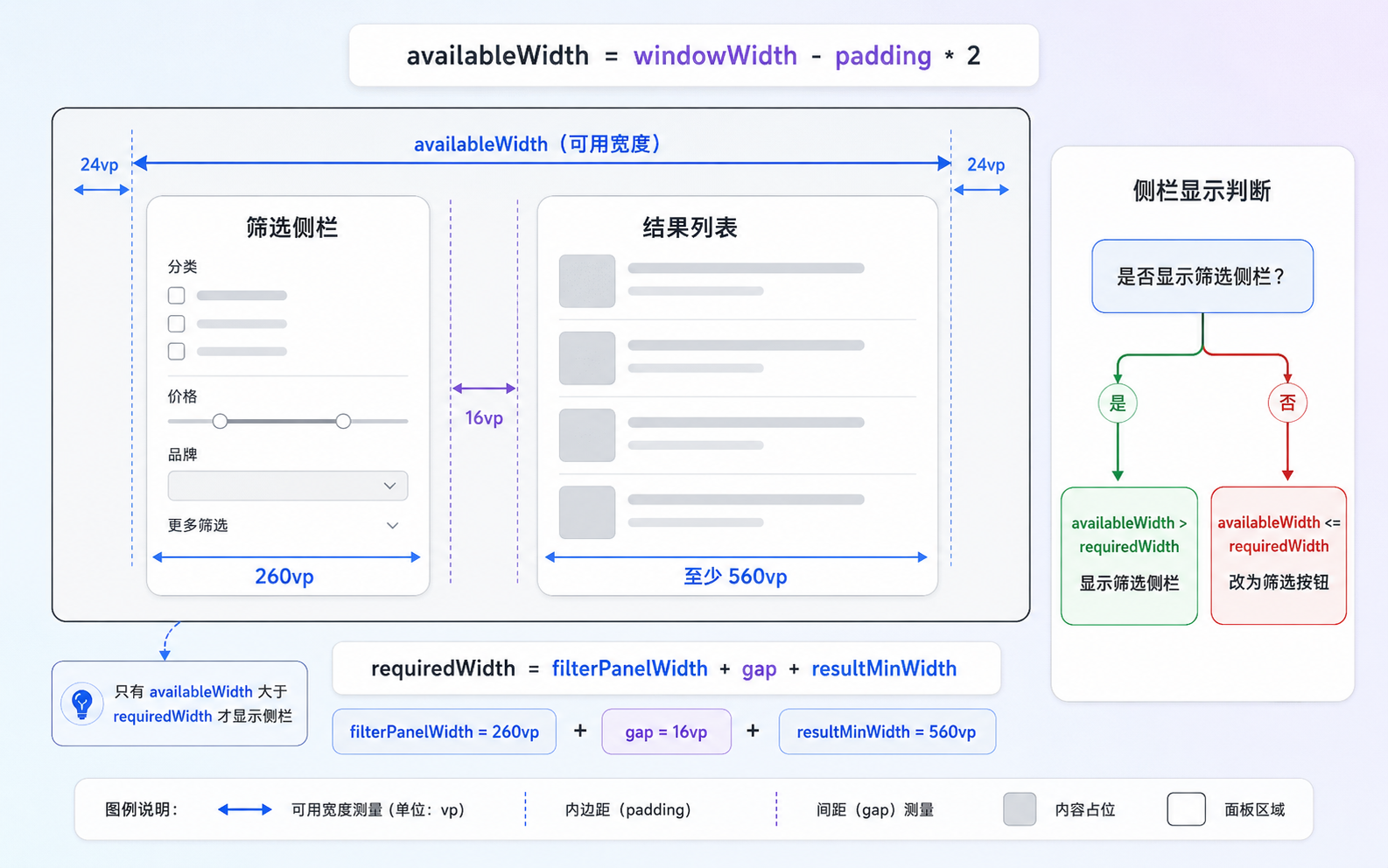
左侧筛选栏固定显示以后,右侧结果列表必须还能读。如果侧栏一出现,结果列表被压窄,搜索页就只是换了一种拥挤方式。这个页面不能只分析窗口宽度够不够,还要检查筛选栏、间距和右侧结果列表的最小宽度能不能同时放下。
示例里左侧筛选栏是 260vp,右侧结果列表至少保留 560vp,中间间距是 16vp。展开态判断会先扣掉左右 padding,再看这三块区域是否放得下。
private canUseSidebar(): boolean { const width = this.getEffectiveWidth(); const availableWidth = width - this.getPagePadding() * 2; const requiredWidth = this.filterPanelWidth + this.twoColumnGap + this.resultMinWidth; return width >= this.expandedThreshold && availableWidth >= requiredWidth;}这个判断比单独写 width >= 860 更接近真实页面。因为页面不是从屏幕最左边直接开始排版,左右 padding、中间间距都要算进去。搜索结果卡片也不能无限压缩,它至少要保住标题、状态、摘要和来源这些信息。
三、状态要放在页面层
3.1 小屏面板和大屏侧栏共用状态
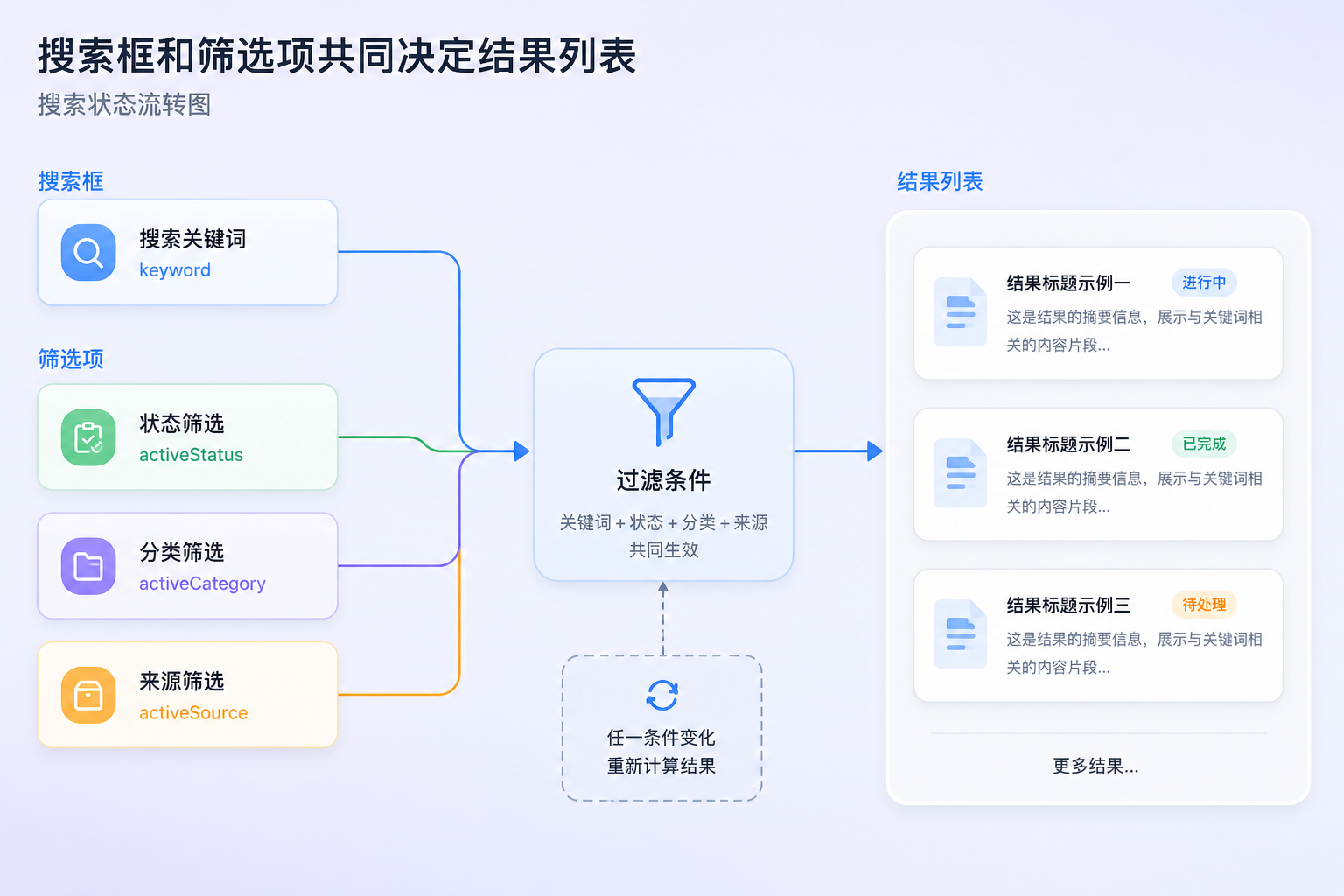
搜索页一旦支持外屏和展开态两种结构,那么筛选状态就不能写在某一个组件里。外屏用底部面板,大屏用左侧侧栏,但它们改的应该是同一组条件。用户在外屏里选了待处理和拍照整理,切到展开态以后,侧栏应该仍然显示这两个条件,右侧结果也应该保持一致。
示例里我把关键词、状态、分类、来源都放在页面层。
@State private keyword: string = '';@State private activeStatus: string = '全部';@State private activeCategory: string = '全部';@State private activeSource: string = '全部';这样做以后,搜索框、小屏底部筛选面板、大屏左侧筛选栏,都读写同一套状态。窗口宽度变化时,UI 形态改变,筛选条件不会跟着丢。这个处理在真实项目里很重要,因为搜索页通常还会接分页、排序、接口请求和缓存,状态分散以后很容易出现结果不一致。
我会把这类页面的状态理解成页面级状态,而不是组件级状态。筛选面板只是改状态的入口,侧栏也是改状态的入口,结果列表才是状态变化后的展示。入口可以变,状态最好保持一份。
3.2 结果列表只从一处条件里计算
示例里用 getFilteredResults() 根据关键词和筛选项计算结果。真实项目里可以把这个函数换成接口请求参数,但关系仍然是一样的。
private getFilteredResults(): SearchResultItem[] { const text = this.keyword.trim(); return this.results.filter((item: SearchResultItem) => { const matchKeyword = text.length === 0 || item.title.includes(text) || item.summary.includes(text); const matchStatus = this.activeStatus === '全部' || item.status === this.activeStatus; const matchCategory = this.activeCategory === '全部' || item.category === this.activeCategory; const matchSource = this.activeSource === '全部' || item.source === this.activeSource; return matchKeyword && matchStatus && matchCategory && matchSource; });}这个函数里,关键词为空时不过滤关键词,某个筛选项为“全部”时不过滤对应字段。这样读起来比较直接,页面结果来自同一套条件,不会因为小屏弹层和大屏侧栏拆成两份逻辑。
实际接入后端时,我会把 keyword、status、category、source 整理成 query 参数。关键词输入可以做防抖,状态和分类切换可以立即刷新。分页和排序也要跟着条件变化处理,比如切换筛选条件后回到第一页,避免用户停留在不匹配的分页位置。
四、在实际运行结果中理解
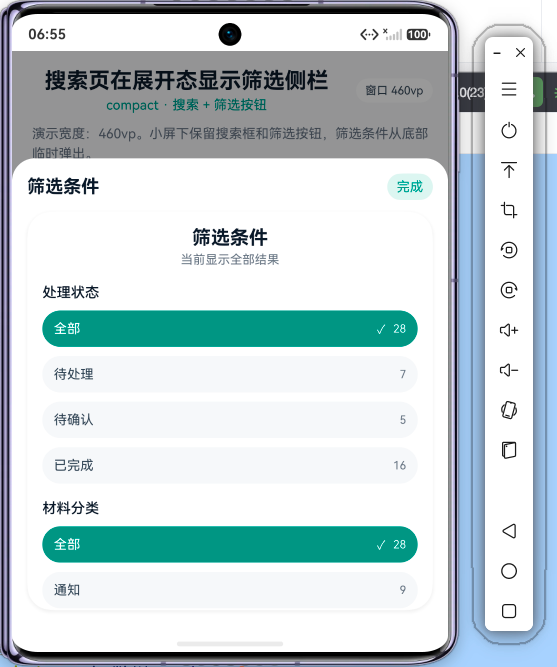
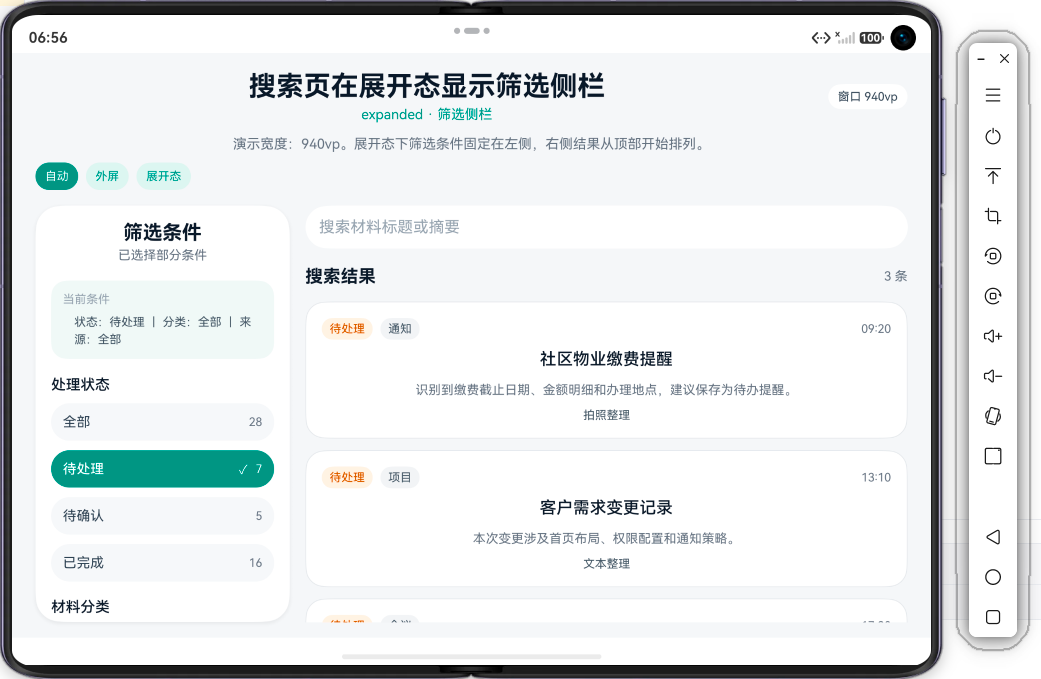
为了演示我上面的思路,我用一个独立页面模拟材料搜索。外屏状态下,顶部是搜索框和筛选按钮;点击筛选后,从底部弹出筛选面板。展开态下,左侧直接显示筛选栏,右侧显示搜索框和结果列表。两种形态用同一套搜索状态,结果也从同一个 getFilteredResults() 里计算。
大家可以注意在窗口变化后的页面结构关系。外屏要保住结果列表宽度,筛选条件就临时弹出;展开态要让筛选条件常驻,让用户边改条件边看结果。在真实项目里,大家把本地数组换成接口请求即可,页面结构和状态关系仍然可以沿用。
五、怎么运用到实际项目中
5.1 演示宽度要删掉
示例里的 previewWidth 只是为了在同一个模拟器里切换外屏和展开态。真实项目里不需要这些按钮,页面应该直接使用真实窗口宽度。
private getEffectiveWidth(): number { if (this.previewWidth > 0) { return this.previewWidth; } return this.pageWidth;}迁回项目时,可以直接返回 pageWidth。
private getEffectiveWidth(): number { return this.pageWidth;}页面宽度可以继续通过 onAreaChange 写入。这里记录的是页面根容器宽度,而不是设备型号。对搜索页来说,同一台设备可能处在展开态、外屏、分屏和自由窗口里,筛选栏能不能常驻,要看当前窗口实际能给多少空间。
5.2 筛选项要分层
左侧筛选栏固定以后,很容易被不断加内容。状态、分类、来源、时间范围、标签、负责人、排序方式,全都放进去以后,侧栏会变成一个很长的筛选页。展开态虽然有空间,但侧栏本身也要控制信息密度。
筛选项可以分成几类:
- 高频条件放在侧栏,比如状态、分类、来源
- 低频条件放到更多筛选里,比如负责人、时间范围、排序方式
- 需要复杂输入的条件进入单独筛选页,比如高级搜索
- 清空条件这类操作放在侧栏顶部或结果区域顶部,别藏得太深
这样侧栏可以长期固定,但不会把搜索页左侧做得太重。搜索页真正要承载的,仍然是右侧结果列表。侧栏只是帮助用户缩小范围,不应该把所有高级条件都摊在第一页。
5.3 调用接口要处理请求节奏
示例里用本地数组做筛选,输入关键词后立刻过滤结果。真实项目里如果调用接口,就要考虑搜索节奏。用户每输入一个字符就请求接口,可能会造成请求频繁,也容易让列表不断闪动。
我在项目里通常会做两层处理。关键词输入可以加防抖,状态和分类切换可以立即刷新。这样用户输入时不会每个字符都请求,点击筛选项时又能及时看到结果变化。分页、排序、清空条件也要和筛选状态统一处理,不要让不同组件各自维护一套请求参数。
这里也要考虑窗口切换。外屏弹层和展开态侧栏只是 UI 形态变化,搜索条件不应该因为窗口变宽或变窄而重置。用户从外屏切到展开态以后,关键词和筛选项都应该继续保留,结果列表也应该保持当前条件下的内容。
总结
搜索页在展开态里最值得调整的,不是结果列表能不能显示更多卡片,而是筛选条件能不能从临时弹层变成常驻区域。外屏里,搜索框加筛选按钮能把空间留给结果列表;展开态里,左侧固定筛选栏能减少反复打开弹层的动作,也能让用户持续看到当前条件。
我会把这类搜索页进行如下分析:
- 小屏下保留筛选按钮,避免固定侧栏挤压结果列表。
- 展开态下先计算可用宽度,确认左侧筛选栏和右侧结果列表都能放下。
- 高频条件放在侧栏,低频条件进入更多筛选或高级搜索。
- 搜索框、小屏筛选面板和大屏侧栏读写同一套状态。
- 接口请求要处理防抖、分页重置和条件同步,不能只改 UI。
在实际项目中,筛选侧栏最容易被做成一块静态区域。它看起来像大屏适配,但是实际价值取决于结果列表是否真的跟着条件变化。只要状态放在页面层,筛选入口可以跟着窗口进行变化,小屏弹出、大屏常驻,结果列表仍然使用同一套查询条件。
附:完整代码
interface FilterOption { id: number; title: string; count: number;}interface SearchResultItem { id: number; title: string; status: string; category: string; source: string; time: string; summary: string;}@Entry@Componentstruct Index { // 页面真实宽度,由 onAreaChange 写入 @State private pageWidth: number = 0; // 演示宽度,只用于在同一个模拟器里观察外屏和展开态 @State private previewWidth: number = 0; // 搜索与筛选状态放在页面层,小屏弹层和大屏侧栏共用同一套状态 @State private keyword: string = ''; @State private activeStatus: string = '全部'; @State private activeCategory: string = '全部'; @State private activeSource: string = '全部'; // 小屏筛选面板开关。展开态下筛选栏常驻,不需要这个弹层 @State private showFilterSheet: boolean = false; private readonly filterPanelWidth: number = 260; private readonly resultMinWidth: number = 560; private readonly twoColumnGap: number = 16; private readonly expandedThreshold: number = 860; private readonly statusOptions: FilterOption[] = [ { id: 1, title: '全部', count: 28 }, { id: 2, title: '待处理', count: 7 }, { id: 3, title: '待确认', count: 5 }, { id: 4, title: '已完成', count: 16 } ]; private readonly categoryOptions: FilterOption[] = [ { id: 1, title: '全部', count: 28 }, { id: 2, title: '通知', count: 9 }, { id: 3, title: '会议', count: 6 }, { id: 4, title: '项目', count: 8 }, { id: 5, title: '提醒', count: 5 } ]; private readonly sourceOptions: FilterOption[] = [ { id: 1, title: '全部', count: 28 }, { id: 2, title: '拍照整理', count: 12 }, { id: 3, title: '语音转写', count: 7 }, { id: 4, title: '文本整理', count: 9 } ]; private readonly results: SearchResultItem[] = [ { id: 1, title: '社区物业缴费提醒', status: '待处理', category: '通知', source: '拍照整理', time: '09:20', summary: '识别到缴费截止日期、金额明细和办理地点,建议保存为待办提醒。' }, { id: 2, title: 'Pura X Max 适配会议纪要', status: '待确认', category: '会议', source: '语音转写', time: '10:45', summary: '整理出搜索页、筛选侧栏、分屏窗口和横屏结构几类问题。' }, { id: 3, title: '客户需求变更记录', status: '待处理', category: '项目', source: '文本整理', time: '13:10', summary: '本次变更涉及首页布局、权限配置和通知策略。' }, { id: 4, title: '活动报名确认单', status: '已完成', category: '通知', source: '拍照整理', time: '15:25', summary: '提取到报名人、联系方式、活动时间和签到地址。' }, { id: 5, title: '门诊复查预约提示', status: '已完成', category: '提醒', source: '拍照整理', time: '16:40', summary: '提取到复查时间、科室、楼层和注意事项。' }, { id: 6, title: '周会待办整理', status: '待处理', category: '会议', source: '语音转写', time: '17:30', summary: '从会议内容中提取研发排期、页面验收和发布准备事项。' } ]; // Demo 中优先使用演示宽度,真实项目里可以直接返回 pageWidth private getEffectiveWidth(): number { if (this.previewWidth > 0) { return this.previewWidth; } return this.pageWidth; } private getPagePadding(): number { if (this.getEffectiveWidth() >= this.expandedThreshold) { return 24; } return 16; } // 侧栏出现前先确认左侧筛选栏、间距和右侧结果列表都能放下 private canUseSidebar(): boolean { const width = this.getEffectiveWidth(); const availableWidth = width - this.getPagePadding() * 2; const requiredWidth = this.filterPanelWidth + this.twoColumnGap + this.resultMinWidth; return width >= this.expandedThreshold && availableWidth >= requiredWidth; } private isExpanded(): boolean { return this.canUseSidebar(); } private getContentWidth(): Length { if (this.previewWidth > 0) { return this.previewWidth; } return '100%'; } private getTitleSize(): number { return this.isExpanded() ? 28 : 23; } private getModeText(): string { return this.isExpanded() ? 'expanded · 筛选侧栏' : 'compact · 搜索 + 筛选按钮'; } private getModeDesc(): string { if (this.isExpanded()) { return '展开态下筛选条件固定在左侧,右侧结果从顶部开始排列。'; } return '小屏下保留搜索框和筛选按钮,筛选条件从底部临时弹出。'; } private setPreview(width: number) { this.previewWidth = width; this.showFilterSheet = false; } private clearFilters() { this.activeStatus = '全部'; this.activeCategory = '全部'; this.activeSource = '全部'; } private hasActiveFilter(): boolean { return this.activeStatus !== '全部' || this.activeCategory !== '全部' || this.activeSource !== '全部'; } // 统一处理筛选项点击,底部面板和左侧侧栏都写入同一套页面状态 private selectFilter(kind: string, title: string) { if (kind === 'status') { this.activeStatus = title; return; } if (kind === 'category') { this.activeCategory = title; return; } if (kind === 'source') { this.activeSource = title; } } private isFilterSelected(kind: string, title: string): boolean { if (kind === 'status') { return this.activeStatus === title; } if (kind === 'category') { return this.activeCategory === title; } if (kind === 'source') { return this.activeSource === title; } return false; } private getFilteredResults(): SearchResultItem[] { const text = this.keyword.trim(); return this.results.filter((item: SearchResultItem) => { const matchKeyword = text.length === 0 || item.title.includes(text) || item.summary.includes(text); const matchStatus = this.activeStatus === '全部' || item.status === this.activeStatus; const matchCategory = this.activeCategory === '全部' || item.category === this.activeCategory; const matchSource = this.activeSource === '全部' || item.source === this.activeSource; return matchKeyword && matchStatus && matchCategory && matchSource; }); } private getStatusColor(status: string): string { if (status === '待处理') { return '#B25E00'; } if (status === '待确认') { return '#7C3AED'; } return '#276749'; } private getStatusBgColor(status: string): string { if (status === '待处理') { return '#FFF4E5'; } if (status === '待确认') { return '#F1EAFE'; } return '#E7F5EE'; } @Builder private PreviewButton(text: string, width: number) { Text(text) .fontSize(12) .fontColor(this.previewWidth === width ? '#FFFFFF' : '#2F8F83') .textAlign(TextAlign.Center) .padding({ left: 10, right: 10, top: 7, bottom: 7 }) .backgroundColor(this.previewWidth === width ? '#2F8F83' : '#E6F4F1') .borderRadius(999) .onClick(() => { this.setPreview(width); }) } @Builder private HeaderPanel() { Column({ space: 10 }) { Row({ space: 10 }) { Column({ space: 4 }) { Text('搜索页在展开态显示筛选侧栏') .fontSize(this.getTitleSize()) .fontWeight(FontWeight.Bold) .fontColor('#111827') .maxLines(1) .textOverflow({ overflow: TextOverflow.Ellipsis }) Text(this.getModeText()) .fontSize(14) .fontColor('#2F8F83') .maxLines(1) .textOverflow({ overflow: TextOverflow.Ellipsis }) } .layoutWeight(1) Text('窗口 ' + Math.round(this.pageWidth).toString() + 'vp') .fontSize(12) .fontColor('#374151') .padding({ left: 10, right: 10, top: 6, bottom: 6 }) .backgroundColor('#FFFFFF') .borderRadius(999) } .width('100%') Text('演示宽度:' + Math.round(this.getEffectiveWidth()).toString() + 'vp。' + this.getModeDesc()) .fontSize(14) .fontColor('#6B7280') .lineHeight(21) .maxLines(2) .textOverflow({ overflow: TextOverflow.Ellipsis }) Row({ space: 8 }) { this.PreviewButton('自动', 0) this.PreviewButton('外屏', 430) this.PreviewButton('展开态', 1040) } .width('100%') } .width('100%') } @Builder private StatusPill(status: string) { Text(status) .fontSize(12) .fontColor(this.getStatusColor(status)) .padding({ left: 8, right: 8, top: 4, bottom: 4 }) .backgroundColor(this.getStatusBgColor(status)) .borderRadius(999) } @Builder private FilterChip(item: FilterOption, kind: string) { Row({ space: 8 }) { Text(item.title) .fontSize(14) .fontColor(this.isFilterSelected(kind, item.title) ? '#FFFFFF' : '#374151') .fontWeight(this.isFilterSelected(kind, item.title) ? FontWeight.Medium : FontWeight.Regular) .maxLines(1) .textOverflow({ overflow: TextOverflow.Ellipsis }) Blank() if (this.isFilterSelected(kind, item.title)) { Text('✓') .fontSize(13) .fontColor('#FFFFFF') } Text(item.count.toString()) .fontSize(12) .fontColor(this.isFilterSelected(kind, item.title) ? '#FFFFFF' : '#6B7280') } .width('100%') .height(38) .padding({ left: 12, right: 12 }) .backgroundColor(this.isFilterSelected(kind, item.title) ? '#2F8F83' : '#F7F8FA') .borderRadius(19) .onClick(() => { this.selectFilter(kind, item.title); }) } @Builder private FilterSection(title: string, kind: string) { Column({ space: 10 }) { Text(title) .fontSize(15) .fontWeight(FontWeight.Medium) .fontColor('#111827') .width('100%') if (kind === 'status') { ForEach(this.statusOptions, (item: FilterOption) => { this.FilterChip(item, 'status') }, (item: FilterOption) => item.id.toString() + '-' + this.activeStatus) } else if (kind === 'category') { ForEach(this.categoryOptions, (item: FilterOption) => { this.FilterChip(item, 'category') }, (item: FilterOption) => item.id.toString() + '-' + this.activeCategory) } else { ForEach(this.sourceOptions, (item: FilterOption) => { this.FilterChip(item, 'source') }, (item: FilterOption) => item.id.toString() + '-' + this.activeSource) } } .width('100%') } @Builder private ActiveFilterSummary() { if (this.hasActiveFilter()) { Column({ space: 6 }) { Text('当前条件') .fontSize(12) .fontColor('#9CA3AF') .width('100%') Text('状态:' + this.activeStatus + ' | 分类:' + this.activeCategory + ' | 来源:' + this.activeSource) .fontSize(12) .fontColor('#4B5563') .lineHeight(18) .maxLines(2) .textOverflow({ overflow: TextOverflow.Ellipsis }) } .width('100%') .padding(12) .backgroundColor('#F3F8F7') .borderRadius(16) } } @Builder private ClearFilterBlock() { Column({ space: 8 }) { Text('筛选会直接影响右侧结果列表。小屏弹层和大屏侧栏都使用同一套条件。') .fontSize(12) .fontColor('#6B7280') .lineHeight(18) .maxLines(3) .textOverflow({ overflow: TextOverflow.Ellipsis }) if (this.hasActiveFilter()) { Button('清空筛选') .height(38) .fontSize(13) .fontColor('#2F8F83') .width('100%') .backgroundColor('#E6F4F1') .borderRadius(19) .onClick(() => { this.clearFilters(); }) } } .width('100%') .padding(12) .backgroundColor('#F7F8FA') .borderRadius(18) } @Builder private FilterPanel() { Column() { Scroll() { Column({ space: 18 }) { Row() { Column({ space: 4 }) { Text('筛选条件') .fontSize(20) .fontWeight(FontWeight.Bold) .fontColor('#111827') Text(this.hasActiveFilter() ? '已选择部分条件' : '当前显示全部结果') .fontSize(13) .fontColor('#6B7280') } .layoutWeight(1) } .width('100%') this.ActiveFilterSummary() this.FilterSection('处理状态', 'status') this.FilterSection('材料分类', 'category') this.FilterSection('来源方式', 'source') this.ClearFilterBlock() } .width('100%') .padding({ left: 16, right: 16, top: 16, bottom: 28 }) } .width('100%') .height('100%') .edgeEffect(EdgeEffect.Spring) } .width('100%') .height('100%') .backgroundColor('#FFFFFF') .borderRadius(26) .shadow({ radius: 12, color: '#10000000', offsetX: 0, offsetY: 4 }) } @Builder private SearchBar() { Row({ space: 10 }) { TextInput({ text: this.keyword, placeholder: '搜索材料标题或摘要' }) .height(44) .layoutWeight(1) .fontSize(15) .fontColor('#111827') .placeholderColor('#9CA3AF') .backgroundColor('#FFFFFF') .borderRadius(22) .padding({ left: 14, right: 14 }) .onChange((value: string) => { this.keyword = value; }) if (!this.isExpanded()) { Button('筛选') .height(42) .fontSize(14) .fontColor('#FFFFFF') .padding({ left: 16, right: 16 }) .backgroundColor('#2F8F83') .borderRadius(21) .onClick(() => { this.showFilterSheet = true; }) } } .width('100%') } @Builder private ResultCard(item: SearchResultItem) { Column({ space: 10 }) { Row({ space: 8 }) { this.StatusPill(item.status) Text(item.category) .fontSize(12) .fontColor('#4B5563') .padding({ left: 8, right: 8, top: 4, bottom: 4 }) .backgroundColor('#F3F4F6') .borderRadius(999) Blank() Text(item.time) .fontSize(12) .fontColor('#6B7280') } .width('100%') Text(item.title) .fontSize(17) .fontWeight(FontWeight.Medium) .fontColor('#111827') .maxLines(1) .textOverflow({ overflow: TextOverflow.Ellipsis }) Text(item.summary) .fontSize(13) .fontColor('#6B7280') .lineHeight(20) .maxLines(this.isExpanded() ? 2 : 1) .textOverflow({ overflow: TextOverflow.Ellipsis }) Text(item.source) .fontSize(12) .fontColor('#4B5563') } .width('100%') .padding(16) .backgroundColor('#FFFFFF') .borderRadius(20) .border({ width: 1, color: '#E5E7EB' }) } @Builder private EmptyResult() { Column({ space: 10 }) { Text('没有找到匹配的材料') .fontSize(16) .fontWeight(FontWeight.Medium) .fontColor('#111827') Text('可以换一个关键词,或者清空部分筛选条件再试。') .fontSize(13) .fontColor('#6B7280') .lineHeight(20) .textAlign(TextAlign.Center) } .width('100%') .padding(28) .backgroundColor('#FFFFFF') .borderRadius(20) .alignItems(HorizontalAlign.Center) } @Builder private ResultsArea() { Column({ space: 12 }) { Row() { Text('搜索结果') .fontSize(18) .fontWeight(FontWeight.Bold) .fontColor('#111827') Blank() Text(this.getFilteredResults().length.toString() + ' 条') .fontSize(13) .fontColor('#6B7280') } .width('100%') .height(28) .flexShrink(0) if (this.getFilteredResults().length === 0) { Column() { this.EmptyResult() } .width('100%') .layoutWeight(1) .justifyContent(FlexAlign.Start) .alignItems(HorizontalAlign.Start) } else { List({ space: 12 }) { ForEach(this.getFilteredResults(), (item: SearchResultItem) => { ListItem() { this.ResultCard(item) } .width('100%') }, (item: SearchResultItem) => item.id.toString()) } .width('100%') .layoutWeight(1) .cachedCount(2) .edgeEffect(EdgeEffect.Spring) } } .width('100%') .height('100%') .justifyContent(FlexAlign.Start) .alignItems(HorizontalAlign.Start) } @Builder private BottomFilterSheet() { Column() { Blank() Column({ space: 12 }) { Row() { Text('筛选条件') .fontSize(19) .fontWeight(FontWeight.Bold) .fontColor('#111827') Blank() Text('完成') .fontSize(14) .fontColor('#2F8F83') .padding({ left: 10, right: 10, top: 6, bottom: 6 }) .backgroundColor('#E6F4F1') .borderRadius(999) .onClick(() => { this.showFilterSheet = false; }) } .width('100%') Column() { this.FilterPanel() } .height(420) .width('100%') } .width('100%') .padding(16) .backgroundColor('#FFFFFF') .borderRadius({ topLeft: 24, topRight: 24, bottomLeft: 0, bottomRight: 0 }) } .width('100%') .height('100%') } @Builder private MainContent() { if (this.isExpanded()) { Row({ space: this.twoColumnGap }) { Column() { this.FilterPanel() } .width(this.filterPanelWidth) .height('100%') .flexShrink(0) Column({ space: 14 }) { this.SearchBar() Column() { this.ResultsArea() } .layoutWeight(1) .width('100%') .justifyContent(FlexAlign.Start) .alignItems(HorizontalAlign.Start) } .layoutWeight(1) .height('100%') .justifyContent(FlexAlign.Start) .alignItems(HorizontalAlign.Start) } .width('100%') .height('100%') .alignItems(VerticalAlign.Top) } else { Column({ space: 14 }) { this.SearchBar() Column() { this.ResultsArea() } .layoutWeight(1) .width('100%') .justifyContent(FlexAlign.Start) .alignItems(HorizontalAlign.Start) } .width('100%') .height('100%') .justifyContent(FlexAlign.Start) .alignItems(HorizontalAlign.Start) } } build() { Stack() { Column() { Column({ space: 16 }) { this.HeaderPanel() Column() { this.MainContent() } .layoutWeight(1) .width('100%') .justifyContent(FlexAlign.Start) .alignItems(HorizontalAlign.Start) } .width(this.getContentWidth()) .height('100%') .padding({ left: this.getPagePadding(), right: this.getPagePadding(), top: 18, bottom: 16 }) } .width('100%') .height('100%') .alignItems(HorizontalAlign.Center) if (this.showFilterSheet && !this.isExpanded()) { Column() .width('100%') .height('100%') .backgroundColor('#66000000') .onClick(() => { this.showFilterSheet = false; }) this.BottomFilterSheet() } } .width('100%') .height('100%') .backgroundColor('#F6F7F9') .onAreaChange((_: Area, newValue: Area) => { const width = Number(newValue.width); if (!Number.isNaN(width) && width > 0) { this.pageWidth = width; } }) }}暂无评论数据
发布
相关推荐
 智慧的键盘侠
 11
11 0
0 永不编译通过 92 0 恒久 60 0
 码农小马 115 0
 小雨同学
产品总监、独立开发者社群主理人、资深全栈工程师,HarmonyOS应用开发者高级认证,PMP认证,CSDN博客专家,鸿蒙极客,Trae Fellow,阿里云社区专家博主、51CTO 博客专家、OpenTiny 优秀布道师、科大讯飞荣誉讲师。
帖子
提问
粉丝
【鸿蒙原生开发会议随记 Pro】用 NavPathStack 收拢会议页面跳转和返回刷新
2026-06-09 10:28:07 发布【鸿蒙原生开发会议随记 Pro】EntryAbility、SplashPage 与首页路由处理
2026-06-08 09:09:36 发布 京公网安备:11010502051901号