



HarmonyOS7 使用 arktoolbox 三方库:join: 把数组拼成字符串,空数组、单元素、自定义分隔符都帮你兜好了
原创
 全栈若城 2026-09-06 14:47:12 发布
3366 浏览 12 点赞 0 收藏
## 前言
大家好,我是若城。
这期开始,想跟大家聊聊我自己刚折腾完的一个工具库。说白了,就是平时写 HarmonyOS 应用时那些重复到想吐的活,我顺手攒成了一套方法库: 目前里面已经收了 `200+` 个常用方法,开发时那些高频场景基本都覆盖到了。
后面我会把这些方法一个个拆开讲——不光说它能干啥、怎么用,也会把那些文档里不会写、但一踩就坑的细节拎出来说。不想天天重复造轮子的同学,直接 `ohpm install arktoolbox` 装到项目里就能上手。
这个库已经发布到 OpenHarmony 了,感兴趣的话可以关注我后续的文章。

## join: 数组转字符串这件小事,踩了个坑之后我选了它
在 HarmonyOS 页面里做展示,数组转字符串是高频动作: 把选中的标签拼成一行、把搜索关键词连成摘要、把路径节点拼成面包屑。原生 ArkTS 的 `array.join()` 当然能用,但 ArkToolBox 的 `join` 把它包得更稳,空数组、单元素、自定义分隔符都处理得干净。
我自己在写列表详情页时,就因为原生 `join` 对空数组返回空字符串这一点没留意,渲染出了一行多余的逗号。ArkToolBox 的 `join` 把边界情况想在了前面。
库地址: [ArkToolBox](https://ohpm.openharmony.cn/#/cn/detail/arktoolbox)。装好就能调:
```bash
ohpm install arktoolbox
```

## 方法签名与源码
`join` 的实现只有几行,下面是从 `library/src/main/ets/utils/ArrayUtils.ets` 原样复制的片段:
```typescript
export function join(array: T[], separator: string = ','): string {
if (array.length === 0) {
return '';
}
let result = String(array[0]);
for (let i = 1; i < array.length; i++) {
result += separator + String(array[i]);
}
return result;
}
```
逻辑看一眼就懂: 空数组直接返回空字符串;否则拿第一个元素当开头,从第二个开始每个元素前拼一个分隔符。这里有个细节我挺欣赏,它对每个元素都走 `String(...)` 再拼接,所以你往数组里塞数字、布尔甚至对象,都能转成可读文本,不会像某些手写过拼接那样漏掉类型转换。
> 划重点: 默认分隔符是逗号 `,`,和原生 `Array.prototype.join` 行为一致。想换分隔符就传第二个参数,比如 `' | '`、`' -> '` 都行。
## 参数与返回值
| 参数 | 类型 | 说明 |
|-----|-----|-----|
| array | `T[]` | 待拼接的数组,可为任意元素类型 |
| separator | `string`(可选,默认 `,`) | 元素之间的连接符 |
| 返回值 | `string` | 拼接结果;空数组返回 `''` |
返回值是纯字符串,原数组不会被改动。空数组返回空字符串这一点很关键,页面渲染时不用再为 `undefined` 或 `[object Object]` 兜底。
## 跟原生 join 有什么不同
坦白讲,功能上差别不大。ArkToolBox 的 `join` 胜在边界处理更明确: 它显式对每个元素做了 `String()` 转换,混合类型数组不会出现 `[object Object]` 这种让人头大的输出。单元素数组不会多补一个分隔符,空数组直接走短路返回空串。
还有个容易踩的坑: `join` 不会在元素之间自动补空格。你传 `' '` 才有一个空格,不传的话默认就是逗号紧贴着元素。做中文展示时我建议分隔符写成 `'、'` 或 `' | '` 这种带符号的串,别指望排版会自动好看。
## 方法案例源码
```typescript
import { join } from 'arktoolbox';
import router from '@ohos.router';
import { LengthMetrics } from '@kit.ArkUI';
interface JoinCase {
title: string;
arrayDesc: string;
array: string[];
separator: string;
separatorDesc: string;
result: string;
}
@Entry
@Component
struct JoinDemo {
@State customArray: string = 'a, b, c, d';
@State customSeparator: string = '-';
@State customResult: string = '';
@State customHasRun: boolean = false;
@State customParsedArray: string[] = [];
private readonly demos: JoinCase[] = [
{
title: '默认分隔符',
arrayDesc: "['a', 'b', 'c']",
array: ['a', 'b', 'c'],
separator: ',',
separatorDesc: "',' (默认)",
result: ''
},
{
title: '自定义分隔符',
arrayDesc: "['a', 'b', 'c']",
array: ['a', 'b', 'c'],
separator: '~',
separatorDesc: "'~'",
result: ''
},
{
title: '单元素数组',
arrayDesc: "['hello']",
array: ['hello'],
separator: ',',
separatorDesc: "','",
result: ''
},
{
title: '空数组',
arrayDesc: '[]',
array: [],
separator: ',',
separatorDesc: "','",
result: ''
},
{
title: '空格分隔符',
arrayDesc: "['Hello', 'World']",
array: ['Hello', 'World'],
separator: ' ',
separatorDesc: "' '",
result: ''
},
{
title: '长分隔符',
arrayDesc: "['a', 'b', 'c']",
array: ['a', 'b', 'c'],
separator: ' -> ',
separatorDesc: "' -> '",
result: ''
}
];
aboutToAppear(): void {
this.demos[0].result = join(['a', 'b', 'c'], ',');
this.demos[1].result = join(['a', 'b', 'c'], '~');
this.demos[2].result = join(['hello'], ',');
this.demos[3].result = join([], ',');
this.demos[4].result = join(['Hello', 'World'], ' ');
this.demos[5].result = join(['a', 'b', 'c'], ' -> ');
}
@Builder
TitleBar() {
Row() {
Text('<')
.fontSize(20)
.fontColor('#0A84FF')
.onClick(() => {
router.back();
})
.padding({ right: 12 })
Text('join() 方法演示')
.fontSize(18)
.fontWeight(FontWeight.Medium)
.fontColor('#1D1D1F')
.layoutWeight(1)
}
.width('100%')
.height(56)
.padding({ left: 16, right: 16 })
.backgroundColor('#FFFFFF')
}
@Builder
MethodDescription() {
Column({ space: 8 }) {
Text('方法说明')
.fontSize(16)
.fontWeight(FontWeight.Medium)
.fontColor('#1D1D1F')
Text('将数组中的所有元素转换成字符串,并用分隔符连接起来。默认分隔符为逗号。不修改原数组。')
.fontSize(14)
.fontColor('#6E6E73')
.lineHeight(22)
Row({ space: 12 }) {
Column({ space: 4 }) {
Text('参数')
.fontSize(12)
.fontColor('#8E8E93')
Text('array: T[]')
.fontSize(13)
.fontColor('#1D1D1F')
Text('separator?: string')
.fontSize(13)
.fontColor('#1D1D1F')
}
.alignItems(HorizontalAlign.Start)
.layoutWeight(1)
.padding(12)
.borderRadius(8)
.backgroundColor('#F5F5F7')
Column({ space: 4 }) {
Text('返回值')
.fontSize(12)
.fontColor('#8E8E93')
Text('string')
.fontSize(13)
.fontColor('#1D1D1F')
Text('空数组返回空字符串')
.fontSize(12)
.fontColor('#8E8E93')
}
.alignItems(HorizontalAlign.Start)
.layoutWeight(1)
.padding(12)
.borderRadius(8)
.backgroundColor('#F5F5F7')
}
Column({ space: 4 }) {
Text('关键特性')
.fontSize(12)
.fontColor('#8E8E93')
Flex({ wrap: FlexWrap.Wrap, space: { main: LengthMetrics.vp(6), cross: LengthMetrics.vp(6) } }) {
Text('默认逗号分隔')
.fontSize(12)
.fontColor('#5856D6')
.padding({ left: 8, right: 8, top: 3, bottom: 3 })
.borderRadius(4)
.backgroundColor('#EDEDFC')
Text('不修改原数组')
.fontSize(12)
.fontColor('#5856D6')
.padding({ left: 8, right: 8, top: 3, bottom: 3 })
.borderRadius(4)
.backgroundColor('#EDEDFC')
Text('自动转为字符串')
.fontSize(12)
.fontColor('#5856D6')
.padding({ left: 8, right: 8, top: 3, bottom: 3 })
.borderRadius(4)
.backgroundColor('#EDEDFC')
}
}
.alignItems(HorizontalAlign.Start)
.width('100%')
}
.width('100%')
.padding(16)
.borderRadius(12)
.backgroundColor('#FFFFFF')
}
@Builder
ElementBadge(val: string) {
Text(val)
.fontSize(14)
.fontColor('#FF9500')
.padding({ left: 10, right: 10, top: 5, bottom: 5 })
.borderRadius(6)
.backgroundColor('#FFF3E0')
.fontWeight(FontWeight.Medium)
}
@Builder
SeparatorBadge(sep: string) {
Text(sep)
.fontSize(13)
.fontColor('#8E8E93')
.padding({ left: 4, right: 4, top: 3, bottom: 3 })
.borderRadius(4)
.backgroundColor('#F5F5F7')
.fontStyle(FontStyle.Italic)
}
@Builder
ResultStringBadge(result: string) {
Text(result.length > 0 ? `"${result}"` : '"" (空字符串)')
.fontSize(15)
.fontColor('#34C759')
.fontWeight(FontWeight.Medium)
.padding({ left: 10, right: 10, top: 6, bottom: 6 })
.borderRadius(8)
.backgroundColor('#E8F8EE')
}
@Builder
DemoCard(demoCase: JoinCase, index: number) {
Column({ space: 12 }) {
Row() {
Text(`案例${index + 1}`)
.fontSize(12)
.fontColor('#FFFFFF')
.padding({ left: 8, right: 8, top: 2, bottom: 2 })
.borderRadius(4)
.backgroundColor('#0A84FF')
Text(demoCase.title)
.fontSize(15)
.fontWeight(FontWeight.Medium)
.fontColor('#1D1D1F')
.margin({ left: 8 })
}
Column({ space: 6 }) {
Text('原始数组')
.fontSize(12)
.fontColor('#8E8E93')
if (demoCase.array.length === 0) {
Text('[]')
.fontSize(14)
.fontColor('#8E8E93')
} else {
Row({ space: 4 }) {
Text('[')
.fontSize(14)
.fontColor('#8E8E93')
ForEach(demoCase.array, (val: string, idx: number) => {
this.ElementBadge(val)
}, (val: string, idx: number) => `join-${index}-${idx}`)
Text(']')
.fontSize(14)
.fontColor('#8E8E93')
}
}
}
.alignItems(HorizontalAlign.Start)
.width('100%')
Column({ space: 4 }) {
Text('连接过程')
.fontSize(12)
.fontColor('#8E8E93')
if (demoCase.array.length === 0) {
Text('空数组 → 无需连接')
.fontSize(13)
.fontColor('#8E8E93')
} else if (demoCase.array.length === 1) {
Row({ space: 4 }) {
this.ElementBadge(demoCase.array[0])
Text('→')
.fontSize(14)
.fontColor('#8E8E93')
this.ResultStringBadge(demoCase.result)
}
} else {
Row({ space: 2 }) {
ForEach(demoCase.array, (val: string, idx: number) => {
this.ElementBadge(val)
if (idx < demoCase.array.length - 1) {
this.SeparatorBadge(demoCase.separator)
}
}, (val: string, idx: number) => `join-proc-${index}-${idx}`)
Text('→')
.fontSize(14)
.fontColor('#8E8E93')
.margin({ left: 4, right: 4 })
this.ResultStringBadge(demoCase.result)
}
}
}
.alignItems(HorizontalAlign.Start)
.width('100%')
Divider().color('#E5E5EA')
Row({ space: 8 }) {
Text('分隔符:')
.fontSize(12)
.fontColor('#8E8E93')
Text(demoCase.separatorDesc)
.fontSize(13)
.fontColor('#0A84FF')
.fontWeight(FontWeight.Medium)
}
Row({ space: 8 }) {
Text('结果:')
.fontSize(12)
.fontColor('#8E8E73')
if (demoCase.result.length === 0) {
Text('"" (空字符串)')
.fontSize(14)
.fontColor('#8E8E93')
} else {
Text(`"${demoCase.result}"`)
.fontSize(14)
.fontColor('#34C759')
.fontWeight(FontWeight.Medium)
}
}
}
.width('100%')
.padding(16)
.borderRadius(12)
.backgroundColor('#FFFFFF')
}
@Builder
InteractiveCard() {
Column({ space: 12 }) {
Row() {
Text('自定义')
.fontSize(12)
.fontColor('#FFFFFF')
.padding({ left: 8, right: 8, top: 2, bottom: 2 })
.borderRadius(4)
.backgroundColor('#34C759')
Text('交互式体验')
.fontSize(15)
.fontWeight(FontWeight.Medium)
.fontColor('#1D1D1F')
.margin({ left: 8 })
}
Column({ space: 4 }) {
Text('数组元素(逗号分隔)')
.fontSize(12)
.fontColor('#8E8E93')
TextInput({ placeholder: '例如: a, b, c, d', text: this.customArray })
.fontSize(14)
.width('100%')
.padding({ left: 12, right: 12, top: 10, bottom: 10 })
.borderRadius(8)
.backgroundColor('#F5F5F7')
.onChange((value: string) => {
this.customArray = value;
})
}
.alignItems(HorizontalAlign.Start)
Column({ space: 4 }) {
Text('分隔符')
.fontSize(12)
.fontColor('#8E8E93')
TextInput({ placeholder: '例如: - 或 ,', text: this.customSeparator })
.fontSize(14)
.width('100%')
.padding({ left: 12, right: 12, top: 10, bottom: 10 })
.borderRadius(8)
.backgroundColor('#F5F5F7')
.onChange((value: string) => {
this.customSeparator = value;
})
}
.alignItems(HorizontalAlign.Start)
Button('执行 join')
.width('100%')
.height(44)
.fontSize(15)
.fontWeight(FontWeight.Medium)
.fontColor('#FFFFFF')
.backgroundColor('#0A84FF')
.borderRadius(10)
.onClick(() => {
const arr: string[] = this.customArray.split(',').map((s: string) => s.trim()).filter((s: string) => s.length > 0);
this.customParsedArray = arr;
this.customResult = join(arr, this.customSeparator);
this.customHasRun = true;
})
if (this.customHasRun) {
Divider().color('#E5E5EA')
Column({ space: 6 }) {
Text('原始数组')
.fontSize(12)
.fontColor('#8E8E93')
if (this.customParsedArray.length === 0) {
Text('[]')
.fontSize(14)
.fontColor('#8E8E93')
} else {
Row({ space: 4 }) {
Text('[')
.fontSize(14)
.fontColor('#8E8E93')
ForEach(this.customParsedArray,
(val: string, idx: number) => {
this.ElementBadge(val)
}, (val: string, idx: number) => `custom-elem-${idx}`)
Text(']')
.fontSize(14)
.fontColor('#8E8E93')
}
}
}
.alignItems(HorizontalAlign.Start)
.width('100%')
Column({ space: 4 }) {
Text('连接过程')
.fontSize(12)
.fontColor('#8E8E93')
if (this.customParsedArray.length === 0) {
Text('空数组 → 无需连接')
.fontSize(13)
.fontColor('#8E8E93')
} else if (this.customParsedArray.length === 1) {
Row({ space: 4 }) {
this.ElementBadge(this.customParsedArray[0])
Text('→')
.fontSize(14)
.fontColor('#8E8E93')
this.ResultStringBadge(this.customResult)
}
} else {
Row({ space: 2 }) {
ForEach(this.customParsedArray,
(val: string, idx: number) => {
this.ElementBadge(val)
if (idx < this.customParsedArray.length - 1) {
this.SeparatorBadge(this.customSeparator)
}
}, (val: string, idx: number) => `custom-proc-${idx}`)
Text('→')
.fontSize(14)
.fontColor('#8E8E93')
.margin({ left: 4, right: 4 })
this.ResultStringBadge(this.customResult)
}
}
}
.alignItems(HorizontalAlign.Start)
.width('100%')
Divider().color('#E5E5EA')
Row({ space: 8 }) {
Text('分隔符:')
.fontSize(12)
.fontColor('#8E8E93')
Text(`'${this.customSeparator}'`)
.fontSize(13)
.fontColor('#0A84FF')
.fontWeight(FontWeight.Medium)
}
Row({ space: 8 }) {
Text('结果:')
.fontSize(12)
.fontColor('#8E8E73')
if (this.customResult.length === 0) {
Text('"" (空字符串)')
.fontSize(14)
.fontColor('#8E8E93')
} else {
Text(`"${this.customResult}"`)
.fontSize(14)
.fontColor('#34C759')
.fontWeight(FontWeight.Medium)
}
}
}
}
.width('100%')
.padding(16)
.borderRadius(12)
.backgroundColor('#FFFFFF')
}
build() {
Column() {
this.TitleBar()
Scroll() {
Column({ space: 12 }) {
this.MethodDescription()
this.InteractiveCard()
ForEach(this.demos, (demoCase: JoinCase, index: number) => {
this.DemoCard(demoCase, index)
}, (demoCase: JoinCase, index: number) => `${index}`)
}
.padding(16)
}
.layoutWeight(1)
.backgroundColor('#F2F2F7')
}
.width('100%')
.height('100%')
.backgroundColor('#F2F2F7')
}
}
```
## 案例演示
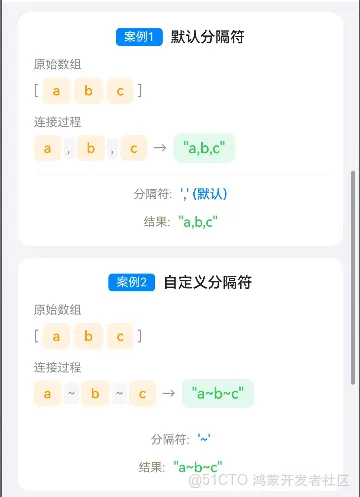
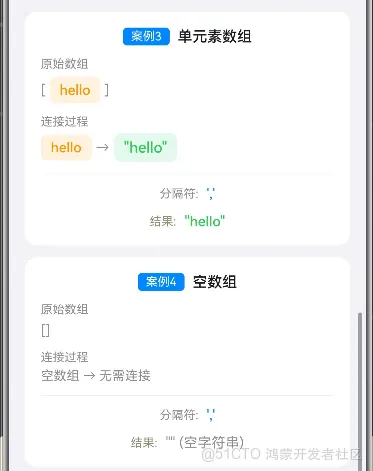
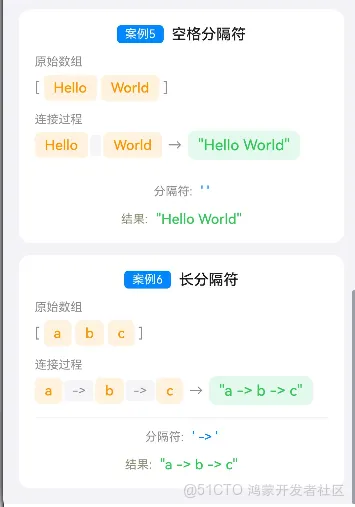
Demo 文件预置了六个案例,在 `aboutToAppear` 里集中计算。逐个推演:
1. 案例「默认分隔符」: `join(['a','b','c'], ',')`。开头 `'a'`,后面依次拼 `,b`、`,c`,**结果 `"a,b,c"`**。
2. 案例「自定义分隔符」: `join(['a','b','c'], '~')`。把逗号换成 `~`,**结果 `"a~b~c"`**。
3. 案例「单元素数组」: `join(['hello'], ',')`。只有一个元素,循环不进第二次,直接返回 `'hello'`,**结果 `"hello"`**(没有多余逗号)。
4. 案例「空数组」: `join([], ',')`。长度 0,首行 `if` 直接返回空串,**结果 `""`**。
5. 案例「空格分隔符」: `join(['Hello','World'], ' ')`。拼成 **`"Hello World"`**,做句子文案时常用。
6. 案例「长分隔符」: `join(['a','b','c'], ' -> ')`。分隔符本身带空格,得到 **`"a -> b -> c"`**,做步骤条、路径展示很顺手。
## 总结
`join` 把数组拼字符串的活儿做得很克制: 默认逗号、空数组返空串、元素自动转文本。需要时传个分隔符就能适配标签、路径、摘要各种展示,是那种写了就忘不掉的小工具。
实际项目里用得最多的场景: 标签行 `join('、')`,错误汇总 `join('\n')` 塞进弹窗,联调时请求参数 `join('&')` 拼成 query 串。有个坑顺带提一句,分隔符如果来自用户输入,记得做白名单校验,别让用户传个会破坏布局的字符。
## 前言
大家好,我是若城。
这期开始,想跟大家聊聊我自己刚折腾完的一个工具库。说白了,就是平时写 HarmonyOS 应用时那些重复到想吐的活,我顺手攒成了一套方法库: 目前里面已经收了 `200+` 个常用方法,开发时那些高频场景基本都覆盖到了。
后面我会把这些方法一个个拆开讲——不光说它能干啥、怎么用,也会把那些文档里不会写、但一踩就坑的细节拎出来说。不想天天重复造轮子的同学,直接 `ohpm install arktoolbox` 装到项目里就能上手。
这个库已经发布到 OpenHarmony 了,感兴趣的话可以关注我后续的文章。

## join: 数组转字符串这件小事,踩了个坑之后我选了它
在 HarmonyOS 页面里做展示,数组转字符串是高频动作: 把选中的标签拼成一行、把搜索关键词连成摘要、把路径节点拼成面包屑。原生 ArkTS 的 `array.join()` 当然能用,但 ArkToolBox 的 `join` 把它包得更稳,空数组、单元素、自定义分隔符都处理得干净。
我自己在写列表详情页时,就因为原生 `join` 对空数组返回空字符串这一点没留意,渲染出了一行多余的逗号。ArkToolBox 的 `join` 把边界情况想在了前面。
库地址: [ArkToolBox](https://ohpm.openharmony.cn/#/cn/detail/arktoolbox)。装好就能调:
```bash
ohpm install arktoolbox
```

## 方法签名与源码
`join` 的实现只有几行,下面是从 `library/src/main/ets/utils/ArrayUtils.ets` 原样复制的片段:
```typescript
export function join<T>(array: T[], separator: string = ','): string {
if (array.length === 0) {
return '';
}
let result = String(array[0]);
for (let i = 1; i < array.length; i++) {
result += separator + String(array[i]);
}
return result;
}
```

逻辑看一眼就懂: 空数组直接返回空字符串;否则拿第一个元素当开头,从第二个开始每个元素前拼一个分隔符。这里有个细节我挺欣赏,它对每个元素都走 `String(...)` 再拼接,所以你往数组里塞数字、布尔甚至对象,都能转成可读文本,不会像某些手写过拼接那样漏掉类型转换。
> 划重点: 默认分隔符是逗号 `,`,和原生 `Array.prototype.join` 行为一致。想换分隔符就传第二个参数,比如 `' | '`、`' -> '` 都行。
## 参数与返回值
| 参数 | 类型 | 说明 |
|-----|-----|-----|
| array | `T[]` | 待拼接的数组,可为任意元素类型 |
| separator | `string`(可选,默认 `,`) | 元素之间的连接符 |
| 返回值 | `string` | 拼接结果;空数组返回 `''` |
返回值是纯字符串,原数组不会被改动。空数组返回空字符串这一点很关键,页面渲染时不用再为 `undefined` 或 `[object Object]` 兜底。
## 跟原生 join 有什么不同
坦白讲,功能上差别不大。ArkToolBox 的 `join` 胜在边界处理更明确: 它显式对每个元素做了 `String()` 转换,混合类型数组不会出现 `[object Object]` 这种让人头大的输出。单元素数组不会多补一个分隔符,空数组直接走短路返回空串。
还有个容易踩的坑: `join` 不会在元素之间自动补空格。你传 `' '` 才有一个空格,不传的话默认就是逗号紧贴着元素。做中文展示时我建议分隔符写成 `'、'` 或 `' | '` 这种带符号的串,别指望排版会自动好看。
## 方法案例源码
```typescript
import { join } from 'arktoolbox';
import router from '@ohos.router';
import { LengthMetrics } from '@kit.ArkUI';
interface JoinCase {
title: string;
arrayDesc: string;
array: string[];
separator: string;
separatorDesc: string;
result: string;
}
@Entry
@Component
struct JoinDemo {
@State customArray: string = 'a, b, c, d';
@State customSeparator: string = '-';
@State customResult: string = '';
@State customHasRun: boolean = false;
@State customParsedArray: string[] = [];
private readonly demos: JoinCase[] = [
{
title: '默认分隔符',
arrayDesc: "['a', 'b', 'c']",
array: ['a', 'b', 'c'],
separator: ',',
separatorDesc: "',' (默认)",
result: ''
},
{
title: '自定义分隔符',
arrayDesc: "['a', 'b', 'c']",
array: ['a', 'b', 'c'],
separator: '~',
separatorDesc: "'~'",
result: ''
},
{
title: '单元素数组',
arrayDesc: "['hello']",
array: ['hello'],
separator: ',',
separatorDesc: "','",
result: ''
},
{
title: '空数组',
arrayDesc: '[]',
array: [],
separator: ',',
separatorDesc: "','",
result: ''
},
{
title: '空格分隔符',
arrayDesc: "['Hello', 'World']",
array: ['Hello', 'World'],
separator: ' ',
separatorDesc: "' '",
result: ''
},
{
title: '长分隔符',
arrayDesc: "['a', 'b', 'c']",
array: ['a', 'b', 'c'],
separator: ' -> ',
separatorDesc: "' -> '",
result: ''
}
];
aboutToAppear(): void {
this.demos[0].result = join(['a', 'b', 'c'], ',');
this.demos[1].result = join(['a', 'b', 'c'], '~');
this.demos[2].result = join(['hello'], ',');
this.demos[3].result = join([], ',');
this.demos[4].result = join(['Hello', 'World'], ' ');
this.demos[5].result = join(['a', 'b', 'c'], ' -> ');
}
@Builder
TitleBar() {
Row() {
Text('<')
.fontSize(20)
.fontColor('#0A84FF')
.onClick(() => {
router.back();
})
.padding({ right: 12 })
Text('join() 方法演示')
.fontSize(18)
.fontWeight(FontWeight.Medium)
.fontColor('#1D1D1F')
.layoutWeight(1)
}
.width('100%')
.height(56)
.padding({ left: 16, right: 16 })
.backgroundColor('#FFFFFF')
}
@Builder
MethodDescription() {
Column({ space: 8 }) {
Text('方法说明')
.fontSize(16)
.fontWeight(FontWeight.Medium)
.fontColor('#1D1D1F')
Text('将数组中的所有元素转换成字符串,并用分隔符连接起来。默认分隔符为逗号。不修改原数组。')
.fontSize(14)
.fontColor('#6E6E73')
.lineHeight(22)
Row({ space: 12 }) {
Column({ space: 4 }) {
Text('参数')
.fontSize(12)
.fontColor('#8E8E93')
Text('array: T[]')
.fontSize(13)
.fontColor('#1D1D1F')
Text('separator?: string')
.fontSize(13)
.fontColor('#1D1D1F')
}
.alignItems(HorizontalAlign.Start)
.layoutWeight(1)
.padding(12)
.borderRadius(8)
.backgroundColor('#F5F5F7')
Column({ space: 4 }) {
Text('返回值')
.fontSize(12)
.fontColor('#8E8E93')
Text('string')
.fontSize(13)
.fontColor('#1D1D1F')
Text('空数组返回空字符串')
.fontSize(12)
.fontColor('#8E8E93')
}
.alignItems(HorizontalAlign.Start)
.layoutWeight(1)
.padding(12)
.borderRadius(8)
.backgroundColor('#F5F5F7')
}
Column({ space: 4 }) {
Text('关键特性')
.fontSize(12)
.fontColor('#8E8E93')
Flex({ wrap: FlexWrap.Wrap, space: { main: LengthMetrics.vp(6), cross: LengthMetrics.vp(6) } }) {
Text('默认逗号分隔')
.fontSize(12)
.fontColor('#5856D6')
.padding({ left: 8, right: 8, top: 3, bottom: 3 })
.borderRadius(4)
.backgroundColor('#EDEDFC')
Text('不修改原数组')
.fontSize(12)
.fontColor('#5856D6')
.padding({ left: 8, right: 8, top: 3, bottom: 3 })
.borderRadius(4)
.backgroundColor('#EDEDFC')
Text('自动转为字符串')
.fontSize(12)
.fontColor('#5856D6')
.padding({ left: 8, right: 8, top: 3, bottom: 3 })
.borderRadius(4)
.backgroundColor('#EDEDFC')
}
}
.alignItems(HorizontalAlign.Start)
.width('100%')
}
.width('100%')
.padding(16)
.borderRadius(12)
.backgroundColor('#FFFFFF')
}
@Builder
ElementBadge(val: string) {
Text(val)
.fontSize(14)
.fontColor('#FF9500')
.padding({ left: 10, right: 10, top: 5, bottom: 5 })
.borderRadius(6)
.backgroundColor('#FFF3E0')
.fontWeight(FontWeight.Medium)
}
@Builder
SeparatorBadge(sep: string) {
Text(sep)
.fontSize(13)
.fontColor('#8E8E93')
.padding({ left: 4, right: 4, top: 3, bottom: 3 })
.borderRadius(4)
.backgroundColor('#F5F5F7')
.fontStyle(FontStyle.Italic)
}
@Builder
ResultStringBadge(result: string) {
Text(result.length > 0 ? `"${result}"` : '"" (空字符串)')
.fontSize(15)
.fontColor('#34C759')
.fontWeight(FontWeight.Medium)
.padding({ left: 10, right: 10, top: 6, bottom: 6 })
.borderRadius(8)
.backgroundColor('#E8F8EE')
}
@Builder
DemoCard(demoCase: JoinCase, index: number) {
Column({ space: 12 }) {
Row() {
Text(`案例${index + 1}`)
.fontSize(12)
.fontColor('#FFFFFF')
.padding({ left: 8, right: 8, top: 2, bottom: 2 })
.borderRadius(4)
.backgroundColor('#0A84FF')
Text(demoCase.title)
.fontSize(15)
.fontWeight(FontWeight.Medium)
.fontColor('#1D1D1F')
.margin({ left: 8 })
}
Column({ space: 6 }) {
Text('原始数组')
.fontSize(12)
.fontColor('#8E8E93')
if (demoCase.array.length === 0) {
Text('[]')
.fontSize(14)
.fontColor('#8E8E93')
} else {
Row({ space: 4 }) {
Text('[')
.fontSize(14)
.fontColor('#8E8E93')
ForEach(demoCase.array, (val: string, idx: number) => {
this.ElementBadge(val)
}, (val: string, idx: number) => `join-${index}-${idx}`)
Text(']')
.fontSize(14)
.fontColor('#8E8E93')
}
}
}
.alignItems(HorizontalAlign.Start)
.width('100%')
Column({ space: 4 }) {
Text('连接过程')
.fontSize(12)
.fontColor('#8E8E93')
if (demoCase.array.length === 0) {
Text('空数组 → 无需连接')
.fontSize(13)
.fontColor('#8E8E93')
} else if (demoCase.array.length === 1) {
Row({ space: 4 }) {
this.ElementBadge(demoCase.array[0])
Text('→')
.fontSize(14)
.fontColor('#8E8E93')
this.ResultStringBadge(demoCase.result)
}
} else {
Row({ space: 2 }) {
ForEach(demoCase.array, (val: string, idx: number) => {
this.ElementBadge(val)
if (idx < demoCase.array.length - 1) {
this.SeparatorBadge(demoCase.separator)
}
}, (val: string, idx: number) => `join-proc-${index}-${idx}`)
Text('→')
.fontSize(14)
.fontColor('#8E8E93')
.margin({ left: 4, right: 4 })
this.ResultStringBadge(demoCase.result)
}
}
}
.alignItems(HorizontalAlign.Start)
.width('100%')
Divider().color('#E5E5EA')
Row({ space: 8 }) {
Text('分隔符:')
.fontSize(12)
.fontColor('#8E8E93')
Text(demoCase.separatorDesc)
.fontSize(13)
.fontColor('#0A84FF')
.fontWeight(FontWeight.Medium)
}
Row({ space: 8 }) {
Text('结果:')
.fontSize(12)
.fontColor('#8E8E73')
if (demoCase.result.length === 0) {
Text('"" (空字符串)')
.fontSize(14)
.fontColor('#8E8E93')
} else {
Text(`"${demoCase.result}"`)
.fontSize(14)
.fontColor('#34C759')
.fontWeight(FontWeight.Medium)
}
}
}
.width('100%')
.padding(16)
.borderRadius(12)
.backgroundColor('#FFFFFF')
}
@Builder
InteractiveCard() {
Column({ space: 12 }) {
Row() {
Text('自定义')
.fontSize(12)
.fontColor('#FFFFFF')
.padding({ left: 8, right: 8, top: 2, bottom: 2 })
.borderRadius(4)
.backgroundColor('#34C759')
Text('交互式体验')
.fontSize(15)
.fontWeight(FontWeight.Medium)
.fontColor('#1D1D1F')
.margin({ left: 8 })
}
Column({ space: 4 }) {
Text('数组元素(逗号分隔)')
.fontSize(12)
.fontColor('#8E8E93')
TextInput({ placeholder: '例如: a, b, c, d', text: this.customArray })
.fontSize(14)
.width('100%')
.padding({ left: 12, right: 12, top: 10, bottom: 10 })
.borderRadius(8)
.backgroundColor('#F5F5F7')
.onChange((value: string) => {
this.customArray = value;
})
}
.alignItems(HorizontalAlign.Start)
Column({ space: 4 }) {
Text('分隔符')
.fontSize(12)
.fontColor('#8E8E93')
TextInput({ placeholder: '例如: - 或 ,', text: this.customSeparator })
.fontSize(14)
.width('100%')
.padding({ left: 12, right: 12, top: 10, bottom: 10 })
.borderRadius(8)
.backgroundColor('#F5F5F7')
.onChange((value: string) => {
this.customSeparator = value;
})
}
.alignItems(HorizontalAlign.Start)
Button('执行 join')
.width('100%')
.height(44)
.fontSize(15)
.fontWeight(FontWeight.Medium)
.fontColor('#FFFFFF')
.backgroundColor('#0A84FF')
.borderRadius(10)
.onClick(() => {
const arr: string[] = this.customArray.split(',').map((s: string) => s.trim()).filter((s: string) => s.length > 0);
this.customParsedArray = arr;
this.customResult = join(arr, this.customSeparator);
this.customHasRun = true;
})
if (this.customHasRun) {
Divider().color('#E5E5EA')
Column({ space: 6 }) {
Text('原始数组')
.fontSize(12)
.fontColor('#8E8E93')
if (this.customParsedArray.length === 0) {
Text('[]')
.fontSize(14)
.fontColor('#8E8E93')
} else {
Row({ space: 4 }) {
Text('[')
.fontSize(14)
.fontColor('#8E8E93')
ForEach(this.customParsedArray,
(val: string, idx: number) => {
this.ElementBadge(val)
}, (val: string, idx: number) => `custom-elem-${idx}`)
Text(']')
.fontSize(14)
.fontColor('#8E8E93')
}
}
}
.alignItems(HorizontalAlign.Start)
.width('100%')
Column({ space: 4 }) {
Text('连接过程')
.fontSize(12)
.fontColor('#8E8E93')
if (this.customParsedArray.length === 0) {
Text('空数组 → 无需连接')
.fontSize(13)
.fontColor('#8E8E93')
} else if (this.customParsedArray.length === 1) {
Row({ space: 4 }) {
this.ElementBadge(this.customParsedArray[0])
Text('→')
.fontSize(14)
.fontColor('#8E8E93')
this.ResultStringBadge(this.customResult)
}
} else {
Row({ space: 2 }) {
ForEach(this.customParsedArray,
(val: string, idx: number) => {
this.ElementBadge(val)
if (idx < this.customParsedArray.length - 1) {
this.SeparatorBadge(this.customSeparator)
}
}, (val: string, idx: number) => `custom-proc-${idx}`)
Text('→')
.fontSize(14)
.fontColor('#8E8E93')
.margin({ left: 4, right: 4 })
this.ResultStringBadge(this.customResult)
}
}
}
.alignItems(HorizontalAlign.Start)
.width('100%')
Divider().color('#E5E5EA')
Row({ space: 8 }) {
Text('分隔符:')
.fontSize(12)
.fontColor('#8E8E93')
Text(`'${this.customSeparator}'`)
.fontSize(13)
.fontColor('#0A84FF')
.fontWeight(FontWeight.Medium)
}
Row({ space: 8 }) {
Text('结果:')
.fontSize(12)
.fontColor('#8E8E73')
if (this.customResult.length === 0) {
Text('"" (空字符串)')
.fontSize(14)
.fontColor('#8E8E93')
} else {
Text(`"${this.customResult}"`)
.fontSize(14)
.fontColor('#34C759')
.fontWeight(FontWeight.Medium)
}
}
}
}
.width('100%')
.padding(16)
.borderRadius(12)
.backgroundColor('#FFFFFF')
}
build() {
Column() {
this.TitleBar()
Scroll() {
Column({ space: 12 }) {
this.MethodDescription()
this.InteractiveCard()
ForEach(this.demos, (demoCase: JoinCase, index: number) => {
this.DemoCard(demoCase, index)
}, (demoCase: JoinCase, index: number) => `${index}`)
}
.padding(16)
}
.layoutWeight(1)
.backgroundColor('#F2F2F7')
}
.width('100%')
.height('100%')
.backgroundColor('#F2F2F7')
}
}
```
## 案例演示



Demo 文件预置了六个案例,在 `aboutToAppear` 里集中计算。逐个推演:
1. 案例「默认分隔符」: `join(['a','b','c'], ',')`。开头 `'a'`,后面依次拼 `,b`、`,c`,**结果 `"a,b,c"`**。
2. 案例「自定义分隔符」: `join(['a','b','c'], '~')`。把逗号换成 `~`,**结果 `"a~b~c"`**。
3. 案例「单元素数组」: `join(['hello'], ',')`。只有一个元素,循环不进第二次,直接返回 `'hello'`,**结果 `"hello"`**(没有多余逗号)。
4. 案例「空数组」: `join([], ',')`。长度 0,首行 `if` 直接返回空串,**结果 `""`**。
5. 案例「空格分隔符」: `join(['Hello','World'], ' ')`。拼成 **`"Hello World"`**,做句子文案时常用。
6. 案例「长分隔符」: `join(['a','b','c'], ' -> ')`。分隔符本身带空格,得到 **`"a -> b -> c"`**,做步骤条、路径展示很顺手。

## 总结
`join` 把数组拼字符串的活儿做得很克制: 默认逗号、空数组返空串、元素自动转文本。需要时传个分隔符就能适配标签、路径、摘要各种展示,是那种写了就忘不掉的小工具。
实际项目里用得最多的场景: 标签行 `join('、')`,错误汇总 `join('\n')` 塞进弹窗,联调时请求参数 `join('&')` 拼成 query 串。有个坑顺带提一句,分隔符如果来自用户输入,记得做白名单校验,别让用户传个会破坏布局的字符。
©本站发布的所有内容,包括但不限于文字、图片、音频、视频、图表、标志、标识、广告、商标、商号、域名、软件、程序等,除特别标明外,均来源于网络或用户投稿,版权归原作者或原出处所有。我们致力于保护原作者版权,若涉及版权问题,请及时联系我们进行处理。
分类
HarmonyOS
标签
HarmonyOS7
arktoolbox
join
暂无评论数据
加载中...
发布
相关推荐
ASCF 鸿蒙设备方向监听,手机怎么转你都知道
 在人间耕耘
在人间耕耘 304
304 0
0演示昵称与真实账号的边界:如何避免把本地角色写成登录系统
 hei 1019 0
鸿蒙闪控球进阶:从智慧生活场景拉起到自动截图记账,我把整条链路踩了一遍
在人间耕耘 2129 0HarmonyOS 7 Fast Kit 算法加速实战:四大核心能力,把算力从系统里"借"出来
 威哥爱编程 3520 0
 全栈若城
拥有 10 年软件研发领域实战经验,其中 7 年深耕一线技术研发,3 年聚焦研发团队管理,具备 “技术落地 + 团队统筹” 双维度能力。技术栈覆盖全链路开发需求,前端开发、Python 后端开发、HarmonyOS 应用开发、SQL 数据库优化及服务器部署运维均有扎实实践; 华为 HRC 、腾讯云 TDP 。在技术生态与知识分享领域持续输出: 清华出版社签约作者; CSDN 博主、鸿蒙开发者社区明星开发者,累计输出多篇高价值技术干货,助力开发者成长,现以全栈软件工程师身份,专注于项目落地与团队效能提升。
77
帖子
0
提问
0
粉丝
最新发布
HarmonyOS7 使用 arktoolbox 三方库:map(parseInt) 返回 NaN? rc_ary 一刀切掉多余参数
2026-09-18 17:34:13 发布HarmonyOS7 使用 arktoolbox 三方库:indexOf 和 lastIndexOf: 在数组里找人,从左还是从右你定
2026-09-18 17:30:57 发布热门推荐
8137 浏览
 京公网安备:11010502051901号