


ArkTs布局入门03——层叠布局(Stack)
 蓝亭书序 2026-08-07 14:29:08 发布
5445 浏览 30 点赞 0 收藏
1、概述
叠布局(StackLayout)用于在屏幕上预留一块区域来显示组件中的元素,提供元素可以重叠的布局。层叠布局通过Stack容器组件实现位置的固定定位与层叠,容器中的子元素(子组件)依次入栈,后一个子元素覆盖前一个子元素,子元素可以叠加,也可以设置位置。
层叠布局具有较强的页面层叠、位置定位能力,其使用场景有广告、卡片层叠效果等。
如下图,Stack作为容器,容器内的子元素(子组件)的顺序为Item1->Item2->Item3。

2、开发布局
Stack组件为容器组件,容器内可包含各种子组件。其中子组件默认进行居中堆叠。子元素被约束在Stack下,进行自己的样式定义以及排列
Column(){
  Stack({ }) {
    Column(){}.width('90%').height('100%').backgroundColor('#ff58b87c')
    Text('text').width('60%').height('60%').backgroundColor('#ffc3f6aa')
    Button('button').width('30%').height('30%').backgroundColor('#ff8ff3eb').fontColor('#000')
  }.width('100%').height(150).margin({ top: 50 })
}
3、对齐方式
Stack组件通过alignContent参数实现位置的相对移动。如图2所示,支持九种对齐方式。
Stack容器内元素的对齐方式

4、Z轴控制
Stack容器中兄弟组件显示层级关系可以通过Z序控制的zIndex属性改变。zIndex值越大,显示层级越高,即zIndex值大的组件会覆盖在zIndex值小的组件上方。
在层叠布局中,如果后面子元素尺寸大于前面子元素尺寸,则前面子元素完全隐藏。
Stack({ alignContent: Alignment.BottomStart }) {
  Column() {
    Text('Stack子元素1').textAlign(TextAlign.End).fontSize(20)
  }.width(100).height(100).backgroundColor(0xffd306)

  Column() {
    Text('Stack子元素2').fontSize(20)
  }.width(150).height(150).backgroundColor(Color.Pink)

  Column() {
    Text('Stack子元素3').fontSize(20)
  }.width(200).height(200).backgroundColor(Color.Grey)
}.margin({ top: 100 }).width(350).height(350).backgroundColor(0xe0e0e0)
上图中,最后的子元素3的尺寸大于前面的所有子元素,所以,前面两个元素完全隐藏。改变子元素1,子元素2的zIndex属性后,可以将元素展示出来。
Stack({ alignContent: Alignment.BottomStart }) {
  Column() {
    Text('Stack子元素1').fontSize(20)
  }.width(100).height(100).backgroundColor(0xffd306).zIndex(2)

  Column() {
    Text('Stack子元素2').fontSize(20)
  }.width(150).height(150).backgroundColor(Color.Pink).zIndex(1)

  Column() {
    Text('Stack子元素3').fontSize(20)
  }.width(200).height(200).backgroundColor(Color.Grey)
}.margin({ top: 100 }).width(350).height(350).backgroundColor(0xe0e0e0)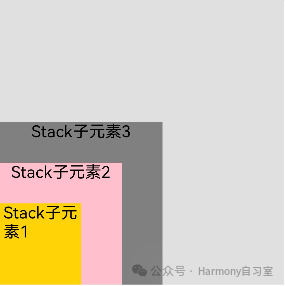
5、demo
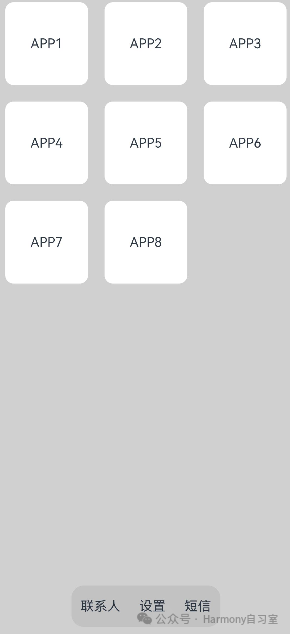
使用叠层布局,我们可以搭建一个简单的页面,页面最底部有个常驻的工具栏,主内容区域是用户正文。代码和示意图如下:
@Entry
@Component
struct StackSample {
  private arr: string[] = ['APP1', 'APP2', 'APP3', 'APP4', 'APP5', 'APP6', 'APP7', 'APP8'];

  build() {
    Stack({ alignContent: Alignment.Bottom }) {
      Flex({ wrap: FlexWrap.Wrap }) {
        ForEach(this.arr, (item) => {
          Text(item)
            .width(100)
            .height(100)
            .fontSize(16)
            .margin(10)
            .textAlign(TextAlign.Center)
            .borderRadius(10)
            .backgroundColor(0xFFFFFF)
        }, item => item)
      }.width('100%').height('100%')

      Flex({ justifyContent: FlexAlign.SpaceAround, alignItems: ItemAlign.Center }) {
        Text('联系人').fontSize(16)
        Text('设置').fontSize(16)
        Text('短信').fontSize(16)
      }
      .width('50%')
      .height(50)
      .backgroundColor('#16302e2e')
      .margin({ bottom: 15 })
      .borderRadius(15)
    }.width('100%').height('100%').backgroundColor('#CFD0CF')
  }
}
©本站发布的所有内容,包括但不限于文字、图片、音频、视频、图表、标志、标识、广告、商标、商号、域名、软件、程序等,除特别标明外,均来源于网络或用户投稿,版权归原作者或原出处所有。我们致力于保护原作者版权,若涉及版权问题,请及时联系我们进行处理。
分类
HarmonyOS
标签
Demo
Z轴控制
对齐方式
相关推荐
ArkTS 九种泄漏模式的排查指南(下)
 鸿蒙小助手
鸿蒙小助手 657
657 0
0ArkTS 九种泄漏模式的排查指南(上)
鸿蒙小助手 505 0一笔加油费到月度报表:用 ArkTS 做一个离线优先的“车账本”
 ccai 1048 0
鸿蒙上 React Native fetch:从入门到请求封装
 在人间耕耘 2073 0
React Native LayoutAnimation 鸿蒙上布局动画适配指南
在人间耕耘 2554 0 蓝亭书序
我还没有写个人简介......
56
帖子
0
提问
236
粉丝
最新发布
鸿蒙媒体开发系列07——AVRecorder音频录制
2026-08-25 17:45:43 发布鸿蒙媒体开发系列06——输出设备与音频流管理
2026-08-25 17:45:05 发布热门推荐
8137 浏览
相关问题
 京公网安备:11010502051901号