




鸿蒙UI开发——组件滤镜效果
 蓝亭书序
2026-11-18 13:30:10 发布
0 浏览 0 收藏
1、概 述
ArkUI为组件提供了滤镜效果设置,背景滤镜、前景滤镜、合成滤镜。我们可以通过以下方式为组件设置对应的滤镜效果。
Text('前景滤镜')
// ..其他属性
.foregroundFilter(filterTest1) // 通过 foregroundFilter 设置模糊效果

Text('背景滤镜')
// ...其他属性
.backgroundFilter(filterTest2) // 通过 backgroundFilter 设置模糊效果

Text('合成滤镜')
// ...其他属性
.compositingFilter(filterTest3) // 通过 compositingFilter 设置模糊效果
具体用法,下面展开介绍。
2、设置滤镜效果
foregroundFilter、backgroundFilter、compositingFilter三个属性的入参是Filter对象。Filter对象的创建方式如下:
import { uiEffect } from "@kit.ArkGraphics2D";
// ....
let filter : uiEffect.Filter = uiEffect.createFilter()
目前Filter对象暂时只能设置一种效果,blur模糊效果,接口如下:
blur(blurRadius: number): Filter我们创建好的Filter则可以传入到组件对应的属性中。
一个案例如下(有一个文本组件,有一张背景图片,分别设置三种滤镜效果):
- 前景滤镜将文字进行模糊处理;
- 背景对背景图片进行了处理;
- 合成滤镜是对两者同时进行处理;
【注意:目前版本的IDE预览器中是看不到效果的,需要在真机或者模拟器中运行】
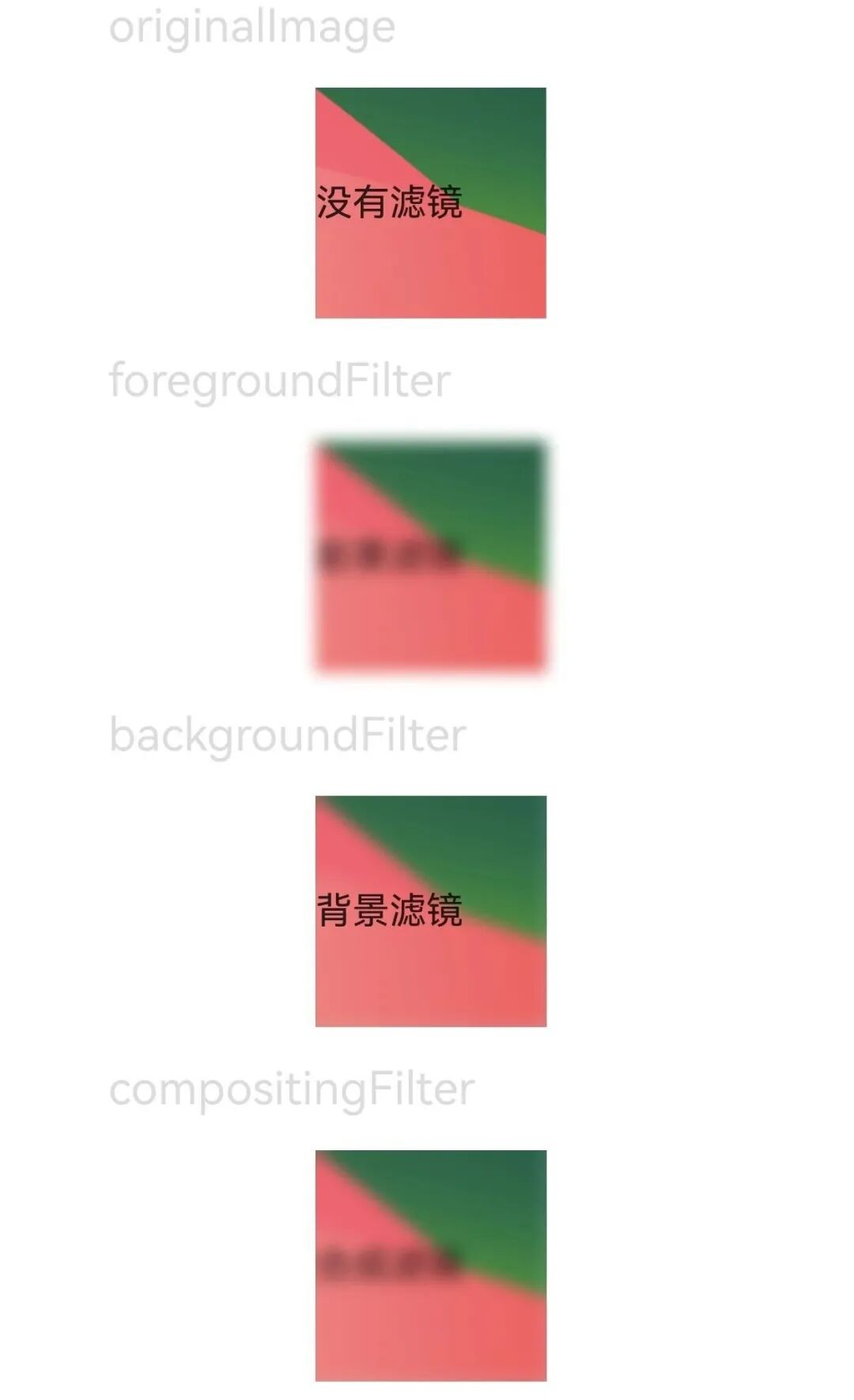
代码如下:
// xxx.ets
import { uiEffect } from '@kit.ArkGraphics2D';

@Entry
@Component
struct FilterEffectExample {
  @State filterTest1: uiEffect.Filter = uiEffect.createFilter().blur(10)
  @State filterTest2: uiEffect.Filter = uiEffect.createFilter().blur(10)
  @State filterTest3: uiEffect.Filter = uiEffect.createFilter().blur(10)

  build() {
    Column({ space: 15 }) {

      Text('originalImage').fontSize(20).width('75%').fontColor('#DCDCDC')
      Text('没有滤镜')
        .width(100)
        .height(100)
        .backgroundColor('#ADD8E6')
        .backgroundImage($r("app.media.test"))
        .backgroundImageSize({ width: 100, height: 100 })


      Text('foregroundFilter').fontSize(20).width('75%').fontColor('#DCDCDC')
      Text('前景滤镜')
        .width(100)
        .height(100)
        .backgroundColor('#ADD8E6')
        .backgroundImage($r("app.media.test"))
        .backgroundImageSize({ width: 100, height: 100 })
        .foregroundFilter(this.filterTest1) // 通过 foregroundFilter 设置模糊效果

      Text('backgroundFilter').fontSize(20).width('75%').fontColor('#DCDCDC')
      Text('背景滤镜')
        .width(100)
        .height(100)
        .backgroundColor('#ADD8E6')
        .backgroundImage($r("app.media.test"))
        .backgroundImageSize({ width: 100, height: 100 })
        .backgroundFilter(this.filterTest2) // 通过 backgroundFilter 设置模糊效果

      Text('compositingFilter').fontSize(20).width('75%').fontColor('#DCDCDC')
      Text('合成滤镜')
        .width(100)
        .height(100)
        .backgroundColor('#ADD8E6')
        .backgroundImage($r("app.media.test"))
        .backgroundImageSize({ width: 100, height: 100 })
        .compositingFilter(this.filterTest3) // 通过 compositingFilter 设置模糊效果
    }
    .height('100%')
    .width('100%')
  }
}
©本站发布的所有内容,包括但不限于文字、图片、音频、视频、图表、标志、标识、广告、商标、商号、域名、软件、程序等,除特别标明外,均来源于网络或用户投稿,版权归原作者或原出处所有。我们致力于保护原作者版权,若涉及版权问题,请及时联系我们进行处理。
分类
HarmonyOS
标签
ArkUI
组件
鸿蒙UI
暂无评论数据
加载中...
发布
相关推荐
鸿蒙UI开发——上拉抽屉的更新与事件回调
蓝亭书序 0
 0
鸿蒙原生 Want 信息传递载体实战指南
 在人间耕耘 0 0
鸿蒙原生 Preferences C/C++ 数据持久化实战指南
在人间耕耘 0 0鸿蒙UI开发——实现一个上拉抽屉效果
蓝亭书序 0 0鸿蒙UI开发——Builder与LocalBuilder对比
蓝亭书序 0 0 蓝亭书序
我还没有写个人简介......
137
帖子
0
提问
236
粉丝
最新发布
鸿蒙多线程开发——Worker多线程
2026-11-04 14:22:24 发布鸿蒙多线程开发——TaskPool任务池
2026-11-04 14:21:14 发布热门推荐
23445 浏览
23030 浏览
20621 浏览
相关问题
 京公网安备:11010502051901号