鸿蒙开发之Button按钮有哪些类型,如何通过代码设置
 Tiechui.Wang 2020-09-23 12:56:05 发布
2468 浏览 20 点赞 13 收藏
Button类型分类
按照按钮的形状,按钮可以分为:
普通按钮
椭圆按钮
胶囊按钮
圆形按钮
其它
Button类型效果和代码
普通按钮
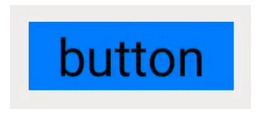
普通按钮和其他按钮的区别在于不需要设置任何形状,只设置文本和背景颜色即可,例如:
<Button
    ohos:width="150vp"
    ohos:height="50vp"
    ohos:text_size="27fp"
    ohos:text="button"
    ohos:background_element="$graphic:color_blue_element"
    ohos:left_margin="15vp"
    ohos:bottom_margin="15vp"
    ohos:right_padding="8vp"
    ohos:left_padding="8vp"
/>
椭圆按钮
椭圆按钮是通过设置background_element的来实现的,background_element的shape设置为椭圆(oval),例如:

<Button
    ohos:width="150vp"
    ohos:height="50vp"
    ohos:text_size="27fp"
    ohos:text="button"
    ohos:background_element="$graphic:oval_button_element"
    ohos:left_margin="15vp"
    ohos:bottom_margin="15vp"
    ohos:right_padding="8vp"
    ohos:left_padding="8vp"
    ohos:element_left="$graphic:ic_btn_reload"
/>
胶囊按钮
胶囊按钮是一种常见的按钮,设置按钮背景时将背景设置为矩形形状,并且设置ShapeElement的radius的半径,例如:

<Button
    ohos:id="$+id:button"
    ohos:width="match_content"
    ohos:height="match_content"
    ohos:text_size="27fp"
    ohos:text="button"
    ohos:background_element="$graphic:capsule_button_element"
    ohos:left_margin="15vp"
    ohos:bottom_margin="15vp"
    ohos:right_padding="15vp"
    ohos:left_padding="15vp"
/>
圆形按钮
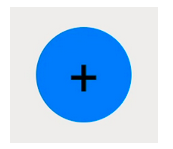
圆形按钮和椭圆按钮的区别在于组件本身的宽度和高度需要相同,例如:
<Button
    ohos:id="$+id:button4"
    ohos:width="50vp"
    ohos:height="50vp"
    ohos:text_size="27fp"
    ohos:background_element="$graphic:circle_button_element"
    ohos:text="+"
    ohos:left_margin="15vp"
    ohos:bottom_margin="15vp"
    ohos:right_padding="15vp"
    ohos:left_padding="15vp"
/>
场景示例
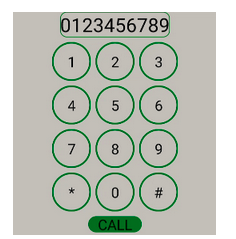
利用圆形按钮,胶囊按钮,文本组件可以绘制出如下拨号盘的UI界面。
<?xml version="1.0" encoding="utf-8"?>
<DirectionalLayout
    xmlns:ohos="http://schemas.huawei.com/res/ohos"
    ohos:width="match_parent"
    ohos:height="match_parent"
    ohos:background_element="$graphic:color_light_gray_element"
    ohos:orientation="vertical">
    <Text
        ohos:width="match_content"
        ohos:height="match_content"
        ohos:text_size="20fp"
        ohos:text="0123456789"
        ohos:background_element="$graphic:green_text_element"
        ohos:text_alignment="center"
        ohos:layout_alignment="horizontal_center"
    />
    <DirectionalLayout
        ohos:width="match_parent"
        ohos:height="match_content"
        ohos:alignment="horizontal_center"
        ohos:orientation="horizontal"
        ohos:top_margin="5vp"
        ohos:bottom_margin="5vp">
        <Button
            ohos:width="40vp"
            ohos:height="40vp"
            ohos:text_size="15fp"
            ohos:background_element="$graphic:green_circle_button_element"
            ohos:text="1"
            ohos:text_alignment="center"
        />
        <Button
            ohos:width="40vp"
            ohos:height="40vp"
            ohos:text_size="15fp"
            ohos:background_element="$graphic:green_circle_button_element"
            ohos:text="2"
            ohos:left_margin="5vp"
            ohos:right_margin="5vp"
            ohos:text_alignment="center"
        />
        <Button
            ohos:width="40vp"
            ohos:height="40vp"
            ohos:text_size="15fp"
            ohos:background_element="$graphic:green_circle_button_element"
            ohos:text="3"
            ohos:text_alignment="center"
        />
    </DirectionalLayout>
    <DirectionalLayout
        ohos:width="match_parent"
        ohos:height="match_content"
        ohos:alignment="horizontal_center"
        ohos:orientation="horizontal"
        ohos:bottom_margin="5vp">
        <Button
            ohos:width="40vp"
            ohos:height="40vp"
            ohos:text_size="15fp"
            ohos:background_element="$graphic:green_circle_button_element"
            ohos:text="4"
            ohos:text_alignment="center"
        />
        <Button
            ohos:width="40vp"
            ohos:height="40vp"
            ohos:text_size="15fp"
            ohos:left_margin="5vp"
            ohos:right_margin="5vp"
            ohos:background_element="$graphic:green_circle_button_element"
            ohos:text="5"
            ohos:text_alignment="center"
        />
        <Button
            ohos:width="40vp"
            ohos:height="40vp"
            ohos:text_size="15fp"
            ohos:background_element="$graphic:green_circle_button_element"
            ohos:text="6"
            ohos:text_alignment="center"
        />
    </DirectionalLayout>
    <DirectionalLayout
        ohos:width="match_parent"
        ohos:height="match_content"
        ohos:alignment="horizontal_center"
        ohos:orientation="horizontal"
        ohos:bottom_margin="5vp">
        <Button
            ohos:width="40vp"
            ohos:height="40vp"
            ohos:text_size="15fp"
            ohos:background_element="$graphic:green_circle_button_element"
            ohos:text="7"
            ohos:text_alignment="center"
        />
        <Button
            ohos:width="40vp"
            ohos:height="40vp"
            ohos:text_size="15fp"
            ohos:left_margin="5vp"
            ohos:right_margin="5vp"
            ohos:background_element="$graphic:green_circle_button_element"
            ohos:text="8"
            ohos:text_alignment="center"
        />
        <Button
            ohos:width="40vp"
            ohos:height="40vp"
            ohos:text_size="15fp"
            ohos:background_element="$graphic:green_circle_button_element"
            ohos:text="9"
            ohos:text_alignment="center"
        />
    </DirectionalLayout>
    <DirectionalLayout
        ohos:width="match_parent"
        ohos:height="match_content"
        ohos:alignment="horizontal_center"
        ohos:orientation="horizontal"
        ohos:bottom_margin="5vp">
        <Button
            ohos:width="40vp"
            ohos:height="40vp"
            ohos:text_size="15fp"
            ohos:background_element="$graphic:green_circle_button_element"
            ohos:text="*"
            ohos:text_alignment="center"
        />
        <Button
            ohos:width="40vp"
            ohos:height="40vp"
            ohos:text_size="15fp"
            ohos:left_margin="5vp"
            ohos:right_margin="5vp"
            ohos:background_element="$graphic:green_circle_button_element"
            ohos:text="0"
            ohos:text_alignment="center"
        />
        <Button
            ohos:width="40vp"
            ohos:height="40vp"
            ohos:text_size="15fp"
            ohos:background_element="$graphic:green_circle_button_element"
            ohos:text="#"
            ohos:text_alignment="center"
        />
    </DirectionalLayout>
    <Button
        ohos:width="match_content"
        ohos:height="match_content"
        ohos:text_size="15fp"
        ohos:text="CALL"
        ohos:background_element="$graphic:green_capsule_button_element"
        ohos:bottom_margin="5vp"
        ohos:text_alignment="center"
        ohos:layout_alignment="horizontal_center"
        ohos:left_padding="10vp"
        ohos:right_padding="10vp"
        ohos:top_padding="2vp"
        ohos:bottom_padding="2vp"
    />
</DirectionalLayout>
作者:知识大胖
来源:CSDN
©本站发布的所有内容,包括但不限于文字、图片、音频、视频、图表、标志、标识、广告、商标、商号、域名、软件、程序等,除特别标明外,均来源于网络或用户投稿,版权归原作者或原出处所有。我们致力于保护原作者版权,若涉及版权问题,请及时联系我们进行处理。
分类
其它
标签
鸿蒙
相关推荐
鸿蒙组件库开发实战:从零打造可复用组件库
 周正
周正 0
0 0
0鸿蒙性能优化实战:从启动优化到流畅度提升的完整方案
周正 1 0鸿蒙单元测试实战:从基础测试到UI测试的完整指南
周正 285 0鸿蒙二维码扫描实战:从基础扫描到多种识别模式的完整指南
周正 474 0鸿蒙文件上传实战:从单文件到多文件分片上传的完整方案
周正 383 0 Tiechui.Wang
我还没有写个人简介......
1091
帖子
0
提问
893
粉丝
最新发布
华为应用市场增长优化师火热认证中
2025-03-10 10:16:02 发布华为应用市场斩获Pocket Gamer2023年移动游戏奖,全球第三大移动应用生态获行业认可
2024-04-27 11:06:07 发布热门推荐