HarmonyOS Java UI之DependentLayout布局示例
 宋你一朵小红花 2020-11-26 11:16:22 发布
3328 浏览 12 点赞 18 收藏
DependentLayout简介
DependentLayout意为相对位置布局,与DirectionalLayout相比较有更多的排布方式,每个组件可以指定相对于其他同级组件的位置,也可以指定相对于父组件的位置。可以使用DependentLayout布局来实现更加复杂的UI界面,同时也可以和其他布局相结合组合出需要的UI界面。
常用属性
相对于指定组件的位置属性
| 位置布局 | 描述 |
| above | 排列在指定组件的上侧 |
| below | 排列在指定组件的下侧 |
| start_of | 排列在指定组件的起始侧 |
| end_of | 排列在指定组件的结束侧 |
| left_of | 排列在指定组件的左侧 |
| right_of | 排列在指定组件的右侧 |
<?xml version="1.0" encoding="utf-8"?>
<DependentLayout
    xmlns:ohos="http://schemas.huawei.com/res/ohos"
    ohos:height="match_parent"
    ohos:width="match_parent"
    ohos:alignment="center">

    <Text
        ohos:id="$+id:text_01"
        ohos:height="match_content"
        ohos:width="match_content"
        ohos:background_element="$graphic:background_dependent_layout"
        ohos:text="我是第一个Text."
        ohos:text_size="50"
        />
    <Text
        ohos:id="$+id:text_02"
        ohos:height="match_content"
        ohos:width="match_content"
        ohos:background_element="$graphic:background_dependent_layout"
        ohos:text="我是第二个Text."
        ohos:text_size="50"
        ohos:above="$id:text_01"
        />

</DependentLayout>
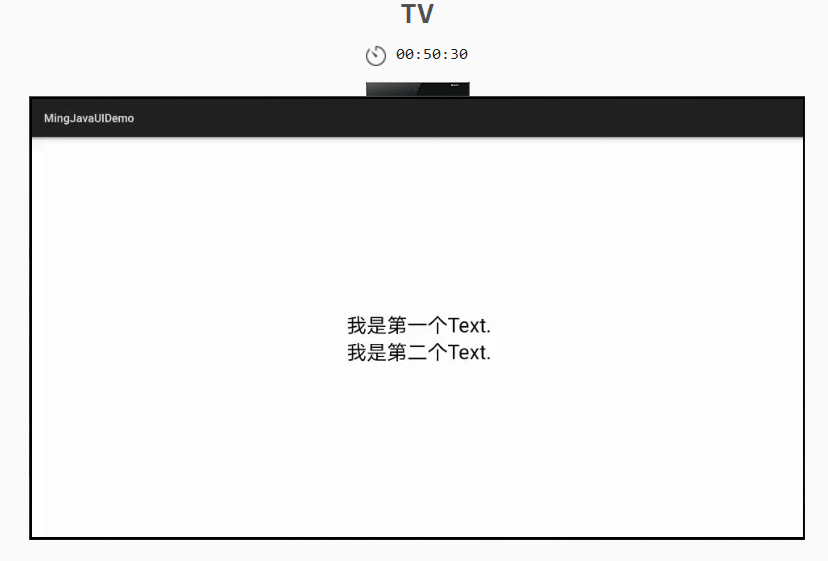
复制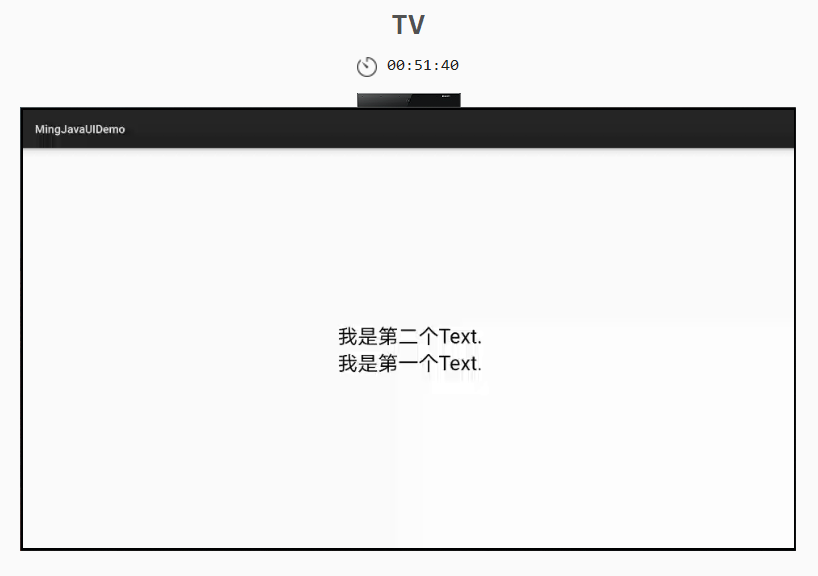 将ohos:above="$id:text_01" 改为ohos:below="$id:text_01",效果如下。
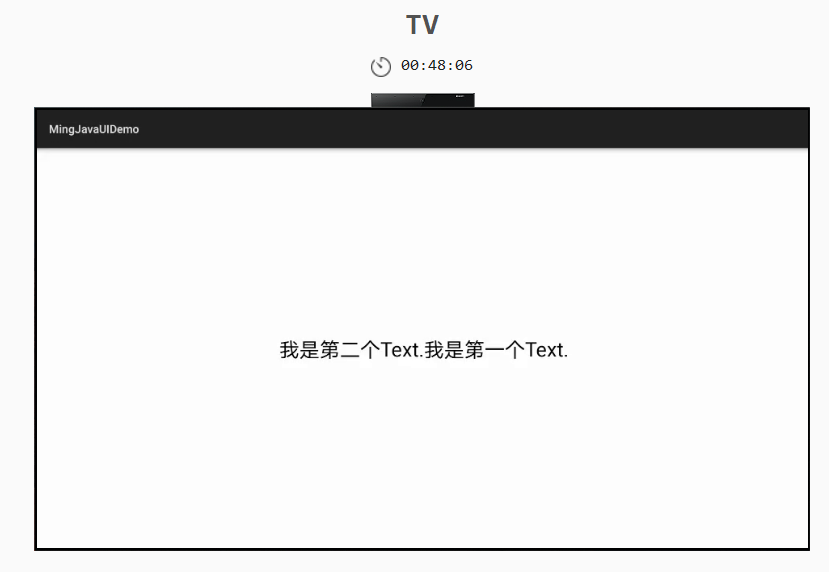
 将ohos:above="$id:text_01" 改为ohos:left_of="$id:text_01",效果如下,其他自行验证。
子组件相对于父组件的位置属性
| 位置布局 | 描述 |
| align_parent_left | 组件处于父组件的左侧 |
| align_parent_right | 组件处于父组件的右侧 |
| align_parent_start | 组件处于父组件的起始侧 |
| align_parent_end | 组件处于父组件的结束侧 |
| align_parent_top | 组件处于父组件的上侧 |
| align_parent_bottom | 组件处于父组件的下侧 |
| center_in_parent | 组件处于父组件的中间 |
<?xml version="1.0" encoding="utf-8"?>
<DependentLayout
xmlns:ohos="http://schemas.huawei.com/res/ohos"
ohos:height="match_parent"
ohos:width="match_parent"
ohos:alignment="center">
<Text
ohos:id="$+id:text_01"
ohos:height="match_content"
ohos:width="match_content"
ohos:background_element="$graphic:background_dependent_layout"
ohos:text="我是第一个Text."
ohos:text_size="50"
ohos:align_parent_bottom="true"
/>
<Text
ohos:id="$+id:text_02"
ohos:height="match_content"
ohos:width="match_content"
ohos:background_element="$graphic:background_dependent_layout"
ohos:text="我是第二个Text."
ohos:text_size="50"
ohos:align_parent_top="true"
/>
<Text
ohos:id="$+id:text_03"
ohos:height="match_content"
ohos:width="match_content"
ohos:background_element="$graphic:background_dependent_layout"
ohos:text="我是第三个Text."
ohos:text_size="50"
ohos:align_parent_right="true"
/>
<Text
ohos:id="$+id:text_04"
ohos:height="match_content"
ohos:width="match_content"
ohos:background_element="$graphic:background_dependent_layout"
ohos:text="我是第四个Text."
ohos:text_size="50"
ohos:center_in_parent="true"
/>
</DependentLayout>
复制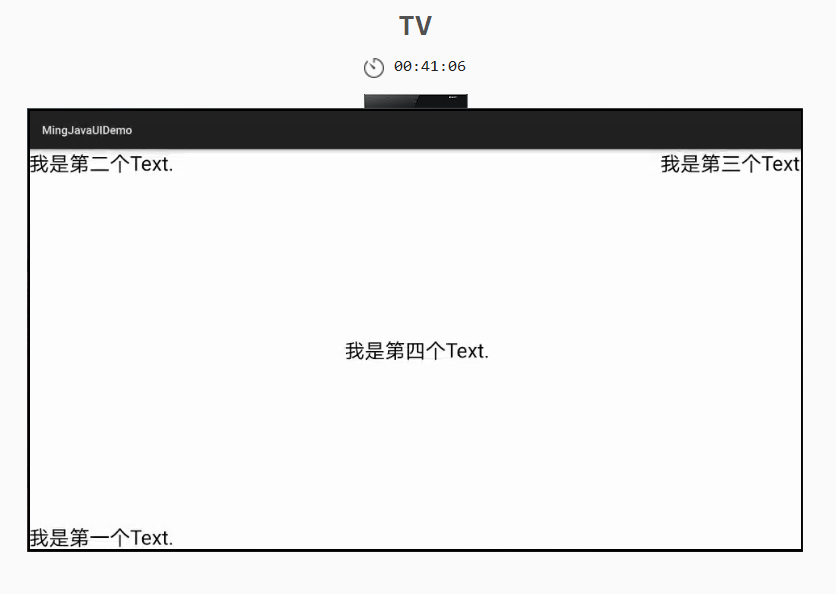 示例
示例
<?xml version="1.0" encoding="utf-8"?>
<DependentLayout
    xmlns:ohos="http://schemas.huawei.com/res/ohos"
    ohos:height="match_parent"
    ohos:width="match_parent">

    <Text
        ohos:id="$+id:text_01"
        ohos:height="70vp"
        ohos:width="match_parent"
        ohos:background_element="#CCCCCC"
        ohos:text="Header"
        ohos:text_alignment="center"
        ohos:text_size="50"
        ohos:align_parent_top="true"
        />
    <Text
        ohos:id="$+id:text_02"
        ohos:height="match_parent"
        ohos:width="100vp"
        ohos:background_element="#5C6E71"
        ohos:text="LEFT"
        ohos:text_alignment="center"
        ohos:text_size="50"
        ohos:align_parent_left="true"
        ohos:below="$id:text_01"
        />
    <Text
        ohos:id="$+id:text_03"
        ohos:height="match_parent"
        ohos:width="100vp"
        ohos:background_element="#5C6E71"
        ohos:text="Right"
        ohos:text_alignment="center"
        ohos:text_size="50"
        ohos:align_parent_right="true"
        ohos:below="$id:text_01"
        />
    <Text
        ohos:id="$+id:text_05"
        ohos:height="match_parent"
        ohos:width="match_parent"
        ohos:background_element="#16CCB7"
        ohos:text_alignment="center"
        ohos:text="Center"
        ohos:text_size="50"
        ohos:right_margin="100vp"
        ohos:below="$id:text_01"
        ohos:right_of="$id:text_02"
        />
    <Text
        ohos:id="$+id:text_04"
        ohos:height="50vp"
        ohos:width="match_parent"
        ohos:background_element="#CCCCCC"
        ohos:text="Footer"
        ohos:text_size="50"
        ohos:align_parent_bottom="true"
        />

</DependentLayout>
复制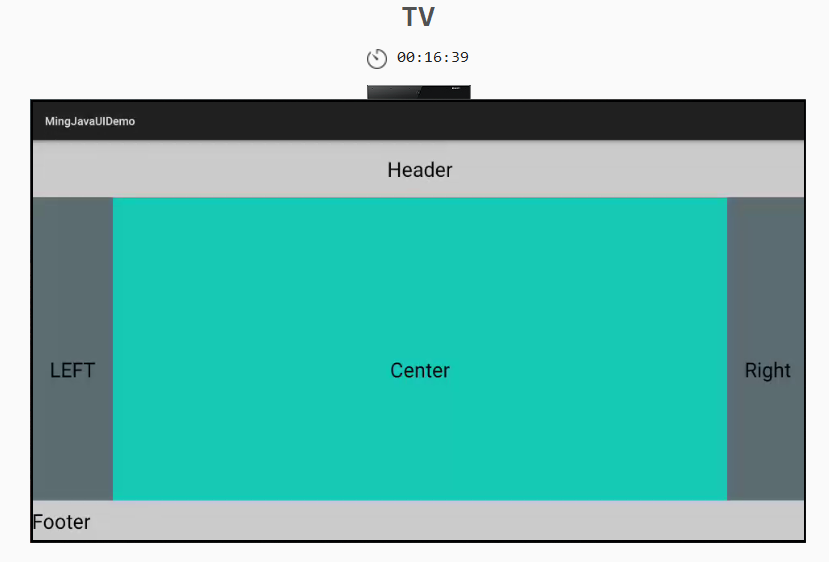
至此,我们已经了解并会使用HarmonyOS Java UI的六大布局,下一节我们将对六大布局进行总结,并将前面没有提到的各类属性做详细的归纳。
©本站发布的所有内容,包括但不限于文字、图片、音频、视频、图表、标志、标识、广告、商标、商号、域名、软件、程序等,除特别标明外,均来源于网络或用户投稿,版权归原作者或原出处所有。我们致力于保护原作者版权,若涉及版权问题,请及时联系我们进行处理。
分类
其它
标签
DirectionalLayout
相关推荐
鸿蒙组件库开发实战:从零打造可复用的UI组件库
 周正
周正 1
1 0
0【划重点】HarmonyOS 应用市场审核 3.5 驳回“十大高频问题”全解析
 鸿蒙小助手 1893 0
在 HarmonyOS 中,如果用户拒绝了应用的某个权限请求,应用中要如何处理?
鸿蒙小助手 7676 0同样使用@State装饰器,有时第三层数据可以更新UI,有时不可以,是什么原因?
鸿蒙小助手 5331 0使用 @Builder数据刷新后UI没有刷新,导致图片错乱怎么解决?
鸿蒙小助手 7381 0 宋你一朵小红花
我还没有写个人简介......
881
帖子
0
提问
1679
粉丝
最新发布
华为鸿蒙 HarmonyOS 6.0.0.108 SP2 Developer 版本新增 9 套桌面图标
2025-10-20 23:17:16 发布注意!华为开启鸿蒙6.0系统推送,稳定性提升
2025-10-14 15:10:36 发布热门推荐