北向应用:自定义dialog布局实践
 Tiechui.Wang 2020-12-08 11:11:00 发布
3623 浏览 19 点赞 17 收藏
研学之自定义dialog布局实践。
显示效果:
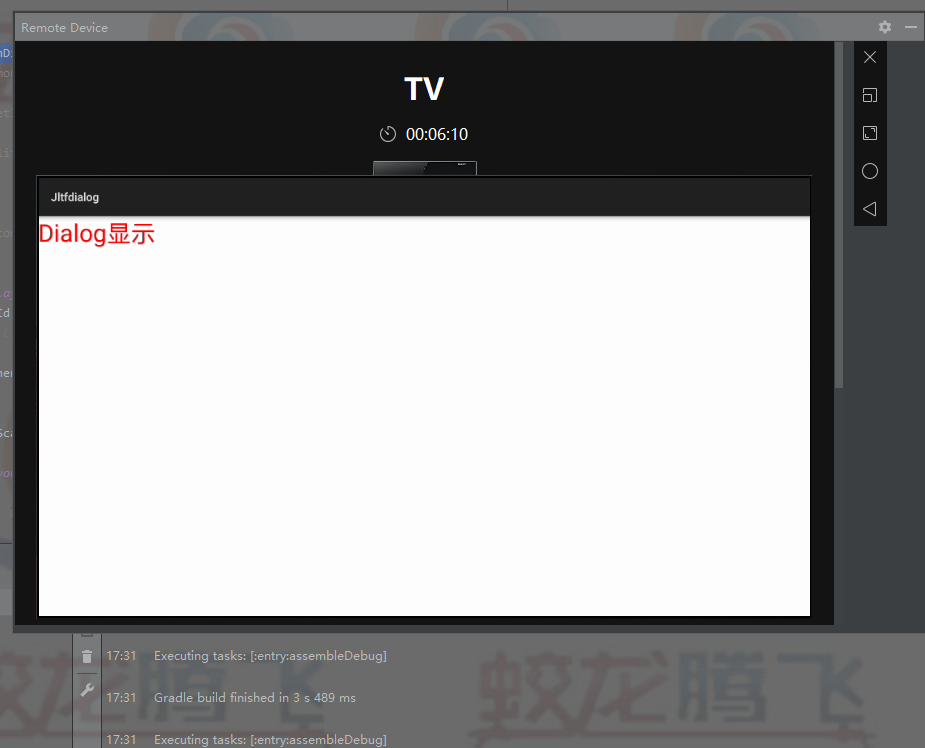
点击图中的文字进行下一步
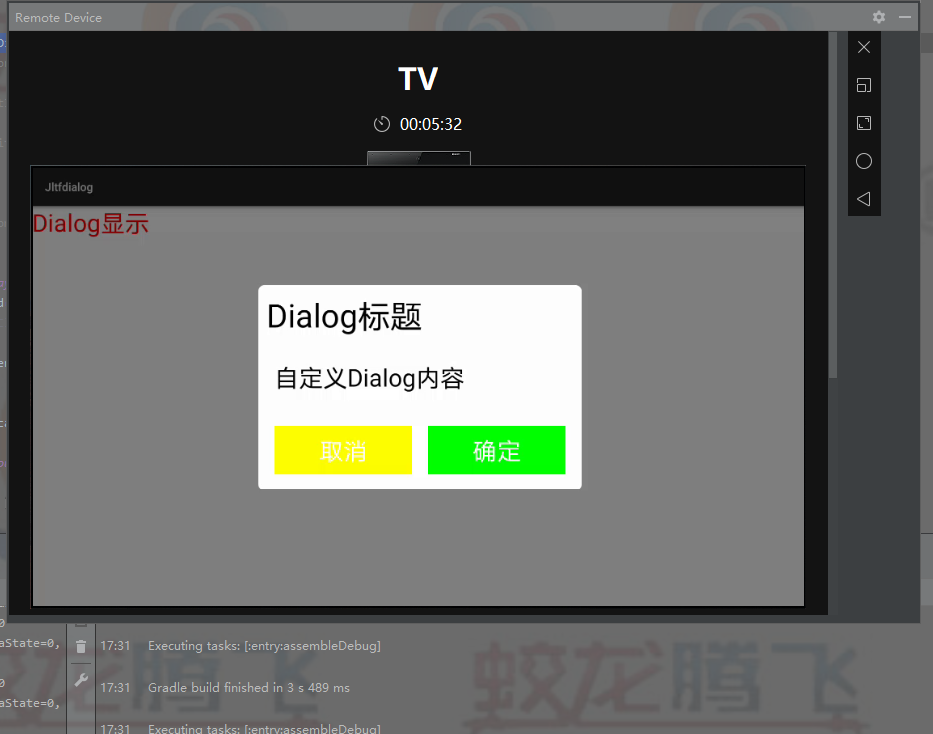
代码的实现:
第一个布局文件
<?xml version="1.0" encoding="utf-8"?>
<DirectionalLayout
    xmlns:ohos="http://schemas.huawei.com/res/ohos"
    ohos:height="match_parent"
    ohos:width="match_parent"
    ohos:orientation="vertical">
    <Button
        ohos:id="$+id:text_01"
        ohos:width="match_content"
        ohos:height="match_content"
        ohos:text_size="30fp"
        ohos:text="Dialog显示"
        ohos:top_margin="0vp"
        ohos:text_color="red"/>
</DirectionalLayout>
第二个布局文件
<?xml version="1.0" encoding="utf-8"?>
<DirectionalLayout
    xmlns:ohos="http://schemas.huawei.com/res/ohos"
    ohos:width="match_parent"
    ohos:height="match_content"
    ohos:padding="10vp"
    ohos:background_element="grey"
    ohos:orientation="vertical">
    <Text
        ohos:width="match_parent"
        ohos:height="match_content"
        ohos:text="Dialog标题"
        ohos:text_color="Black"
        ohos:text_style="bold"
        ohos:text_size="40fp"/>
    <Text
        ohos:width="match_parent"
        ohos:height="match_parent"
        ohos:text="自定义Dialog内容"
        ohos:text_color="Black"
        ohos:text_style="bold"
        ohos:weight="1"
        ohos:text_alignment="vertical_center"
        ohos:top_margin="30vp"
        ohos:bottom_margin="30vp"
        ohos:left_margin="10vp"
        ohos:right_margin="10vp"
        ohos:text_size="30fp"/>

    <DirectionalLayout
        ohos:height="match_content"
        ohos:width="match_parent"
        ohos:orientation="horizontal">
        <Button
            ohos:width="match_parent"
            ohos:text="取消"
            ohos:text_size="30fp"
            ohos:padding="10vp"
            ohos:text_color="White"
            ohos:weight="1"
            ohos:margin="10vp"
            ohos:background_element="yellow"
            ohos:height="match_content"/>
        <Button
            ohos:width="match_parent"
            ohos:text="确定"
            ohos:text_size="30fp"
            ohos:weight="1"
            ohos:padding="10vp"
            ohos:text_color="White"
            ohos:margin="10vp"
            ohos:background_element="green"
            ohos:height="match_content"/>
    </DirectionalLayout>
</DirectionalLayout>
然后进行绑定
package com.example.jltfdialog.slice;
import com.example.jltfdialog.ResourceTable;
import ohos.aafwk.ability.AbilitySlice;
import ohos.aafwk.content.Intent;
import ohos.agp.components.Button;
import ohos.agp.components.Component;
import ohos.agp.components.LayoutScatter;
import ohos.agp.window.dialog.CommonDialog;
public class MainAbilitySlice extends AbilitySlice {
    @Override
    public void onStart(Intent intent) {
        super.onStart(intent);
        CommonDialog commonDialog = new   CommonDialog(this);
       super.setUIContent(ResourceTable.Layout_layout1);
        Button button= (Button) findComponentById(ResourceTable.Id_text_01);
        button.setClickedListener(new Component.ClickedListener() {
            @Override
            public void onClick(Component component) {

                Component component1 =   LayoutScatter.getInstance(getContext())
                        .parse(ResourceTable.Layout_ability_main,   null, true);
                commonDialog.setSize(800, 500);
                commonDialog.setContentCustomComponent(component1);
                commonDialog.show();
            }
        });
    }
    @Override
    public void onActive() {
        super.onActive();
    }
    @Override
    public void onForeground(Intent intent) {
        super.onForeground(intent);
    }
}
©本站发布的所有内容,包括但不限于文字、图片、音频、视频、图表、标志、标识、广告、商标、商号、域名、软件、程序等,除特别标明外,均来源于网络或用户投稿,版权归原作者或原出处所有。我们致力于保护原作者版权,若涉及版权问题,请及时联系我们进行处理。
分类
其它
标签
鸿蒙
相关推荐
【划重点】HarmonyOS 应用市场审核 3.5 驳回“十大高频问题”全解析
 鸿蒙小助手
鸿蒙小助手 1891
1891 0
0在 HarmonyOS 中,如果用户拒绝了应用的某个权限请求,应用中要如何处理?
鸿蒙小助手 7676 0如何在应用内主动刷新卡片?
鸿蒙小助手 6873 0如何判断应用是否处于悬浮窗状态?
鸿蒙小助手 7114 0福田打造全国首个建筑鸿蒙应用标杆 智慧楼宇实现高效低碳运营
 码农小马 7091 0
 Tiechui.Wang
我还没有写个人简介......
1091
帖子
0
提问
893
粉丝
最新发布
华为应用市场增长优化师火热认证中
2025-03-10 10:16:02 发布华为应用市场斩获Pocket Gamer2023年移动游戏奖,全球第三大移动应用生态获行业认可
2024-04-27 11:06:07 发布热门推荐