基于 React Native for HarmonyOS5 的跨平台组件库开发指南
原创
 天树 2025-08-16 20:31:35 发布
4241 浏览 24 点赞 10 收藏
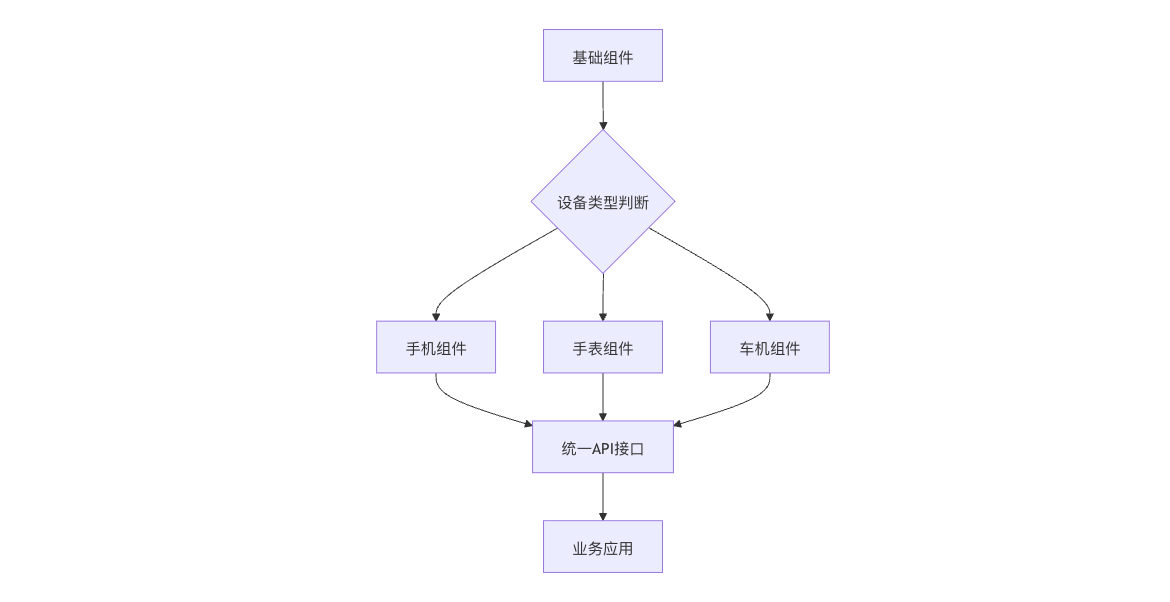
以下为 基于React Native开发HarmonyOS 5跨平台组件库的完整指南,包含核心架构设计、多设备适配方案和可复用的代码实现:
1. 组件库架构设计
2. 开发环境配置
2.1 创建组件库工程
ohos-react-native init HarmonyComponents --template component-library
cd HarmonyComponents
npm install @ohos/harmony-bridge --save2.2 关键依赖配置
// package.json
{
  "peerDependencies": {
    "react": "^18.0.0",
    "react-native": "^0.72.0-harmony"
  },
  "harmony": {
    "componentTypes": ["phone", "watch", "car"],
    "minApiVersion": 5
  }
}3. 基础组件开发
3.1 自适应按钮组件
// HarmonyButton.ets
import { useHarmonyDevice } from '@ohos/harmony-bridge';

export const HarmonyButton = (props: ButtonProps) => {
  const device = useHarmonyDevice();

  // 设备差异化样式
  const styles = {
    phone: {
      padding: 16,
      fontSize: 14
    },
    watch: {
      padding: 8,
      fontSize: 12
    },
    car: {
      padding: 24,
      fontSize: 18
    }
  };

  return (
    <Pressable
      style={[baseStyle, styles[device.type]]}
      onPress={props.onPress}
      harmonyOptions={{
        soundEffect: 'tap',
        hapticFeedback: device.type === 'watch' ? 'light' : 'medium'
      }}
    >
      <Text style={textStyle}>{props.title}</Text>
    </Pressable>
  );
};3.2 分布式列表组件
// DistributedList.ets
import { HarmonyDistributed } from '@ohos/harmony-bridge';

export const DistributedList = ({ data }: ListProps) => {
  const [syncedData, setData] = useState(data);

  useEffect(() => {
    const subscription = HarmonyDistributed.subscribe('list_update', (newData) => {
      setData(newData);
    });

    return () => subscription.unsubscribe();
  }, []);

  const handleItemPress = (item) => {
    // 跨设备同步选中状态
    HarmonyDistributed.publish('item_select', item.id);
  };

  return (
    <FlatList
      data={syncedData}
      renderItem={({ item }) => (
        <ListItem
          item={item}
          onPress={handleItemPress}
        />
      )}
      harmonyProps={{
        scrollSync: true,
        renderThreshold: device.type === 'watch' ? 5 : 10
      }}
    />
  );
};4. HarmonyOS 5专属能力集成
4.1 NPU加速图像组件
// NPUImage.ets
export const NPUImage = ({ uri }: ImageProps) => {
  const [processedUri, setUri] = useState(uri);

  useEffect(() => {
    if (HarmonyDevice.hasNPU()) {
      HarmonyNPU.processImage(uri, {
        operations: ['enhance', 'denoise'],
        onComplete: (result) => setUri(result.url)
      });
    }
  }, [uri]);

  return <Image source={{ uri: processedUri }} />;
};4.2 原子服务卡片组件
// AtomServiceCard.ets
export const ServiceCard = ({ config }: CardProps) => {
  return (
    <View style={styles.card}>
      <HarmonyAtomic.bindService config={config}>
        <CardContent />
        {config.interactive && (
          <Button
            title="立即使用"
            onPress={() => HarmonyAtomic.launch(config.serviceId)}
          />
        )}
      </HarmonyAtomic.bindService>
    </View>
  );
};5. 多设备适配方案
5.1 设备能力检测
// DeviceCapabilities.ts
export const useDeviceCapabilities = () => {
  const [capabilities, setCapabilities] = useState({});

  useEffect(() => {
    HarmonyDevice.getCapabilities().then(caps => {
      setCapabilities({
        hasNPU: caps.npuLevel > 0,
        maxTouchPoints: caps.maxTouchPoints,
        display: {
          dpi: caps.screenDPI,
          shape: caps.screenShape
        }
      });
    });
  }, []);

  return capabilities;
};5.2 响应式布局Hook
// useResponsiveLayout.ts
export const useResponsiveLayout = (breakpoints) => {
  const device = useHarmonyDevice();
  const [layout, setLayout] = useState(null);

  useEffect(() => {
    const updateLayout = () => {
      const { width } = HarmonyDevice.getScreenSize();
      if (width < breakpoints.sm) {
        setLayout('watch');
      } else if (width < breakpoints.md) {
        setLayout('phone');
      } else {
        setLayout('tablet');
      }
    };

    updateLayout();
    HarmonyDevice.on('screen_change', updateLayout);

    return () => HarmonyDevice.off('screen_change', updateLayout);
  }, []);

  return layout;
};6. 性能优化策略
6.1 组件懒加载
// LazyLoader.ets
import { lazy, Suspense } from 'react';

const HeavyComponent = lazy(() =>
  HarmonyModuleLoader.load('ComplexComponent', {
    loadInBackground: true,
    prefetch: true
  })
);

export const LazyLoader = () => (
  <Suspense fallback={<LoadingSpinner />}>
    <HeavyComponent />
  </Suspense>
);6.2 内存管理
// MemoryOptimizedList.ets
export const OptimizedList = ({ data }) => {
  const renderItem = useCallback(({ item }) => (
    <ListItem item={item} />
  ), []);

  return (
    <FlatList
      data={data}
      renderItem={renderItem}
      harmonyProps={{
        recycle: true,
        maxPoolSize: 10,
        itemCacheSize: 5
      }}
    />
  );
};7. 测试与验证
7.1 多设备测试套件
// HarmonyButton.test.ets
describe('HarmonyButton', () => {
  it('在不同设备显示正确尺寸', () => {
    const devices = ['phone', 'watch', 'car'];

    devices.forEach(device => {
      const { getByTestId } = render(
        <HarmonyDeviceMock type={device}>
          <HarmonyButton title="测试" />
        </HarmonyDeviceMock>
      );

      expect(getByTestId('button')).toHaveStyle(
        device === 'watch' ? { padding: 8 } : {}
      );
    });
  });
});7.2 性能基准测试
// PerformanceTest.ets
test('列表滚动帧率应大于50fps', async () => {
  const perfData = await HarmonyProfiler.measureInteraction(
    <DistributedList data={largeData} />,
    {
      interaction: 'scroll',
      duration: 5000
    }
  );

  expect(perfData.avgFPS).toBeGreaterThan(50);
});8. 发布与集成
8.1 构建多目标包
# 构建不同设备类型的包
ohos-react-native build --target phone --output ./dist/phone
ohos-react-native build --target watch --output ./dist/watch8.2 业务应用集成
// 业务应用中使用
import {
  HarmonyButton,
  NPUImage,
  DistributedList
} from '@harmony-components';

const App = () => (
  <View>
    <HarmonyButton title="跨设备操作" />
    <NPUImage uri="image.jpg" />
    <DistributedList data={items} />
  </View>
);9. 最佳实践
- 设备能力分级: const getComponentVariant = () => { if (HarmonyDevice.performanceLevel === 'high') { return EnhancedVersion; } return LiteVersion; }
- 动态主题切换: const ThemedComponent = () => { const theme = useHarmonyTheme(); return <View style={{ background: theme.primaryColor }} />; }
- 跨平台API设计: interface ComponentAPI { // 通用属性 size: 'small' | 'medium' | 'large'; // HarmonyOS专属 harmony?: { npuAccelerated?: boolean; distributedOptions?: DistributedProps; }; }
通过本方案可开发出:
- 一次编码,多设备运行的组件
- 自动适配 不同硬件能力
- 极致性能 的跨平台解决方案
- 完整覆盖 HarmonyOS 5特性
©本站发布的所有内容,包括但不限于文字、图片、音频、视频、图表、标志、标识、广告、商标、商号、域名、软件、程序等,除特别标明外,均来源于网络或用户投稿,版权归原作者或原出处所有。我们致力于保护原作者版权,若涉及版权问题,请及时联系我们进行处理。
分类
HarmonyOS
相关推荐
【我的首款鸿蒙上架应用】用鸿蒙,把旅行账单变成“电子手帐”
 鸿蒙小助手
鸿蒙小助手 7468
7468 0
0华为鸿蒙智家推出首款搭载旗舰手机级芯片的家庭主机
 云端物理学家 3312 0
鸿蒙直播全链路开发实践:打造丝滑稳定的直播体验
鸿蒙小助手 6367 0资本、开发者入局指南:鸿蒙生态的“高潜力赛道”找到了!
数字游民 3227 0鸿蒙平板适配完全指南:从手机到平板的完美迁移
周正 4974 0 天树
9研发与教学经验, 黑马程序员高级讲师, 华为开发者学堂讲师 曾任某上市基金公司前端组长 拥有华为鸿蒙高级开发认证和中职教师资格双证书 精通ArkTS、ArkUI、Vue、小程序、Uniapp等技术 不但授课清晰, 而且指导超过千余名学生成功就业, 具有丰富的IT行业经验
47
帖子
0
提问
756
粉丝
最新发布
HarmonyOS组件/模版集成创新活动-HarmonyOS集成秒验一键登录实践指南
2025-11-24 13:35:10 发布空间计算图表:ECharts 3D可视化在HarmonyOS 5 AR眼镜中的交互实践
2025-11-22 20:39:49 发布热门推荐