 宋你一朵小红花 2021-06-23 10:00:00 发布
卡片名称: JLTFCardTemplateImage;卡片语言: JAVA;体验模板: 工具:deveco studio。
一、效果与说明如下
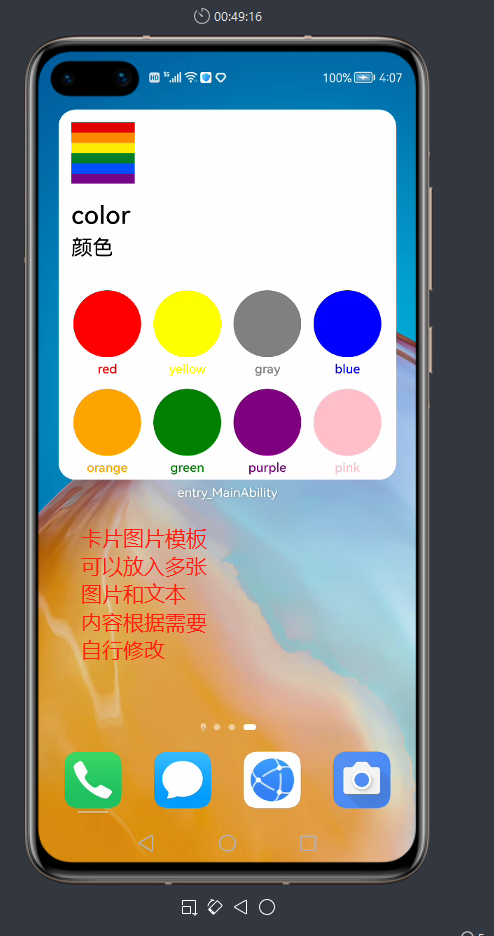
二、具体开发体验过程
第一步
新建一个java的应用项目(不必选择show in service center)
然后构建完成项目后在src下new->service widget
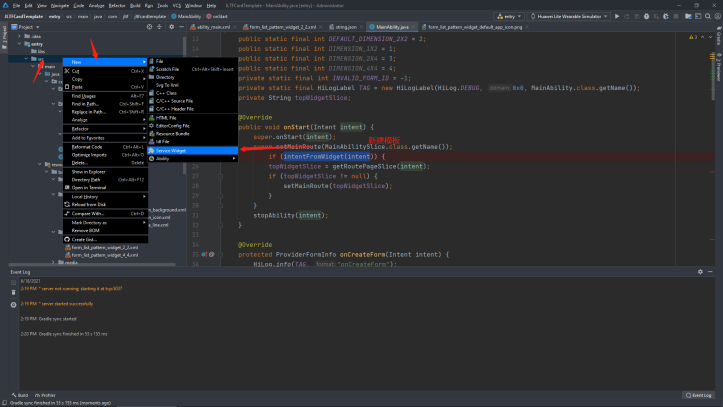
选择basic下的gird pattern模板
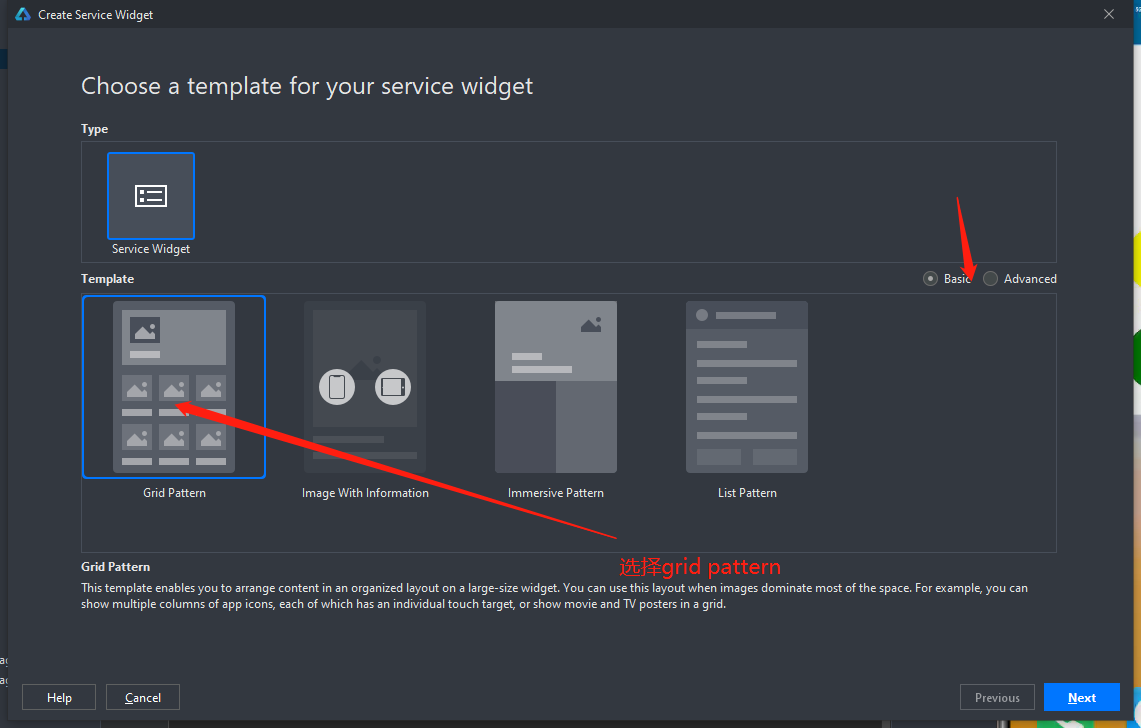
然后next配置你的卡片名和类型和尺寸
登录你的账号然后启动模拟器
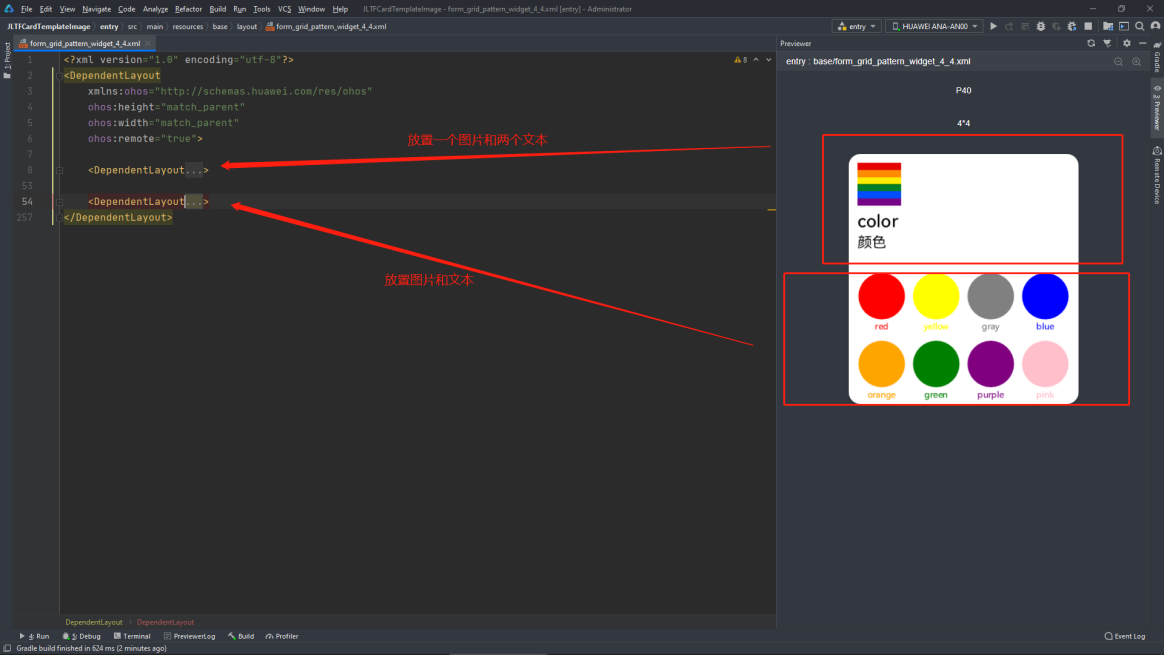
即可实现效果Xml (4*4)
三、部分核心代码
<?xml version="1.0" encoding="utf-8"?>
<DependentLayout
xmlns:ohos="http://schemas.huawei.com/res/ohos"
ohos:height="match_parent"
ohos:width="match_parent"
ohos:remote="true">
<DependentLayout
ohos:height="match_parent"
ohos:width="match_parent"
ohos:align_parent_bottom="true"
ohos:bottom_margin="198vp"
ohos:background_element="#ffffff">
<Image
ohos:id="$+id:image"
ohos:height="60vp"
ohos:width="60vp"
ohos:image_src="$media:color"
ohos:scale_mode="zoom_start"
ohos:start_margin="12vp"
ohos:top_margin="12vp"/>
<DirectionalLayout
ohos:height="match_content"
ohos:width="match_parent"
ohos:align_parent_bottom="true"
ohos:bottom_margin="12vp"
ohos:end_margin="12vp"
ohos:orientation="vertical"
ohos:start_margin="12vp">
<Text
ohos:height="match_content"
ohos:width="match_parent"
ohos:text="$string:widget_title"
ohos:text_color="#000000"
ohos:text_size="24fp"
ohos:text_weight="500"
ohos:truncation_mode="ellipsis_at_end"/>
<Text
ohos:height="match_content"
ohos:width="match_parent"
ohos:text="$string:widget_introduction"
ohos:text_color="#000000"
ohos:text_size="20fp"
ohos:text_weight="400"
ohos:top_margin="2vp"
ohos:truncation_mode="ellipsis_at_end"/>
</DirectionalLayout>
</DependentLayout>
<DependentLayout
ohos:height="198vp"
ohos:width="match_parent"
ohos:align_parent_bottom="true"
ohos:background_element="#FFFFFFFF">
<DirectionalLayout
ohos:height="match_content"
ohos:width="match_parent"
ohos:center_in_parent="true"
ohos:end_margin="8vp"
ohos:orientation="horizontal"
ohos:start_margin="8vp">
<DirectionalLayout
ohos:height="match_parent"
ohos:width="match_parent"
ohos:orientation="vertical"
ohos:weight="1">
<Image
ohos:height="64vp"
ohos:width="64vp"
ohos:background_element="$graphic:red"
ohos:layout_alignment="horizontal_center"
ohos:scale_mode="zoom_center"
ohos:top_margin="12vp"/>
<Text
ohos:height="match_content"
ohos:width="64vp"
ohos:layout_alignment="horizontal_center"
ohos:text="red"
ohos:text_alignment="horizontal_center"
ohos:text_color="#FF0000"
ohos:text_size="12fp"
ohos:text_weight="500"
ohos:top_margin="2vp"
ohos:truncation_mode="ellipsis_at_end"/>
<Image
ohos:height="64vp"
ohos:width="64vp"
ohos:background_element="$graphic:orange"
ohos:layout_alignment="horizontal_center"
ohos:scale_mode="zoom_center"
ohos:top_margin="12vp"/>
<Text
ohos:height="match_content"
ohos:width="64vp"
ohos:layout_alignment="horizontal_center"
ohos:text="orange"
ohos:text_alignment="horizontal_center"
ohos:text_color="#FFA500"
ohos:text_size="12fp"
ohos:text_weight="500"
ohos:top_margin="2vp"
ohos:truncation_mode="ellipsis_at_end"/>
</DirectionalLayout>
</DirectionalLayout>
</DependentLayout>
</DependentLayout>
完整代码地址:
https://gitee.com/jltfcloudcn/jump_to/tree/master/%E5%8D%A1%E7%89%87%E8%89%B2%E5%BD%A9
相关推荐
 鸿蒙小助手
鸿蒙小助手 1893
1893 0 鸿蒙小助手 7847 0 鸿蒙小助手 7676 0 鸿蒙小助手 9099 0 鸿蒙小助手 8018 0
 宋你一朵小红花
我还没有写个人简介......
帖子
提问
粉丝
华为鸿蒙 HarmonyOS 6.0.0.108 SP2 Developer 版本新增 9 套桌面图标
2025-10-20 23:17:16 发布注意!华为开启鸿蒙6.0系统推送,稳定性提升
2025-10-14 15:10:36 发布