 Tiechui.Wang 2021-03-01 10:00:00 发布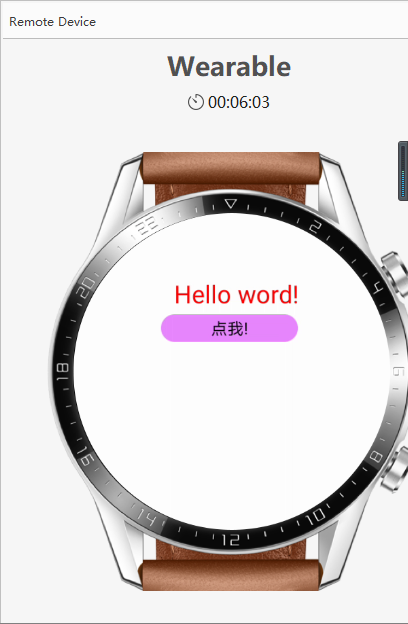

MainAbility.java
package com.example.abilityui;
import com.example.abilityui.slice.MainAbilitySlice;
import ohos.aafwk.ability.Ability;
import ohos.aafwk.content.Intent;
import ohos.agp.colors.RgbColor;
import ohos.agp.components.*;
import ohos.agp.components.element.ShapeElement;
import ohos.agp.utils.Color;
import ohos.agp.utils.TextAlignment;
public class MainAbility extends Ability {
@Override
public void onStart(Intent intent) {
super.onStart(intent);
initUIbyXML();//这里结合了xml和java xml进行界面布局 java进行逻辑编写
// initUIbyJava();//这里调用的是java封装好的布局
}
private void initUIbyXML(){
setUIContent(ResourceTable.Layout_Ability_ui);
Text text = (Text)findComponentById(ResourceTable.Id_test_text);
Button button = (Button) findComponentById(ResourceTable.Id_test_button);
ShapeElement element = new ShapeElement();
element.setCornerRadius(30);
element.setRgbColor(new RgbColor(43,156,15));
//给按钮设置监听器
button.setClickedListener(new Component.ClickedListener() {
//定义一个成员变量
private int a =0;
@Override
public void onClick(Component component) {
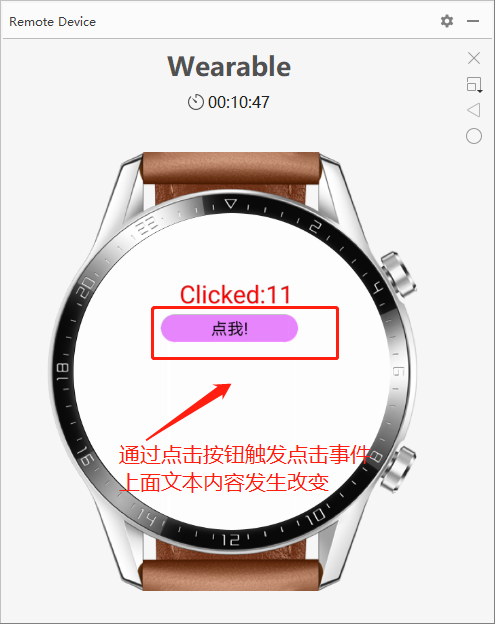
//每当按钮被点击了 a++
a++;
//改变文本框上面的内容
text.setText("Clicked:"+a);
}
});
}
private void initUIbyJava(){
//定义一个容器对象,使用绝对定位来管理组件容器
ComponentContainer container = new PositionLayout(this);
//设置容器宽高,宽高和设备屏幕一样宽,一样高
container.setWidth(ComponentContainer.LayoutConfig.MATCH_PARENT);
container.setHeight(ComponentContainer.LayoutConfig.MATCH_PARENT);
//创建一个文本框对象
Text text = new Text(this);
//显示文本框要展示的内容和信息
text.setText("Hello word!");
//设置位置和大小
text.setTop(100);//y
text.setLeft(140);//x
text.setWidth(200);//w
text.setHeight(40);//h
text.setTextColor(Color.RED);//设置颜色
text.setTextSize(36);//字体大小
text.setTextAlignment(TextAlignment.CENTER);//设置文本对齐方式
//使用ShapeElement设置按钮的外观
ShapeElement element = new ShapeElement();
//这里设置颜色为绿色
element.setRgbColor(new RgbColor(231,135,255));
element.setCornerRadius(30);
//创建一个按钮
Button button = new Button(this);
//设置按钮的位置
button.setText("点我!");
button.setTop(150);
button.setLeft(130);
button.setWidth(200);
button.setHeight(40);
//调用上面设置的颜色
button.setBackground(element);
//给按钮设置监听器
button.setClickedListener(new Component.ClickedListener() {
//定义一个成员变量
private int a =0;
@Override
public void onClick(Component component) {
//每当按钮被点击了 a++
a++;
//改变文本框上面的内容
text.setText("Clicked:"+a);
}
});
//将文本对象放到容器中去
container.addComponent(text);
container.addComponent(button);
//当前的容器委托来管理组件
setUIContent(container);
}
}
Ability_ui.xml
<?xml version="1.0" encoding="utf-8"?>
<DirectionalLayout
xmlns:ohos="http://schemas.huawei.com/res/ohos"
ohos:height="match_parent"
ohos:width="match_parent"
ohos:orientation="vertical">
<Component ohos:width="match_parent"
ohos:height="70"/>
<Text ohos:id="$+id:test_text"
ohos:text="Hello world!"
ohos:width="match_content"
ohos:height="match_content"
ohos:layout_alignment="center"
ohos:top_margin="30"
ohos:text_size="40"/>
<Button ohos:id="$+id:test_button"
ohos:text="点我!"
ohos:width="200"
ohos:height="50"
ohos:layout_alignment="center"
ohos:top_margin="30"
ohos:background_element="#FF00FF00"
ohos:text_size="30"/>
</DirectionalLayout>
相关推荐
 周正
周正 75
75 0 周正 199 0 周正 43 0 周正 97 0 周正 63 0
 Tiechui.Wang
我还没有写个人简介......
帖子
提问
粉丝
华为应用市场增长优化师火热认证中
2025-03-10 10:16:02 发布华为应用市场斩获Pocket Gamer2023年移动游戏奖,全球第三大移动应用生态获行业认可
2024-04-27 11:06:07 发布