鸿蒙的远程交互组件应用及微信小程序的远程交互组件应用
 Tiechui.Wang 2021-01-20 12:00:00 发布
3074 浏览 29 点赞 19 收藏
注:鸿蒙的远程交互组件应用相对复杂 ,访问网络时,首先要配置网络权限,华为官方文档有问题,在此引用我老师配置的模板,见附件
过程:1.导入鸿蒙的网络请求模块fetch
2.发起对服务器的请求(在这过程中需要用JSON.parse将括号中的数据转换成json数据格式,具体见代码中标注)
js业务逻辑层
    //导入鸿蒙的网络请求模块fetch
import fetch from '@system.fetch';
export default {
    data: {
        title: 'World',
        currentTime:'',
        temperature1:'',
        text:'',

    },
        onInit() {
            //发起对心知天气服务器的请求
          fetch.fetch({
              url:'https://api.seniverse.com/v3/weather/now.json?key=S0YbU_VLcvXz-4LZx&location=成都&language=zh-Hans&unit=c',
              responseType:'json',
              success:(resp)=>{
                  //JSON.parse(字符串)转换成json数据格式
                  let weatherInfo=JSON.parse(resp.data);
                  this.currentTime=weatherInfo.results[0].last_update;
                  this.text=weatherInfo.results[0].now.text;
                  this.temperature1=weatherInfo.results[0].now.temperature;
              }
          });
        }
}
渲染层
<div class="container">
    <text class="time">
       {{currentTime}}{{temperature1}}
    </text>
    <text class="time">
      {{temperature1}}
    </text>
    <text class="time">
        {{text}}
    </text>
</div>
css样式属性设置
.container {
    display: flex;
    justify-content: center;
    align-items: center;
    left: 0px;
    top: 0px;
    width: 454px;
    height: 454px;
}
.time {
    font-size: 50px;
    text-align: center;
    width: 200px;
    height: 1200px;
}
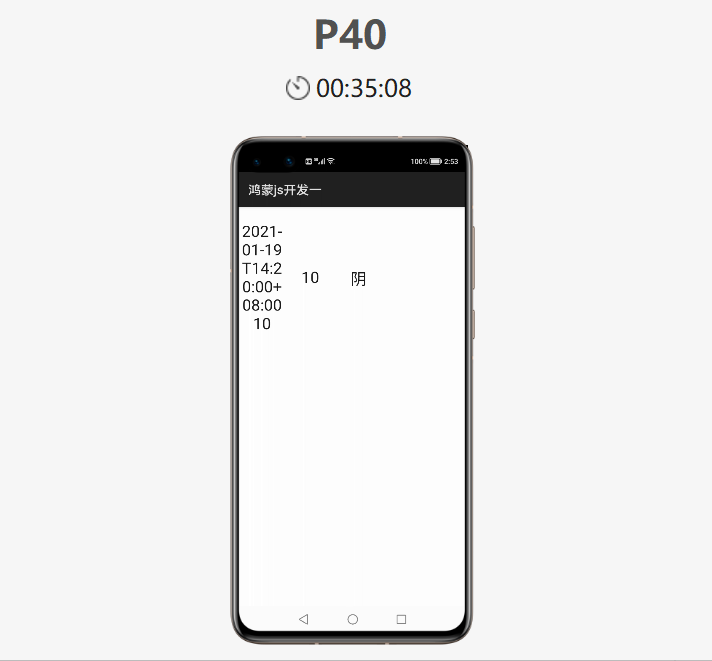
最终效果呈现:
微信小程序的远程交互应用:
js业务逻辑层
// pages/images/weather/weather.js
Page({

  /**
   * 页面的初始数据
   */
  data: {
    weatherInfo:{},
    nextweatherInfo:{}

  },

  /**
   * 生命周期函数--监听页面加载
   */
  onLoad: function (options) {
    //微信小程序请求天气
     wx.request({
       url: 'https://api.seniverse.com/v3/weather/now.json?key=S0YbU_VLcvXz-4LZx&location=成都&language=zh-Hans&unit=c',
       success:(resp)=>{
            let info=resp.data;
            console.log(info);
            this.setData({weatherInfo:info})
       }
     })
     //微信小程序请求生活指数
     wx.request({
       url: 'https://api.seniverse.com/v3/life/suggestion.json?key=S0YbU_VLcvXz-4LZx&location=成都&language=zh-Hans',
       success:(resp )=>{
         let live=resp.data
           console.log(live)
       }

     })
     //微信请求未来三天气预报
     wx.request({
       url: 'https://api.seniverse.com/v3/weather/daily.json?key=S0YbU_VLcvXz-4LZx&location=成都&language=zh-Hans&unit=c&start=-1&days=5',
       success:(resp)=>{
         let time=resp.data;
         console.log(time)
         this.setData({nextweatherInfo:time.results[0].daily})

       }
     })

  },

  /**
   * 生命周期函数--监听页面初次渲染完成
   */
  onReady: function () {

  },

  /**
   * 生命周期函数--监听页面显示
   */
  onShow: function () {

  },

  /**
   * 生命周期函数--监听页面隐藏
   */
  onHide: function () {

  },

  /**
   * 生命周期函数--监听页面卸载
   */
  onUnload: function () {

  },

  /**
   * 页面相关事件处理函数--监听用户下拉动作
   */
  onPullDownRefresh: function () {

  },

  /**
   * 页面上拉触底事件的处理函数
   */
  onReachBottom: function () {

  },

  /**
   * 用户点击右上角分享
   */
  onShareAppMessage: function () {

  }
})
渲染层
<!--pages/images/weather/weather.wxml-->
<text>{{weatherInfo.results[0].last_update}}{{weatherInfo.results[0].location.name}}{{weatherInfo.results[0].now.text}}{{weatherInfo.results[0].now.temperature}}</text>
<view class="margin"></view>
<view class="top">
  <block wx:for="{{nextweatherInfo}}">
    <view class="three">
      <view>
         <text class="txt1">{{item.date}}</text>
      </view>
      <view>
        <text class="txt1">{{item.text_day}}</text>
      </view>
      <view >
        <text class="txt1">{{item.wind_direction}}</text>
      </view>

    </view>
  </block>
</view>
wxss样式属性设置
/* pages/images/weather/weather.wxss */
.margin{
  width: 100%;
  height: 30px;
  background-color: rgb(56, 168, 202);
}
.top{
  width: 100%;
  height: 50vh;
  display: flex;
  flex-direction: row;
  justify-content: center;
  margin: 5px;
}
.three{
  width: 27%;
  height: 50%;
  border: 1px solid blue;
  margin: 5px;

}
.txt1{
  font-weight: bold;
  font: size 15px;

}
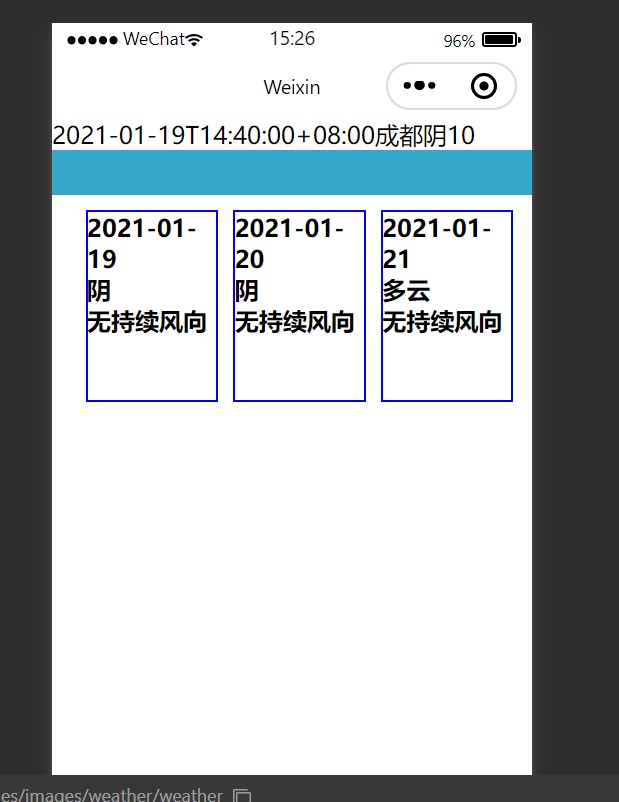
最终效果呈现:
©本站发布的所有内容,包括但不限于文字、图片、音频、视频、图表、标志、标识、广告、商标、商号、域名、软件、程序等,除特别标明外,均来源于网络或用户投稿,版权归原作者或原出处所有。我们致力于保护原作者版权,若涉及版权问题,请及时联系我们进行处理。
分类
其它
标签
鸿蒙
相关推荐
鸿蒙智行春节前推送63项新功能
 听风写代码
听风写代码 160
160 0
0
鸿蒙6来了!浏览手机再也不怕被窥屏了
小码农也有梦 124 0从“手找界面”到“界面找手”,鸿蒙6智感握姿引领交互革新
程序猿老赵 0 0华为:2025年销售收入超过8800亿元人民币,鸿蒙终端设备数突破4000万!
一杯咖啡两千行 250 0 Tiechui.Wang
我还没有写个人简介......
1091
帖子
0
提问
893
粉丝
最新发布
华为应用市场增长优化师火热认证中
2025-03-10 10:16:02 发布华为应用市场斩获Pocket Gamer2023年移动游戏奖,全球第三大移动应用生态获行业认可
2024-04-27 11:06:07 发布热门推荐