鸿蒙的js开发部模式12:鸿蒙的启动动画页的js构建与实践
 宋你一朵小红花 2021-02-05 10:00:00 发布
3962 浏览 26 点赞 12 收藏
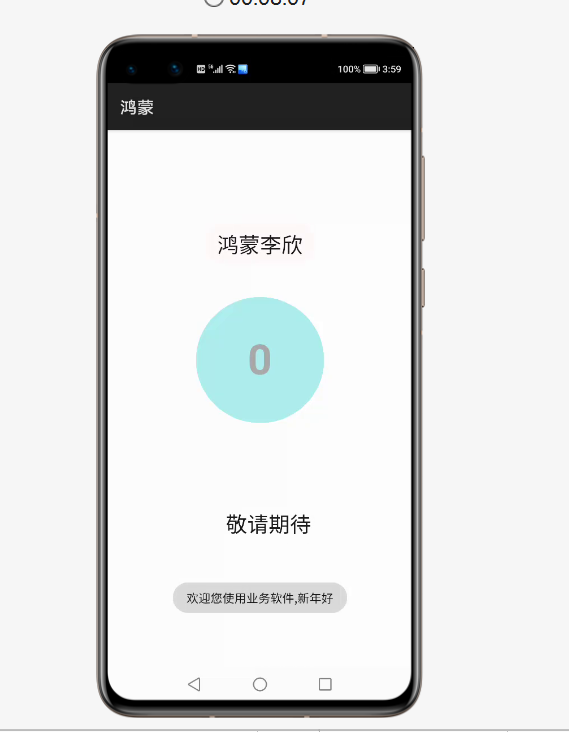
1.app启动动画页的构建效果
中间使用了js的定时函数,上下使用了js控制animation的动画规则,大家可以在此基础上做到更好的效果。

2.js的业务逻辑
import router from '@system.router';
import prompt from '@system.prompt';
export default {
    data: {
        title: 'World',
        startnum:10,
        an1:"",
        an2:""
    },
    onInit(){
        let  that  =this;
        //每隔1秒,startnum值减去1
        //到0的时候,定时函数(定时任务)结束,跳转页面
        //setInterval是定时函数,反复执行
        //表示反复执行的函数的逻辑,每隔多长时间 单位毫秒
       let  an1=setInterval(function(){
            that.startnum--;
            if(that.startnum==0)
            {
                //定时函数清除
                clearInterval(an1);

                prompt.showToast({
                    message:"欢迎您使用业务软件,新年好"

                });

                //setTimeout只执行一次
                setTimeout(function(){
                    //跳转页面
                    router.push({
                        uri:"pages/listgridmore/listgridmore"

                    });
                },2000);

            }
        },1000);

    },
    onShow(){

        this.loadan1();
        this.loadan2();


    },
    loadan1()
    {
        //动画选项
        let  options={
            duration:8000,
            easing:"linear",
            delay:500,
            fill:"forwards",
            iterations:1
        };

        //动画规则
        let  keyframes=[
            {transform:{translate:'480px -100px'},opacity:0.1},
            {transform:{translate:'480px 220px'},opacity:1.0}
        ];

        //作用于那个标记
        this.an1=this.$element("leftdiv").animate(keyframes,options);
        // 动画要去播放
        this.an1.play();


    },
    loadan2()
    {
        //动画选项
        let  options={
            duration:8000,
            easing:"linear",
            delay:500,
            fill:"forwards",
            iterations:1
        };

        //动画规则
        let  keyframes=[
            {transform:{translate:'0px 0px'},opacity:0.1},
            {transform:{translate:'0px -300px'},opacity:1.0}
        ];

        //作用于那个标记
        this.an2=this.$element("rightdiv").animate(keyframes,options);
        // 动画要去播放
        this.an2.play();
    }

}
3.页面标记构建
<div class="container">
   <div  class="topview">
       <div  id="leftdiv" class="leftview">
           <text  class="tv2">鸿蒙李欣</text>
       </div>
   </div>
    <div  class="contentview">
         <div  class="oneview">
            <text  class="tv1">{{startnum}}</text>
         </div>
    </div>

    <div  class="bottomview">
        <div  id="rightdiv" class="rightview">
            <text  class="tv2">敬请期待</text>
        </div>
    </div>
</div>
4.样式构建
.container {
    display: flex;
    flex-direction: column;
    width: 100%;
    height: 1500px;
}
.topview{
    width: 100%;
    height: 20%;
    /**background-color: paleturquoise;**/
}
.contentview{
    width: 100%;
    height: 33%;
   /** background-color: cornflowerblue;**/
    display: flex;
    justify-content: center;
    align-items: center;
}
.bottomview{
    width: 100%;
    height: 46%;
   /** background-color: peru;**/
}
.oneview{
    width: 300px;
    height: 300px;
    border-radius: 150px;
    background-color: paleturquoise;
    display: flex;
    justify-content: center;
    align-items: center;
}
.tv1{
    font-size: 100px;
    font-weight: bold;
    font-family: sans-serif;
    color: darkgray;
}
.leftview{
    position: absolute;
    left: -250px;
    top:0px;
    width: 260px;
    height: 100px;
    background-color: snow;
    display: flex;
    justify-content: center;
    align-items: center;
    border-radius: 50px;
}
.tv2{
    font-size: 50px;
}
.rightview{
    position: absolute;
    left: 250px;
    bottom: 200px;
    width: 260px;
    height: 100px;
    display: flex;
    justify-content: center;
    align-items: center;
    border-radius: 50px;
   /** background-color: cornflowerblue;**/
}
5.最后完成页面跳转
©本站发布的所有内容,包括但不限于文字、图片、音频、视频、图表、标志、标识、广告、商标、商号、域名、软件、程序等,除特别标明外,均来源于网络或用户投稿,版权归原作者或原出处所有。我们致力于保护原作者版权,若涉及版权问题,请及时联系我们进行处理。
分类
其它
标签
鸿蒙的js开发
相关推荐
鸿蒙智行三登春晚,中国豪华车迎来“报幕时刻”
漾漾 573
573 0
0不是鸿蒙6,而是预装EMUI15,华为Mate 80 Pro海外版推出
sgdo:gogo 840 0昆仑玻璃+鸿蒙系统,华为性价比稳的不像话
可达鸭呀 1174 0华为推出云码道:打造自主可控AI编程 支持GLM、DS及鸿蒙专属模型
飞飞碟 917 0自定义Agent与多模型对接:AI辅助鸿蒙应用开发实践
 鸿蒙小助手 867 0
 宋你一朵小红花
我还没有写个人简介......
881
帖子
0
提问
1679
粉丝
最新发布
华为鸿蒙 HarmonyOS 6.0.0.108 SP2 Developer 版本新增 9 套桌面图标
2025-10-20 23:17:16 发布注意!华为开启鸿蒙6.0系统推送,稳定性提升
2025-10-14 15:10:36 发布热门推荐