TextField换行实现以及按回车键换行实现
 Tiechui.Wang 2021-03-26 11:48:00 发布
3772 浏览 14 点赞 20 收藏
今天又有坛友问到TextField换行怎么实现,我来分享一下实现代码吧,首先看布局页面,代码如下
<?xml version="1.0" encoding="utf-8"?>
<DependentLayout
    xmlns:ohos="http://schemas.huawei.com/res/ohos"
    ohos:height="match_parent"
    ohos:width="match_parent"
    ohos:orientation="vertical">

    <TextField
        ohos:id="$+id:txtNumber"
        ohos:height="300vp"
        ohos:width="500vp"
        ohos:background_element="#AFEEEE"
        ohos:align_parent_top="true"
        ohos:text_size="20vp"
        ohos:bubble_height="0"
        ohos:right_margin="20vp"></TextField>
    <Button
        ohos:id="$+id:btnNewLine"
        ohos:height="match_content"
        ohos:width="match_content"
        ohos:background_element="#FFE4B5"
        ohos:text_size="50vp"
        ohos:text="换行"
        ohos:right_of="$id:txtNumber"
        ohos:bottom_margin="30vp"/>
    <Button
        ohos:id="$+id:btnGetText"
        ohos:height="match_content"
        ohos:width="match_content"
        ohos:background_element="#FFE4B5"
        ohos:text_size="50vp"
        ohos:text="获取文本"
        ohos:right_of="$id:txtNumber"
        ohos:below="$id:btnNewLine"/>
</DependentLayout>
然后我们看一下布局页面运行效果如下图
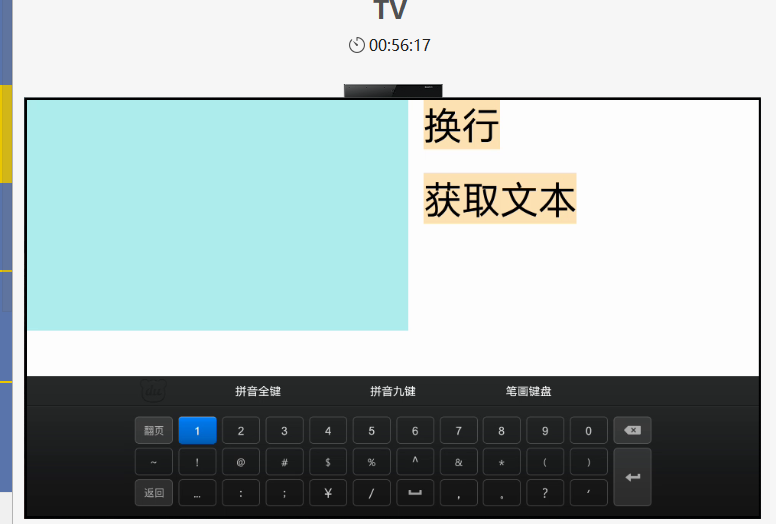
这个布局页面使用相对布局,布局很简单就是一个TextField和两个按钮,因为会涉及到换行所以我将TextField的高度和宽度设置的很大,特别是高度,这样方便查看效果。这里注意一下每次光标落下去会悬浮自带的圆圈光标,可以通过设置bubble_height为0,不然显示着有点不爽。
然后我们看一下Java实现代码,如下
package com.example.tvtest.slice;

import com.example.tvtest.ResourceTable;
import ohos.aafwk.ability.AbilitySlice;
import ohos.aafwk.content.Intent;
import ohos.agp.components.Button;
import ohos.agp.components.Component;
import ohos.agp.components.InputAttribute;
import ohos.agp.components.TextField;
import ohos.hiviewdfx.HiLog;
import ohos.hiviewdfx.HiLogLabel;
import ohos.multimodalinput.event.KeyEvent;

public class TextFieldTestSlice extends AbilitySlice {
    static final HiLogLabel label=new HiLogLabel(HiLog.LOG_APP,0x0001,"回车换行测试");
    @Override
    public void onStart(Intent intent) {
        super.onStart(intent);
        super.setUIContent(ResourceTable.Layout_ability_text_field_test);
        HiLog.info(label,"程序启动了");
        TextField txtNumber = (TextField) findComponentById(ResourceTable.Id_txtNumber);

        txtNumber.setKeyEventListener((c,k)->{
            HiLog.info(label,"按键事件触发");
            if(c.hasFocus())
            {
                //如果不增加该判断则会触发两次
                if(k.isKeyDown()){
                    HiLog.info(label,"回车键按下");
                    if(k.getKeyCode()==k.KEY_ENTER)
                    {
                        String val=txtNumber.getText();
                        txtNumber.setText(val+"\n"+"888");
                        HiLog.info(label,"按了回车键");
                    }
                }
            }
            return false;
        });
        Button btnGetText=(Button)findComponentById(ResourceTable.Id_btnGetText);
        btnGetText.setClickedListener(c->{
            HiLog.info(label,"获取文本点击");
            HiLog.info(label,"文本内容"+txtNumber.getText());
        });
        Button btnNewLine=(Button)findComponentById(ResourceTable.Id_btnNewLine);
        btnNewLine.setClickedListener(c->{
            //代码触发换行
            txtNumber.setText(txtNumber.getText()+"\n"+"123456");
        });
    }

    @Override
    public void onActive() {
        super.onActive();
    }

    @Override
    public void onForeground(Intent intent) {
        super.onForeground(intent);
    }
}
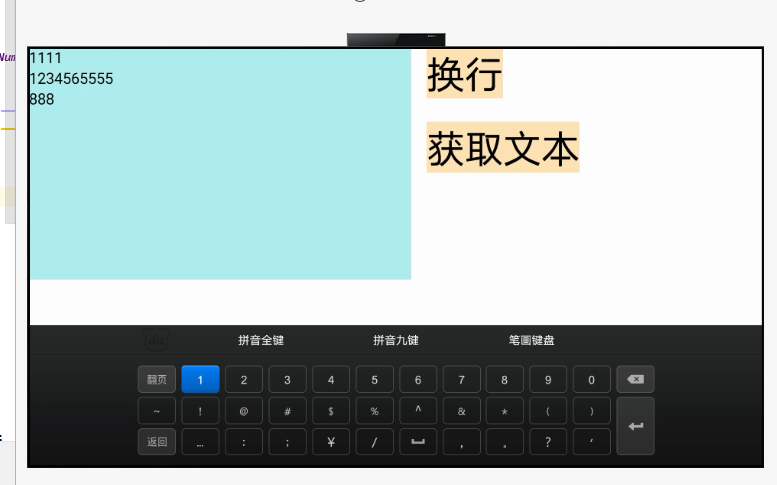
这里要注意一下一定要使用KeyEvent.isKeyDown,不然会触发两次!!! 换行符号就是\n
下面看一下运行效果,如下图
©本站发布的所有内容,包括但不限于文字、图片、音频、视频、图表、标志、标识、广告、商标、商号、域名、软件、程序等,除特别标明外,均来源于网络或用户投稿,版权归原作者或原出处所有。我们致力于保护原作者版权,若涉及版权问题,请及时联系我们进行处理。
分类
其它
标签
鸿蒙
相关推荐
鸿蒙NFC开发实战:从读卡器模式到卡模拟的完整实现
 周正
周正 95
95 0
0怎么实现一个图片一直循环上下匀速移动的动画效果?
 鸿蒙小助手 7847 0
如何实现选择多张图片上传?
鸿蒙小助手 3136 0半模态高度能否自适应,怎么实现?
鸿蒙小助手 7343 0Swiper组件如何实现中间高两边低的效果,前后两个组件的高度如何设置呢?
鸿蒙小助手 8037 0 Tiechui.Wang
我还没有写个人简介......
1091
帖子
0
提问
893
粉丝
最新发布
华为应用市场增长优化师火热认证中
2025-03-10 10:16:02 发布华为应用市场斩获Pocket Gamer2023年移动游戏奖,全球第三大移动应用生态获行业认可
2024-04-27 11:06:07 发布热门推荐