 宋你一朵小红花 2021-06-17 10:11:07 发布
时钟FA卡片开发 样例
介绍
服务卡片是FA的一种主要信息呈现形式,开发者可以在卡片中展示用户最关心的FA数据,并可以通过点击卡片内容直接打开FA。例如,天气类FA,可以在服务卡片中展示当前的基本天气信息,点击卡片启动天气FA,展示详细的天气数据。
同时,服务卡片支持不同的规格尺寸,开发者可以根据展示的不同内容和布局效果,选用不同的卡片尺寸,支持的尺寸包括:1x2、2x2、2x4 和 4x4。
知识点:
1.对象关系型数据库的使用,如何查询、创建卡片、删除卡片
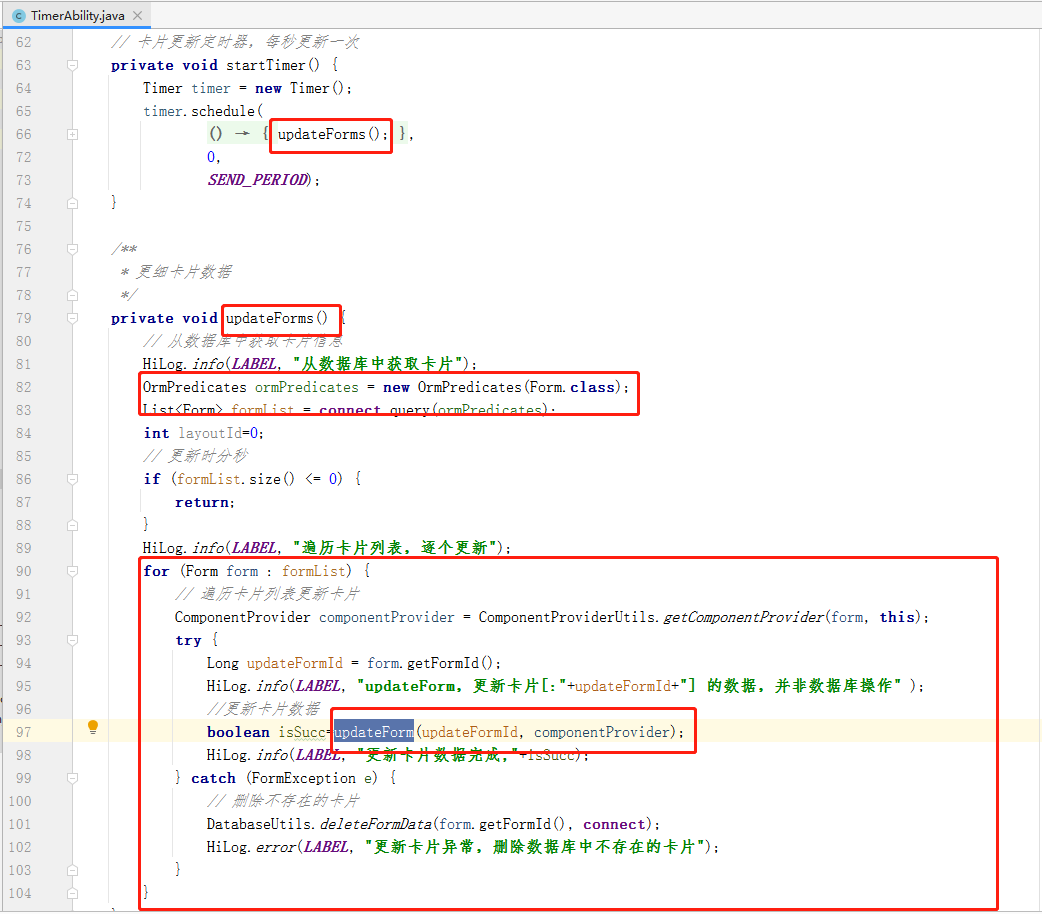
2.如何更新卡片数据
搭建环境
安装DevEco Studio,详情请参考DevEco Studio下载。
设置DevEco Studio开发环境,DevEco Studio开发环境需要依赖于网络环境,需要连接上网络才能确保工具的正常使用,可以根据如下两种情况来配置开发环境:
如果可以直接访问Internet,只需进行下载HarmonyOS SDK操作。
如果网络不能直接访问Internet,需要通过代理服务器才可以访问,请参考配置开发环境。
代码结构解读
├─config.json #项目配置文件
├─java
│  └─com
│      └─huawei
│          └─learnharmony
│              │  MainAbility.java
│              │  MyApplication.java
│              │  TimerAbility.java  #用于定时更新卡片的服务
│              │
│              ├─database
│              │      Form.java	#卡片表,extends OrmObject
│              │      FormDatabase.java #卡片数据库,extends OrmDatabase
│              │
│              ├─slice
│              │      ClockCardSlice.java #时钟卡片主能力页,extends AbilitySlice
│              │
│              └─utils
│                      ComponentProviderUtils.java #ComponentProvider工具类
│                      DatabaseUtils.java #数据库工具类,实现Form的添加和删除
│                      DateUtils.java  #日期工具类
│                      LogUtils.java #日志工具类
│
└─resources
    └─base
        ├─element
        │      string.json
        │
        ├─graphic
        │      background_ability_main.xml
        │      background_week.xml
        │
        ├─layout
        │      ability_main.xml #主能力页,默认
        │      form_image_with_info_date_card_1_2.xml #1x2规格的卡片
        │      form_image_with_info_date_card_2_2.xml #2x2规格的卡片
        │      form_image_with_info_date_card_2_4.xml #2x4规格的卡片
        │
        └─media
                form_image_with_info_datecard_default_image_2.png
                form_image_with_info_form_card_default_image_2.png
                icon.png
卡片布局
form_image_with_info_date_card_1_2.xml #1x2规格的卡片
<?xml version="1.0" encoding="utf-8"?>
<DependentLayout
    xmlns:ohos="http://schemas.huawei.com/res/ohos"
    ohos:height="match_parent"
    ohos:width="match_parent"
    ohos:background_element="#FFFFFFFF"
    ohos:remote="true">

    <DependentLayout
        ohos:height="match_content"
        ohos:width="match_parent"
        ohos:orientation="vertical"
        ohos:vertical_center="true"
        >
        <Text
            ohos:id="$+id:date"
            ohos:height="match_content"
            ohos:width="match_content"
            ohos:center_in_parent="true"
            ohos:text="2021-03-24"
            ohos:text_alignment="vertical_center"
            ohos:text_font="sans-serif-medium"
            ohos:text_size="20fp"
            />

    </DependentLayout>
</DependentLayout>
form_image_with_info_date_card_2_2.xml #2x2规格的卡片
<?xml version="1.0" encoding="utf-8"?>
<DependentLayout
    xmlns:ohos="http://schemas.huawei.com/res/ohos"
    ohos:height="match_parent"
    ohos:width="match_parent"
    ohos:background_element="#FFFFFFFF"
    ohos:remote="true">

    <DirectionalLayout
        ohos:height="match_content"
        ohos:width="match_parent"
        ohos:orientation="vertical"
        >

        <Text
            ohos:id="$+id:date"
            ohos:height="match_content"
            ohos:width="match_parent"
            ohos:text_alignment="horizontal_center"
            ohos:margin="12fp"
            ohos:text="2021-03-24"
            ohos:text_font="sans-serif-medium"
            ohos:text_size="10fp"
            />
    </DirectionalLayout>

    <DirectionalLayout
        ohos:id="$+id:title"
        ohos:height="match_content"
        ohos:width="match_parent"
        ohos:alignment="horizontal_center"
        ohos:orientation="horizontal"
        ohos:top_margin="35fp"
        >

        <Text
            ohos:height="match_content"
            ohos:width="match_content"
            ohos:margin="8vp"
            ohos:text="HOUR"
            ohos:text_size="10fp"
            />

        <Text
            ohos:height="match_content"
            ohos:width="match_content"
            ohos:margin="8vp"
            ohos:text="MIN"
            ohos:text_size="10fp"
            />

        <Text
            ohos:height="match_content"
            ohos:width="match_content"
            ohos:margin="8vp"
            ohos:text="SEC"
            ohos:text_size="10fp"
            />
    </DirectionalLayout>

    <DirectionalLayout
        ohos:id="$+id:time"
        ohos:height="match_content"
        ohos:width="match_parent"
        ohos:alignment="horizontal_center"
        ohos:below="$id:title"
        ohos:orientation="horizontal"
        ohos:top_margin="0.5fp"
        >

        <Text
            ohos:id="$+id:hour"
            ohos:height="match_content"
            ohos:width="match_content"
            ohos:left_margin="10vp"
            ohos:right_margin="5vp"
            ohos:text="00"
            ohos:text_font="HwChinese-medium"
            ohos:text_size="20fp"
            ohos:top_margin="2vp"
            />

        <Text
            ohos:height="match_content"
            ohos:width="match_content"
            ohos:text=":"
            ohos:text_font="bold"
            ohos:text_size="20fp"
            ohos:top_margin="2vp"
            />

        <Text
            ohos:id="$+id:min"
            ohos:height="match_content"
            ohos:width="match_content"
            ohos:left_margin="5vp"
            ohos:right_margin="5vp"
            ohos:text="00"
            ohos:text_font="HwChinese-medium"
            ohos:text_size="20fp"
            ohos:top_margin="2vp"
            />

        <Text
            ohos:height="match_content"
            ohos:width="match_content"
            ohos:text=":"
            ohos:text_font="bold"
            ohos:text_size="20fp"
            ohos:top_margin="2vp"
            />

        <Text
            ohos:id="$+id:sec"
            ohos:height="match_content"
            ohos:width="match_content"
            ohos:left_margin="5vp"
            ohos:right_margin="10vp"
            ohos:text="00"
            ohos:text_font="HwChinese-medium"
            ohos:text_size="20fp"
            ohos:top_margin="2vp"
            />
    </DirectionalLayout>

    <DirectionalLayout
        ohos:height="match_content"
        ohos:width="match_parent"
        ohos:alignment="center"
        ohos:below="$id:time"
        ohos:margin="16fp"
        ohos:orientation="horizontal"
        >
        <Text
            ohos:id="$+id:sun"
            ohos:height="match_content"
            ohos:width="match_content"
            ohos:text="日"
            ohos:text_color="#C0C0C0"
            ohos:text_size="10fp"
            ohos:weight="1"
            />
        <Text
            ohos:id="$+id:mon"
            ohos:height="match_content"
            ohos:width="match_content"
            ohos:text="一"
            ohos:text_color="#C0C0C0"
            ohos:text_size="10fp"
            ohos:weight="1"
            />

        <Text
            ohos:id="$+id:tue"
            ohos:height="match_content"
            ohos:width="match_content"
            ohos:text="二"
            ohos:text_color="#C0C0C0"
            ohos:text_size="10fp"
            ohos:weight="1"
            />

        <Text
            ohos:id="$+id:wed"
            ohos:height="match_content"
            ohos:width="match_content"
            ohos:text="三"
            ohos:text_color="#C0C0C0"
            ohos:text_size="10fp"
            ohos:weight="1"
            />

        <Text
            ohos:id="$+id:thu"
            ohos:height="match_content"
            ohos:width="match_content"
            ohos:text="四"
            ohos:text_color="#C0C0C0"
            ohos:text_size="10fp"
            ohos:weight="1"
            />

        <Text
            ohos:id="$+id:fri"
            ohos:height="match_content"
            ohos:width="match_content"
            ohos:text="五"
            ohos:text_color="#C0C0C0"
            ohos:text_size="10fp"
            ohos:weight="1"
            />

        <Text
            ohos:id="$+id:sat"
            ohos:height="match_content"
            ohos:width="match_content"
            ohos:text="六"
            ohos:text_color="#C0C0C0"
            ohos:text_size="10fp"
            ohos:weight="1"
            />
    </DirectionalLayout>
</DependentLayout>
form_image_with_info_date_card_2_4.xml #2x4规格的卡片
<?xml version="1.0" encoding="utf-8"?>
<DependentLayout
    xmlns:ohos="http://schemas.huawei.com/res/ohos"
    ohos:height="match_parent"
    ohos:width="match_parent"
    ohos:background_element="#FFFFFFFF"
    ohos:remote="true">

    <DependentLayout
        ohos:height="match_content"
        ohos:width="match_parent"
        ohos:orientation="horizontal"
        >

        <Text
            ohos:id="$+id:date"
            ohos:height="match_content"
            ohos:width="match_content"
            ohos:align_parent_left="true"
            ohos:margin="10fp"
            ohos:text="2021-03-24"
            ohos:text_font="sans-serif-medium"
            ohos:text_size="20fp"
            />

        <DirectionalLayout
            ohos:height="match_content"
            ohos:width="match_content"
            ohos:align_parent_right="true"
            ohos:orientation="horizontal"
            ohos:top_margin="10fp"
            >

            <Text
                ohos:id="$+id:sun"
                ohos:height="match_content"
                ohos:width="match_content"
                ohos:text="日"
                ohos:text_color="#C0C0C0"
                ohos:text_size="20fp"
                ohos:weight="1"
                />

            <Text
                ohos:id="$+id:mon"
                ohos:height="match_content"
                ohos:width="match_content"
                ohos:text="一"
                ohos:text_color="#C0C0C0"
                ohos:text_size="20fp"
                ohos:weight="1"
                />

            <Text
                ohos:id="$+id:tue"
                ohos:height="match_content"
                ohos:width="match_content"
                ohos:text="二"
                ohos:text_color="#C0C0C0"
                ohos:text_size="20fp"
                ohos:weight="1"
                />

            <Text
                ohos:id="$+id:wed"
                ohos:height="match_content"
                ohos:width="match_content"
                ohos:text="三"
                ohos:text_color="#C0C0C0"
                ohos:text_size="20fp"
                ohos:weight="1"
                />

            <Text
                ohos:id="$+id:thu"
                ohos:height="match_content"
                ohos:width="match_content"
                ohos:text="四"
                ohos:text_color="#C0C0C0"
                ohos:text_size="20fp"
                ohos:weight="1"
                />

            <Text
                ohos:id="$+id:fri"
                ohos:height="match_content"
                ohos:width="match_content"
                ohos:text="五"
                ohos:text_color="#C0C0C0"
                ohos:text_size="20fp"
                ohos:weight="1"
                />

            <Text
                ohos:id="$+id:sat"
                ohos:height="match_content"
                ohos:width="match_content"
                ohos:text="六"
                ohos:text_color="#C0C0C0"
                ohos:text_size="20fp"
                ohos:weight="1"
                ohos:right_margin="10fp"
                />
        </DirectionalLayout>
    </DependentLayout>

    <DirectionalLayout
        ohos:id="$+id:title"
        ohos:height="match_content"
        ohos:width="match_parent"
        ohos:alignment="horizontal_center"
        ohos:orientation="horizontal"
        ohos:top_margin="35fp"
        >

        <Text
            ohos:height="match_content"
            ohos:width="match_content"

            ohos:top_margin="20vp"
            ohos:left_margin="20vp"
            ohos:right_margin="20vp"
            ohos:text="HOUR"
            ohos:text_size="20fp"
            />

        <Text
            ohos:height="match_content"
            ohos:width="match_content"

            ohos:top_margin="20vp"
            ohos:left_margin="20vp"
            ohos:right_margin="20vp"
            ohos:text="MIN"
            ohos:text_size="20fp"
            />

        <Text
            ohos:height="match_content"
            ohos:width="match_content"
            ohos:top_margin="20vp"
            ohos:left_margin="20vp"
            ohos:right_margin="20vp"
            ohos:text="SEC"
            ohos:text_size="20fp"
            />
    </DirectionalLayout>

    <DirectionalLayout
        ohos:id="$+id:time"
        ohos:height="match_content"
        ohos:width="match_parent"
        ohos:alignment="horizontal_center"
        ohos:below="$id:title"
        ohos:orientation="horizontal"

        >

        <Text
            ohos:id="$+id:hour"
            ohos:height="match_content"
            ohos:width="match_content"
            ohos:left_margin="20vp"
            ohos:right_margin="10vp"
            ohos:text="00"
            ohos:text_font="HwChinese-medium"
            ohos:text_size="40fp"
            ohos:top_margin="2vp"

            />

        <Text
            ohos:height="match_content"
            ohos:width="match_content"
            ohos:text=":"
            ohos:text_font="bold"
            ohos:text_size="40fp"
            ohos:top_margin="2vp"
            />

        <Text
            ohos:id="$+id:min"
            ohos:height="match_content"
            ohos:width="match_content"
            ohos:left_margin="10vp"
            ohos:right_margin="10vp"
            ohos:text="00"
            ohos:text_font="HwChinese-medium"
            ohos:text_size="40fp"
            ohos:top_margin="2vp"
            />

        <Text
            ohos:height="match_content"
            ohos:width="match_content"
            ohos:text=":"
            ohos:text_font="bold"
            ohos:text_size="40fp"
            ohos:top_margin="2vp"
            />

        <Text
            ohos:id="$+id:sec"
            ohos:height="match_content"
            ohos:width="match_content"
            ohos:left_margin="10vp"
            ohos:right_margin="10vp"
            ohos:text="00"
            ohos:text_font="HwChinese-medium"
            ohos:text_size="40fp"
            ohos:top_margin="2vp"
            />
    </DirectionalLayout>


</DependentLayout>
知识点讲解
1.对象关系映射型数据库的使用,如何查询、创建卡片、删除卡片
首先使用注解定义一张Form表,继承自 OrmObject
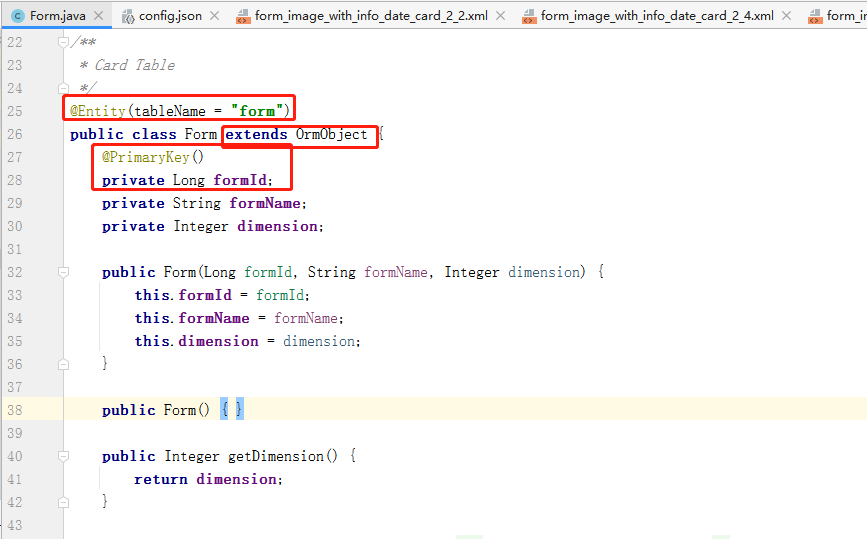
定义对象关系型数据库FormDatabase,继承自OrmDatabase
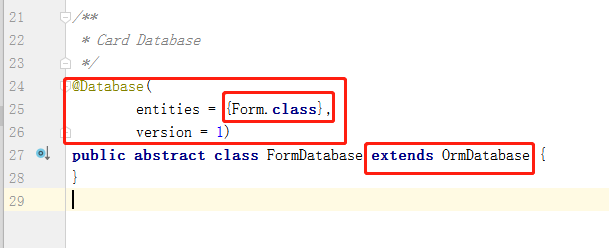
使用DatabaseHelper类获取数据库连接(上下文)OrmContext
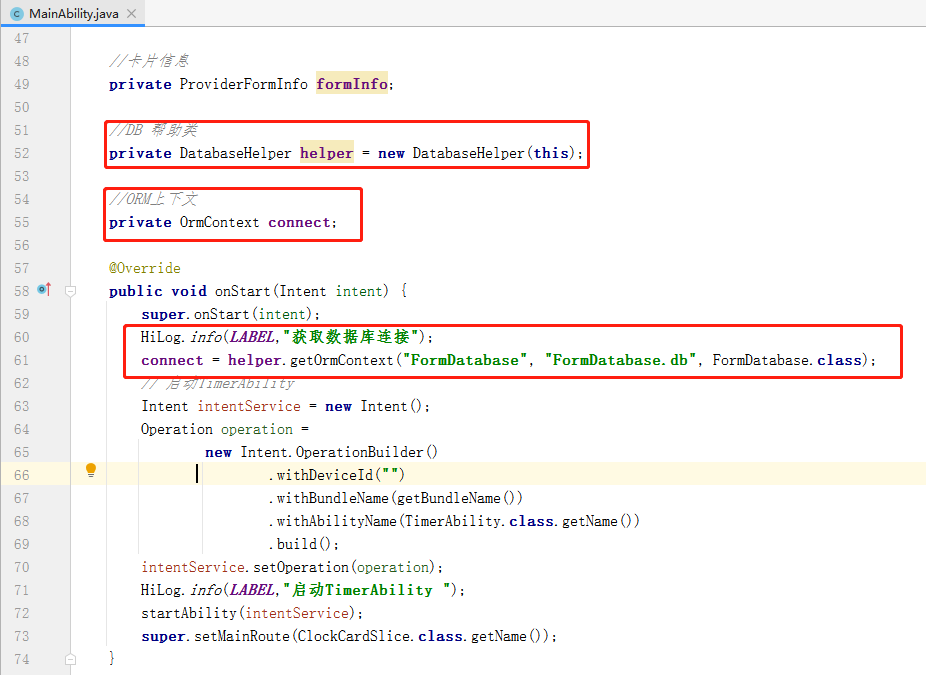
操作数据库,使用OrmPredicates组装条件查询卡片,创建Form卡片、删除Form卡片
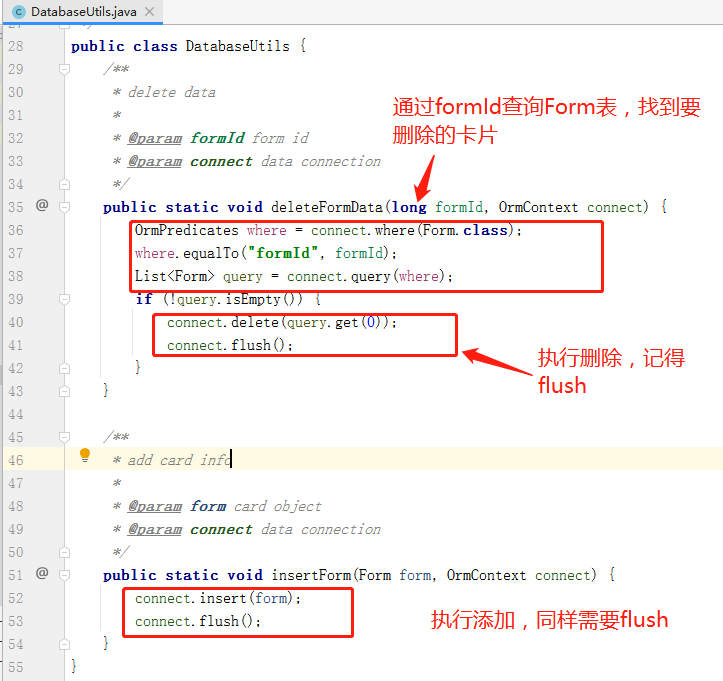
在MainAbility中,创建卡片和删除卡片的回调函数中onCreateForm/onDeleteForm 构建Form操作卡片要用到ProviderFormInfo/ComponentProvider。
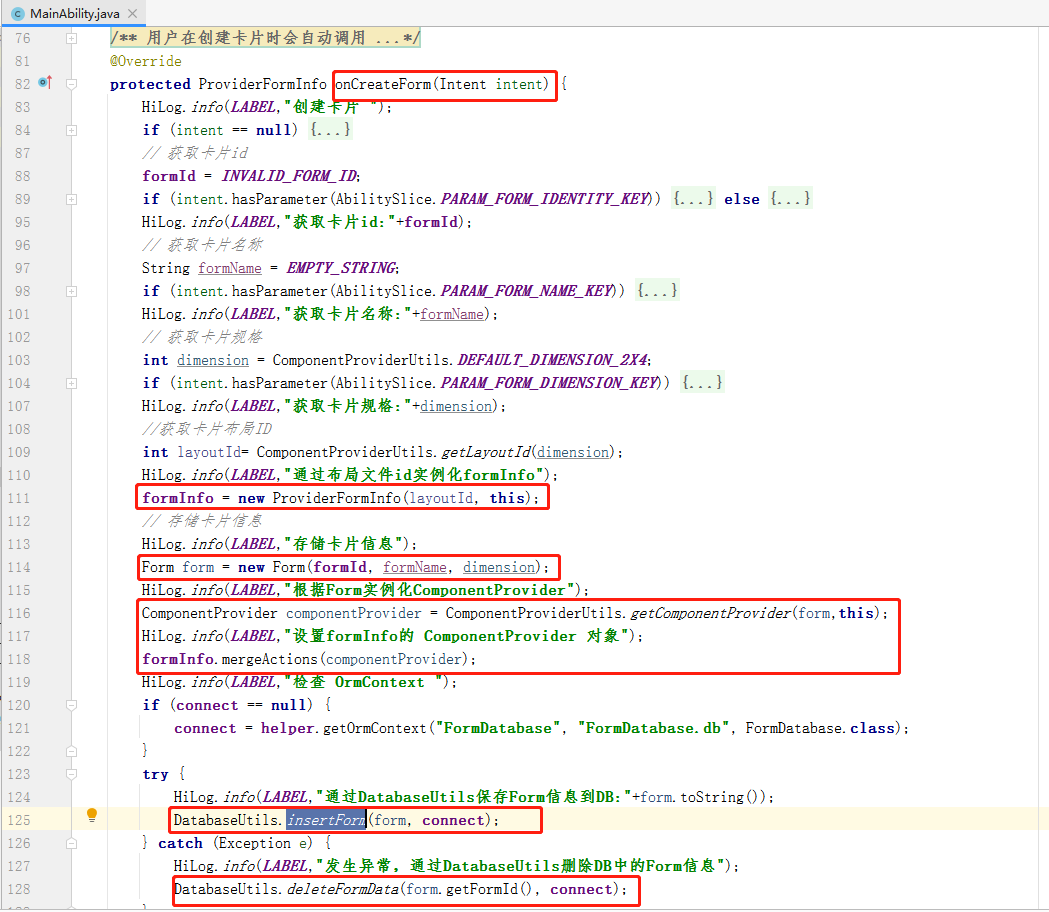
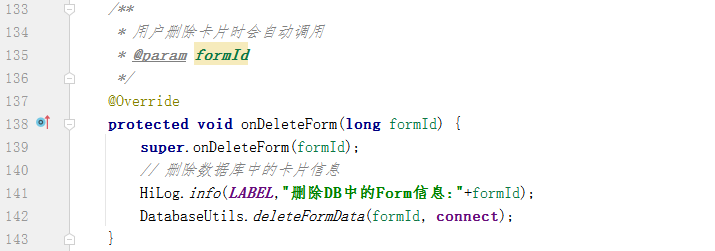
2.如何更新卡片数据
定时器-----查询卡片,遍历(可能有多个)----使用ComponentProvider封装数据-----调用updateForm方法执行更新。
归纳总结
Q1.服务卡片的规格,也就是22/24 是由layout布局文件决定的吗,有啥区别?
规格主要由config.json 的配置决定,有三处landscapeLayouts、supportDimensions、portraitLayouts,新增规格也要增加对应规格的布局文件,但是规格并不是由布局文件本身决定的。
*说明:三处规格的顺序要一致,否则预览时显示也是有问题的。
config.json
{
  "landscapeLayouts": [
    "$layout:form_image_with_info_date_card_1_2",
    "$layout:form_image_with_info_date_card_2_2",
    "$layout:form_image_with_info_date_card_2_4"

  ],
  "isDefault": true,
  "scheduledUpdateTime": "10:30",
  "defaultDimension": "2*4",
  "name": "DateCard",
  "description": "This is a form card",
  "colorMode": "light",
  "type": "Java",
  "supportDimensions": [
    "1*2",
    "2*2",
    "2*4"
  ],
  "portraitLayouts": [
    "$layout:form_image_with_info_date_card_1_2",
    "$layout:form_image_with_info_date_card_2_2",
    "$layout:form_image_with_info_date_card_2_4"
  ],
  "updateEnabled": true,
  "updateDuration": 1,
  "formVisibleNotify": true
}
]
布局文件的命名也不影响规格,但是建议命名统一采用 xxxxx_card_1_2.xml/xxxxx_card_2_2.xml ,支持的规格是个枚举值,参照进行定义就好。
"defaultDimension": {
"description": "This label identifies the default appearance specifications of the card.",
"type": "string",
"enum": [
  "1*2",
  "2*2",
  "2*4",
  "4*4"
]
Q2.为什么要更新卡片到DB ?
1.卡片信息需要保存在数据库中,使用OrmContext的delete/insert来操作db中的卡片
2.卡片的数据不需要更新到db,只是更新到显示,使用updateForm方法更新卡片数据的显示
Q3.如何新增一个规格的卡片?
下面以增加一个1*2规格的卡片为例:
1.config.json ,有三处 landscapeLayouts、supportDimensions、portraitLayouts 要增加
"forms": [
  {
    "landscapeLayouts": [
      "$layout:form_image_with_info_date_card_1_2",
      "$layout:form_image_with_info_date_card_2_2",
      "$layout:form_image_with_info_date_card_2_4"

    ],
    "isDefault": true,
    "scheduledUpdateTime": "10:30",
    "defaultDimension": "2*4",
    "name": "DateCard",
    "description": "This is a form card",
    "colorMode": "dark",
    "type": "Java",
    "supportDimensions": [
      "1*2",
      "2*2",
      "2*4"
    ],
    "portraitLayouts": [
      "$layout:form_image_with_info_date_card_1_2",
      "$layout:form_image_with_info_date_card_2_2",
      "$layout:form_image_with_info_date_card_2_4"
    ],
    "updateEnabled": true,
    "updateDuration": 1,
    "formVisibleNotify": true
  }
]
2.layout
layout下新增form_image_with_info_date_card_1_2.xml 布局文件
<?xml version="1.0" encoding="utf-8"?>
<DependentLayout
    xmlns:ohos="http://schemas.huawei.com/res/ohos"
    ohos:height="match_parent"
    ohos:width="match_parent"
    ohos:background_element="#FFFFFFFF"
    ohos:remote="true">

    <DependentLayout
        ohos:height="match_content"
        ohos:width="match_parent"
        ohos:orientation="vertical"
        ohos:vertical_center="true"
        >
        <Text
            ohos:id="$+id:date"
            ohos:height="match_content"
            ohos:width="match_content"
            ohos:center_in_parent="true"
            ohos:text="2021-03-24"
            ohos:text_alignment="vertical_center"
            ohos:text_font="sans-serif-medium"
            ohos:text_size="20fp"
            />

    </DependentLayout>
</DependentLayout>
3.ComponentProviderUtils.java
更新几处与规格相关的代码
/**
 * 获取对应规格的布局文件
 * @param dimension
 * @return
 */
public static int getLayoutId(int dimension){
    int layoutId = 0;
    if (dimension == DEFAULT_DIMENSION_1X2) {
        HiLog.info(LABEL,"获取1*2的布局文件");
        layoutId = ResourceTable.Layout_form_image_with_info_date_card_1_2;
    }
    if (dimension == DEFAULT_DIMENSION_2X2) {
        HiLog.info(LABEL,"获取1*2的布局文件");
        layoutId = ResourceTable.Layout_form_image_with_info_date_card_2_2;
    }
    if (dimension == DEFAULT_DIMENSION_2X4) {
        HiLog.info(LABEL,"获取2*4的布局文件");
        layoutId = ResourceTable.Layout_form_image_with_info_date_card_2_4;
    }
    return  layoutId;
}

/**
 * Set the value of componentProvider
 * 根据规格来更新卡片信息
 * @param componentProvider component provider
 */
private static void setComponentProviderValue(ComponentProvider componentProvider,int layoutId) {
    Calendar now = Calendar.getInstance();
    int hour = now.get(Calendar.HOUR_OF_DAY);
    int min = now.get(Calendar.MINUTE);
    int second = now.get(Calendar.SECOND);
    String hourString = int2String(hour);
    String minString = int2String(min);
    String secondString = int2String(second);

    switch (layoutId){

        //1*2布局只有个日期组件
        case ResourceTable.Layout_form_image_with_info_date_card_1_2:
            componentProvider.setText(ResourceTable.Id_date, DateUtils.getCurrentDate("yyyy-MM-dd"));
            componentProvider.setTextColor(ResourceTable.Id_date,nowWeekColor);
        default:
            componentProvider.setText(ResourceTable.Id_date, DateUtils.getCurrentDate("yyyy-MM-dd"));
            componentProvider.setText(ResourceTable.Id_hour, hourString);
            componentProvider.setText(ResourceTable.Id_min, minString);
            componentProvider.setText(ResourceTable.Id_sec, secondString);
            // 获取当前星期
            int weekDayId = getWeekDayId();
            componentProvider.setTextColor(weekDayId, nowWeekColor);

            // 将前一天的星期改回原色
            int lastWeekId = getLastWeekDayId();
            componentProvider.setTextColor(lastWeekId, primaryWeekColor);

    }
}
Q4.ClockCardSlice.java和TimerAbility.java 区别?
1.ClockCardSlice.java 代表的是主能力页,是一个FA,负责主能力页的组件的初始化以及数据的定时更新,使用了form_image_with_info_date_card_2_4.xml 的布局。
2.TimerAbility.java 是一个PA,是一个后台服务,负责不同规格卡片上组件的初始化以及数据的定时更新,点击卡片会打开主能力页。
样例中二者都是实现了组件的初始化和数据定时更新,但相互独立。
相关推荐
石榴裴 11
11 0
0 十三代宗师 154 0 代码之外 269 0 程序员老杜 180 0 周正 2062 0
 宋你一朵小红花
我还没有写个人简介......
帖子
提问
粉丝
华为鸿蒙 HarmonyOS 6.0.0.108 SP2 Developer 版本新增 9 套桌面图标
2025-10-20 23:17:16 发布注意!华为开启鸿蒙6.0系统推送,稳定性提升
2025-10-14 15:10:36 发布